• Skip to main content
  • Skip to primary sidebar

Nucleics

  • PeakTrace
    • About PeakTrace
    • PeakTrace Online
    • PeakTrace Online Pro
    • Online Pro for RP customers
    • PeakTrace 6
    • PeakTrace:Box
    • PeakTrace RP
    • PeakTrace for Chromas
    • Buy PeakTrace
    • Why use PeakTrace?
    • Validation of PeakTrace
    • PeakTrace FAQ
    • PeakTrace In Depth
  • DNA Sequencing Products
    • PeakTrace Basecaller
    • PeakTrace:Box
    • PeakTrace RP
    • PeakTrace for Chromas
    • QualTrace
    • LongTrace
    • CounterTrace
    • dLUTE SEQ
    • UniSeq
    • ASIN
  • Support & Services
    • PeakTrace Online Pro Registration
    • QualTrace III Online
    • DNA Sequencing Troubleshooting Guide
    • PeakTrace RP Downloads
    • PeakTrace:Box Downloads
    • Trace Viewers
    • User Manuals
    • Help Guides
      • How to Install Auto PeakTrace 6
      • How to Upgrade to Auto PeakTrace 6
      • How to Update the PeakTrace License on Linux
      • How to Generate a cmDust File
      • Online Activation of Auto PeakTrace 6
      • Auto PeakTrace 6 Online Activation Guide
      • DNA Sequencing Protocols
        • DNA Sequencing Protocol Tips
        • Exonuclease I – Shrimp Alkaline Phosphatase Clean Up of PCR Products
        • Tris EDTA DNA Sequencing Resuspension Buffer
        • DNA Sequencing Reaction Clean-up using Phenol & Butanol
    • DNA Sequencing Service Reviews
    • Software Downloads
    • MSDS
    • Services
      • Genomics Sequencing
      • Bioinformatics
  • Forum
    • Register
    • Login
    • PeakTrace Basecaller Forum
    • PeakTrace:Box Forum
    • Auto PeakTrace RP Forum
    • QualTrace Forum
    • DNA Sequencing Forum
    • DNA Sequencing Software
    • PCR Forum
    • DNA Isolation Forum
    • LongTrace Forum
    • dLUTE SEQ Forum
  • About
    • Contact
    • News
    • Jobs
    • Nucleics Privacy Policy
Buy PeakTrace

Auto PeakTrace RP 6.80 Released

November 21, 2017 By Daniel

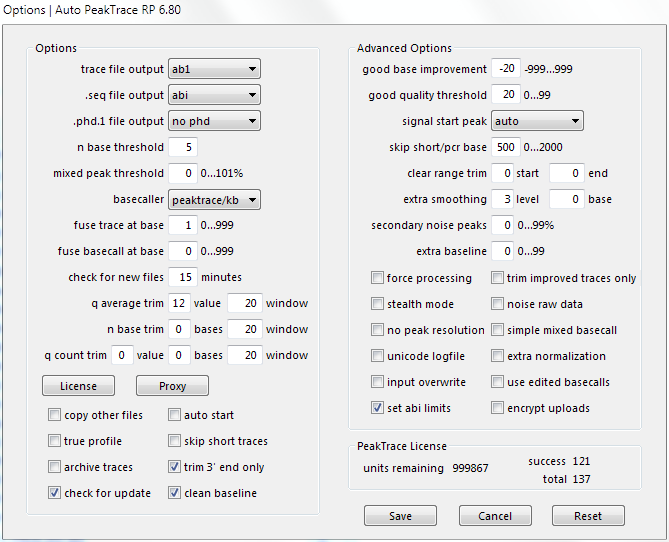
Auto PeakTrace RP 6.80 Options Window

We have released a major feature release for Auto PeakTrace RP (6.80). The full list of changes and improvements include:

  • New Feature. Total traces processed and success rate shown.
  • New Feature. Auto PeakTrace RP 6 can be used as a command line program.
  • Improvements to fuse basecall and fuse trace with difficult sequences.
  • Improvement of the basecalling of “drop out” peaks.
  • Improvements to extra normalization of PCR product traces.
  • More accurate estimated time for trace processing completion.
  • Other bug fixes and enhancements.

The major change of this release is that Auto PeakTrace RP 6.80 can now be used from the command line. This allows the easy integration of Auto PeakTrace RP 6.80 into various LIMS scripts.

If Auto PeakTrace RP 6.80 is used from the command line with no options it will use the settings (including the input and output directories) saved from the last use of Auto PeakTrace RP 6. The saved settings can be overwritten by the use of command line switches. If no switch value is provided on the command line then the value in the saved setting file will be used. Settings that are changed via the command line update the setting file for future runs of Auto PeakTrace RP 6.

It is recommended that if you wish to use Auto PeakTrace RP 6 in a command line script that you first contact Nucleics @ {This email is obscured. Your must have javascript enabled to see it} or your local supplier for advice.

Auto PeakTrace RP 6.70 for Windows and (MacOS X will be released later) and can be downloaded from the PeakTrace RP downloads page. This release is also available via the automatic update feature within Auto PeakTrace RP if you are currently using a recent version.

If you require the password to access the PeakTrace RP downloads page please contact us @{This email is obscured. Your must have javascript enabled to see it} or your local supplier.

Filed Under: macosx, New Release, PeakTrace, PeakTrace RP, windows

Primary Sidebar

DNA Sequencing Help

We have added a guide on troubleshooting automated DNA sequencing problems.

DNA Sequencing Service Facilities Reviews

Please see our review of 325 DNA sequencing core facilities and commercial services for more information on selecting the right sequencing service for your needs.

QualTrace III Online

Try the free online version of the QualTrace DNA sequencing QC software and see how real time quality control tracking can improve your read lengths and lower sequencing failure rates.

Contact Details

email. information@nucleics.com
phone. +61 489 152 658
  • home
  • peaktrace
  • software & reagents
  • forum
  • tools
  • services
  • support
  • about

Nucleics

Sanger Sequencing Software

Already have RP units? Run batches in your browser with PeakTrace Online Pro.

©Nucleics 1999 - 2026