• Skip to main content
  • Skip to primary sidebar

Nucleics

  • PeakTrace
    • About PeakTrace
    • PeakTrace Online
    • PeakTrace Online Pro
    • PeakTrace 6
    • PeakTrace:Box
    • PeakTrace RP
    • PeakTrace for Chromas
    • Buy PeakTrace
    • Why use PeakTrace?
    • Validation of PeakTrace
    • PeakTrace FAQ
    • PeakTrace In Depth
  • DNA Sequencing Products
    • PeakTrace Basecaller
    • PeakTrace:Box
    • PeakTrace RP
    • PeakTrace for Chromas
    • QualTrace
    • LongTrace
    • CounterTrace
    • dLUTE SEQ
    • UniSeq
    • ASIN
  • Support & Services
    • PeakTrace Online Pro Registration
    • QualTrace III Online
    • DNA Sequencing Troubleshooting Guide
    • PeakTrace RP Downloads
    • PeakTrace:Box Downloads
    • Trace Viewers
    • User Manuals
    • Help Guides
      • How to Install Auto PeakTrace 6
      • How to Upgrade to Auto PeakTrace 6
      • How to Update the PeakTrace License on Linux
      • How to Generate a cmDust File
      • Online Activation of Auto PeakTrace 6
      • Auto PeakTrace 6 Online Activation Guide
      • DNA Sequencing Protocols
        • DNA Sequencing Protocol Tips
        • Exonuclease I – Shrimp Alkaline Phosphatase Clean Up of PCR Products
        • Tris EDTA DNA Sequencing Resuspension Buffer
        • DNA Sequencing Reaction Clean-up using Phenol & Butanol
    • DNA Sequencing Service Reviews
    • Software Downloads
    • MSDS
    • Services
      • Genomics Sequencing
      • Bioinformatics
  • Forum
    • Register
    • Login
    • PeakTrace Basecaller Forum
    • PeakTrace:Box Forum
    • Auto PeakTrace RP Forum
    • QualTrace Forum
    • DNA Sequencing Forum
    • DNA Sequencing Software
    • PCR Forum
    • DNA Isolation Forum
    • LongTrace Forum
    • dLUTE SEQ Forum
  • About
    • Contact
    • News
    • Jobs
    • Nucleics Privacy Policy
Buy PeakTrace

In depth look at PeakTrace 6

May 10, 2026 By Daniel

PeakTrace: Simply better basecalling, beside a blue DNA sequencer

PeakTrace 6 (Auto PeakTrace 6, Auto PeakTrace 6 RP and the Linux PeakTrace 6) has a number of very powerful options that may not have been explored by many users of older versions of PeakTrace. We understand that most of our customers are busy running a sequencing facility and so don’t always have the time to look into each new PeakTrace feature on release. To help we have created a series of posts looking in depth at what these new options do, how they can best be used, and how they can help our customers make the most of PeakTrace.
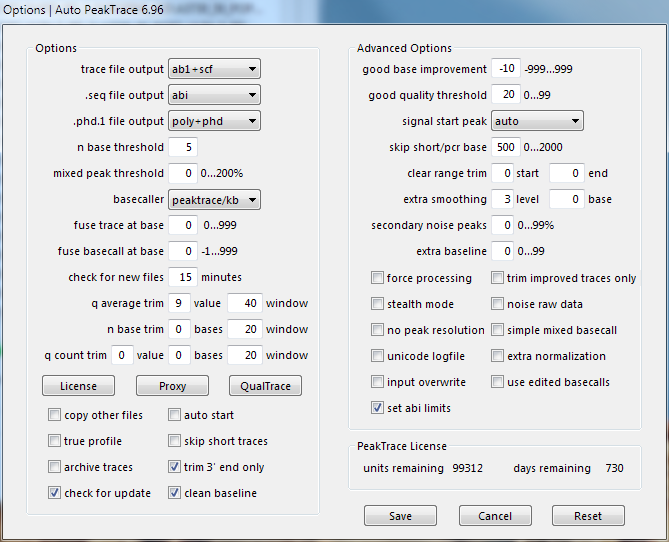
Options window of Auto PeakTrace 6.96, with the basic and advanced options and the license units and days remaining
Auto PeakTrace 6.96 Options

The PeakTrace options covered in depth include:

  • Clean Baseline
  • Automatic Bubble Spike Removal
  • Extra Normalization
  • Extra Smoothing Part I
  • Extra Smoothing Part II
  • Trim 3′ End Only
  • Mixed Basecalling and Simple Mixed Basecalling
  • Picket Fence Trace Basecalling
  • Trace Reports
  • Clean Baseline
  • PCR Trim Base
  • Extra Baseline
  • Secondary Noise Peaks
  • Set ABI Limits
  • Use Edited Basecalls
  • Skip Short Traces
  • PeakTrace Basecalling with KB Fallback
  • Fuse Trace and Fuse Basecall
  • No Peak Resolution
  • Q Average Trace Trimming
  • Input Overwrite
  • True Profile
  • Clear Range Trim
  • Force Processing
  • Trim Improved Traces Only
  • Stealth Mode
  • Noise Raw Data
  • Mixed Peak Threshold over 100%
  • Unicode Logfile
  • Archive Traces
  • Auto Start
  • Q Count Trim
  • N Base Trim
  • .poly file output

Filed Under: In Depth, linux, macosx, news, PeakTrace, PeakTrace RP, windows

Primary Sidebar

DNA Sequencing Help

We have added a guide on troubleshooting automated DNA sequencing problems.

DNA Sequencing Service Facilities Reviews

Please see our review of 325 DNA sequencing core facilities and commercial services for more information on selecting the right sequencing service for your needs.

QualTrace III Online

Try the free online version of the QualTrace DNA sequencing QC software and see how real time quality control tracking can improve your read lengths and lower sequencing failure rates.

Contact Details

email. information@nucleics.com
phone. +61 489 152 658
  • home
  • peaktrace
  • software & reagents
  • forum
  • tools
  • services
  • support
  • about

Nucleics

Sanger Seqencing Software

©Nucleics 1999 - 2026