• Skip to main content
  • Skip to primary sidebar

Nucleics

  • PeakTrace
    • About PeakTrace
    • PeakTrace Online
    • PeakTrace Online Pro
    • Online Pro for RP customers
    • PeakTrace 6
    • PeakTrace:Box
    • PeakTrace RP
    • PeakTrace for Chromas
    • Buy PeakTrace
    • Why use PeakTrace?
    • Validation of PeakTrace
    • PeakTrace FAQ
    • PeakTrace In Depth
  • DNA Sequencing Products
    • PeakTrace Basecaller
    • PeakTrace:Box
    • PeakTrace RP
    • PeakTrace for Chromas
    • QualTrace
    • LongTrace
    • CounterTrace
    • dLUTE SEQ
    • UniSeq
    • ASIN
  • Support & Services
    • PeakTrace Online Pro Registration
    • QualTrace III Online
    • DNA Sequencing Troubleshooting Guide
    • PeakTrace RP Downloads
    • PeakTrace:Box Downloads
    • Trace Viewers
    • User Manuals
    • Help Guides
      • How to Install Auto PeakTrace 6
      • How to Upgrade to Auto PeakTrace 6
      • How to Update the PeakTrace License on Linux
      • How to Generate a cmDust File
      • Online Activation of Auto PeakTrace 6
      • Auto PeakTrace 6 Online Activation Guide
      • DNA Sequencing Protocols
        • DNA Sequencing Protocol Tips
        • Exonuclease I – Shrimp Alkaline Phosphatase Clean Up of PCR Products
        • Tris EDTA DNA Sequencing Resuspension Buffer
        • DNA Sequencing Reaction Clean-up using Phenol & Butanol
    • DNA Sequencing Service Reviews
    • Software Downloads
    • MSDS
    • Services
      • Genomics Sequencing
      • Bioinformatics
  • Forum
    • Register
    • Login
    • PeakTrace Basecaller Forum
    • PeakTrace:Box Forum
    • Auto PeakTrace RP Forum
    • QualTrace Forum
    • DNA Sequencing Forum
    • DNA Sequencing Software
    • PCR Forum
    • DNA Isolation Forum
    • LongTrace Forum
    • dLUTE SEQ Forum
  • About
    • Contact
    • News
    • Jobs
    • Nucleics Privacy Policy
Buy PeakTrace

In Depth: Trim Improved Traces Only

March 1, 2019 By Harrison Campbell

PeakTrace 6 allows users to trim traces based on 5 parameters, Q average, N count, Q count, PCR base and Clear Range trimming. These settings allow the removal of unwanted low quality data, particularly on the 3′ end.

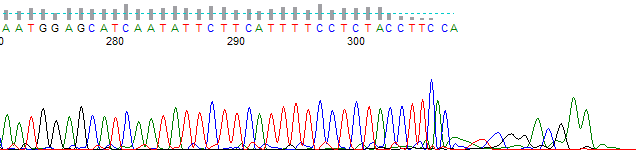
The trim improved traces only option allows the user to decide if they want PeakTrace trimming options to act upon all traces or just those traces basecalled by PeakTrace. This setting is useful if you want traces that were skipped short or below the good improvement threshold to be output in their original condition without trimming.
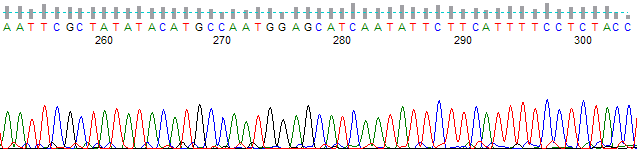
Chromatogram from bases 255 to 304, ending where the low-quality bases were removed
Figure 1. An example of a trace that was skipped short, with Trim improved traces only off. The low quality bases after base 304 have been removed.
Chromatogram continuing past base 304 into low-quality peaks
Figure 2. The same trace but with trim improved traces only on. The low quality bases after base 304 have been retained.

Conclusion

The trimming functions of PeakTrace are useful in removing unwanted poor quality data from the end of a trace. The default settings of PeakTrace assume that you wish to apply the same trim settings to traces improved by PeakTrace and those not (i.e. where the original KB basecall is output). The use of trim improve traces only allows the PeakTrace improved traces to be trimmed leaving the KB basecalled traces untrimmed.

It is not advised to use the trim improved traces only setting under most circumstances.

Pitfalls With Using Trim Improved Traces Only

  1. Users will be given a mix of traces some with long regions of low quality bases and some without low quality regions. Such mixing will result in users questioning the quality of their data.
  2. Use of the trim improved traces only setting affects the good base improvement measurement. It is very common for the KB basecaller to falsely assign high quality bases in regions of low quality. If not trimmed, these bases will be counted towards the total high quality bases in the KB input file. This can result in some PeakTrace improved traces to fall below the required good base improvement threshold. The end result is fewer traces that can be improved by PeakTrace being output.

Filed Under: In Depth, PeakTrace, PeakTrace RP

Primary Sidebar

DNA Sequencing Help

We have added a guide on troubleshooting automated DNA sequencing problems.

DNA Sequencing Service Facilities Reviews

Please see our review of 325 DNA sequencing core facilities and commercial services for more information on selecting the right sequencing service for your needs.

QualTrace III Online

Try the free online version of the QualTrace DNA sequencing QC software and see how real time quality control tracking can improve your read lengths and lower sequencing failure rates.

Contact Details

email. information@nucleics.com
phone. +61 489 152 658
  • home
  • peaktrace
  • software & reagents
  • forum
  • tools
  • services
  • support
  • about

Nucleics

Sanger Sequencing Software

Already have RP units? Run batches in your browser with PeakTrace Online Pro.

©Nucleics 1999 - 2026