• Skip to main content
  • Skip to primary sidebar

Nucleics

  • PeakTrace
    • About PeakTrace
    • PeakTrace Online
    • PeakTrace Online Pro
    • PeakTrace 6
    • PeakTrace:Box
    • PeakTrace RP
    • PeakTrace for Chromas
    • Buy PeakTrace
    • Why use PeakTrace?
    • Validation of PeakTrace
    • PeakTrace FAQ
    • PeakTrace In Depth
  • DNA Sequencing Products
    • PeakTrace Basecaller
    • PeakTrace:Box
    • PeakTrace RP
    • PeakTrace for Chromas
    • QualTrace
    • LongTrace
    • CounterTrace
    • dLUTE SEQ
    • UniSeq
    • ASIN
  • Support & Services
    • PeakTrace Online Pro Registration
    • QualTrace III Online
    • DNA Sequencing Troubleshooting Guide
    • PeakTrace RP Downloads
    • PeakTrace:Box Downloads
    • Trace Viewers
    • User Manuals
    • Help Guides
      • How to Install Auto PeakTrace 6
      • How to Upgrade to Auto PeakTrace 6
      • How to Update the PeakTrace License on Linux
      • How to Generate a cmDust File
      • Online Activation of Auto PeakTrace 6
      • Auto PeakTrace 6 Online Activation Guide
      • DNA Sequencing Protocols
        • DNA Sequencing Protocol Tips
        • Exonuclease I – Shrimp Alkaline Phosphatase Clean Up of PCR Products
        • Tris EDTA DNA Sequencing Resuspension Buffer
        • DNA Sequencing Reaction Clean-up using Phenol & Butanol
    • DNA Sequencing Service Reviews
    • Software Downloads
    • MSDS
    • Services
      • Genomics Sequencing
      • Bioinformatics
  • Forum
    • Register
    • Login
    • PeakTrace Basecaller Forum
    • PeakTrace:Box Forum
    • Auto PeakTrace RP Forum
    • QualTrace Forum
    • DNA Sequencing Forum
    • DNA Sequencing Software
    • PCR Forum
    • DNA Isolation Forum
    • LongTrace Forum
    • dLUTE SEQ Forum
  • About
    • Contact
    • News
    • Jobs
    • Nucleics Privacy Policy
Buy PeakTrace

Auto PeakTrace 6.50 & PeakTrace 6.50 Released

January 17, 2017 By Daniel

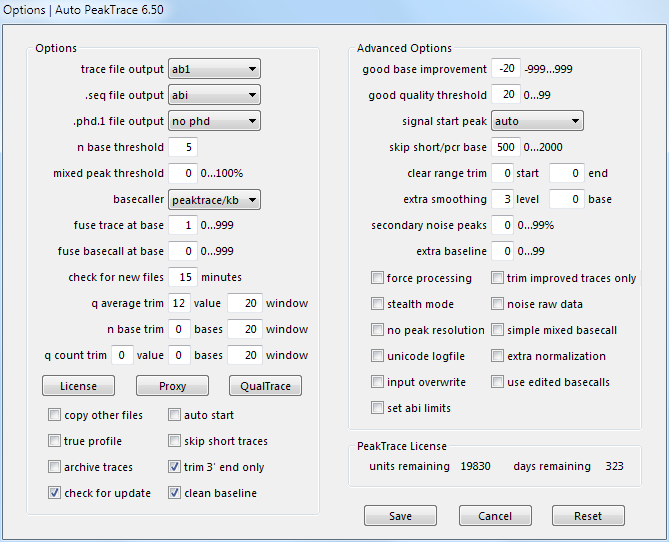
Auto PeakTrace 6.50 Options Window

PeakTrace 6.50 for Linux, PeakTrace 6.50 for Windows, and Auto PeakTrace 6.50 have been released. This update improves the performance and accuracy of PeakTrace and incorporates improvements to the QualTrace III Trace Reports to make them independent of PeakTrace. This release is a recommended update for all users of PeakTrace. The full list of changes

  • New Feature. QualTrace III only Trace Reports.
  • Improvements to mixed basecalling to reduce the false negative rate.
  • Improvements to the processing of short traces to increase trace read length.
  • Improvements to the fuse trace module.
  • The .scf file now records the correct basecaller if stealth mode or abi/kb basecaller options are used.
  • Update of CodeMeter runtime to 6.40a.

PeakTrace 6.50 for Linux, PeakTrace 6.50 for Windows, and Auto PeakTrace 6.50 can be downloaded as usual from the PeakTrace:Box Downloads page. The automatic update for Auto PeakTrace will be released in the coming days.

The two command line versions (PeakTrace 6.50 for Windows or Linux) require a password to unzip the files so please contact us @ {This email is obscured. Your must have javascript enabled to see it} or your local supplier for the archive password (this is different to the password to access the downloads page). You will need to download and use the free program 7zip to unzip the archives.

If you do not have the password to access the PeakTrace:Box Downloads page please contact us @ {This email is obscured. Your must have javascript enabled to see it} or contact your local supplier for the update. This update will also be available via the automatic update system soon if you are using PeakTrace 6.20 or higher.

If you are currently running a version of PeakTrace from before 6.10 you will also need a license upgrade and/or the PeakTrace Serial Number. Please contact us to obtain these updates.

The changes and improvements of this release have also been provided to the RP servers so users of Auto PeakTrace RP will obtain them automatically.

Filed Under: linux, New Release, news, PeakTrace, windows

Primary Sidebar

DNA Sequencing Help

We have added a guide on troubleshooting automated DNA sequencing problems.

DNA Sequencing Service Facilities Reviews

Please see our review of 325 DNA sequencing core facilities and commercial services for more information on selecting the right sequencing service for your needs.

QualTrace III Online

Try the free online version of the QualTrace DNA sequencing QC software and see how real time quality control tracking can improve your read lengths and lower sequencing failure rates.

Contact Details

email. information@nucleics.com
phone. +61 489 152 658
  • home
  • peaktrace
  • software & reagents
  • forum
  • tools
  • services
  • support
  • about

Nucleics

Sanger Seqencing Software

©Nucleics 1999 - 2026