• Skip to main content
  • Skip to primary sidebar

Nucleics

  • PeakTrace
    • About PeakTrace
    • PeakTrace Online
    • PeakTrace Online Pro
    • Online Pro for RP customers
    • PeakTrace 6
    • PeakTrace:Box
    • PeakTrace RP
    • PeakTrace for Chromas
    • Buy PeakTrace
    • Why use PeakTrace?
    • Validation of PeakTrace
    • PeakTrace FAQ
    • PeakTrace In Depth
  • DNA Sequencing Products
    • PeakTrace Basecaller
    • PeakTrace:Box
    • PeakTrace RP
    • PeakTrace for Chromas
    • QualTrace
    • LongTrace
    • CounterTrace
    • dLUTE SEQ
    • UniSeq
    • ASIN
  • Support & Services
    • PeakTrace Online Pro Registration
    • QualTrace III Online
    • DNA Sequencing Troubleshooting Guide
    • PeakTrace RP Downloads
    • PeakTrace:Box Downloads
    • Trace Viewers
    • User Manuals
    • Help Guides
      • How to Install Auto PeakTrace 6
      • How to Upgrade to Auto PeakTrace 6
      • How to Update the PeakTrace License on Linux
      • How to Generate a cmDust File
      • Online Activation of Auto PeakTrace 6
      • Auto PeakTrace 6 Online Activation Guide
      • DNA Sequencing Protocols
        • DNA Sequencing Protocol Tips
        • Exonuclease I – Shrimp Alkaline Phosphatase Clean Up of PCR Products
        • Tris EDTA DNA Sequencing Resuspension Buffer
        • DNA Sequencing Reaction Clean-up using Phenol & Butanol
    • DNA Sequencing Service Reviews
    • Software Downloads
    • MSDS
    • Services
      • Genomics Sequencing
      • Bioinformatics
  • Forum
    • Register
    • Login
    • PeakTrace Basecaller Forum
    • PeakTrace:Box Forum
    • Auto PeakTrace RP Forum
    • QualTrace Forum
    • DNA Sequencing Forum
    • DNA Sequencing Software
    • PCR Forum
    • DNA Isolation Forum
    • LongTrace Forum
    • dLUTE SEQ Forum
  • About
    • Contact
    • News
    • Jobs
    • Nucleics Privacy Policy
Buy PeakTrace

In Depth: Mixed Peak Threshold over 100%

January 25, 2019 By Daniel

One of the less obvious settings in PeakTrace is using a mixed peak threshold value over 100%. The mixed peak threshold controls the value at which a basecall with a secondary peak is called as a mixed base. For example, if the mixed peak threshold is set to 40% then any peaks with a secondary peak 40% or greater than the height of the primary peak will be called as a mixed (degenerate) base.

A secondary function of the mixed peak threshold value is controlling the removal of secondary peaks smaller than the threshold value when using the clean baseline and extra baseline options. If a mixed peak threshold value of 20% is used along with extra baseline and clean baseline then those secondary peaks smaller than 20% of the primary peak will be removed from the trace. Any peaks with a secondary peak higher than the threshold value will be called as a mixed base.

If it is desired to keep the secondary peaks above a certain size, but not call the peaks as mixed/degenerate then using a mixed peak threshold over 100% will enable both the minor secondary peaks to be removed and the major secondary peaks to be kept while the primary peak is called as the base.

Figure 1 shows an example of a trace with a significant amount of noise, but also some true mixed peaks. These can be very difficult to detect in noisy traces as the processing KB performs on the raw data can remove or change the height of both true peaks and noise peaks.
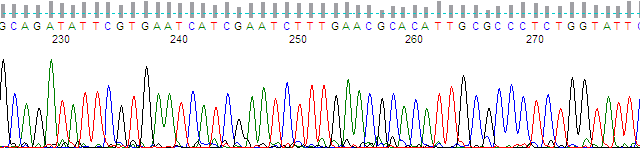
Chromatogram of about bases 225 to 275 basecalled by KB, with sharp peaks and few visible secondary peaks
Figure 1. KB Basecaller™ processed region

Figure 2 shows the same peak region but processed with PeakTrace no peak resolution processing. This processing mode outputs the raw data with minimal processing (signal baseline and dye mobility shift correction) enabling the true peak data to be examined. A complex pattern of secondary peaks is observed in Figure 2 that are missing from the KB trace.
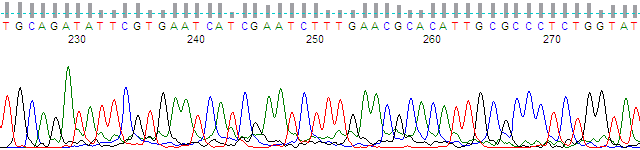
The same region as raw data, with broader peaks and many small secondary peaks beneath the primary peaks
Figure 2. Raw data (no peak resolution).

Figure 3 shows the same region processed with standard PeakTrace basecalling and processing. While the secondary peaks are better separated from the noise peaks and have heights that correspond to the peak heights seen in the raw data, many of these secondary peaks are small and not significant mixed bases.
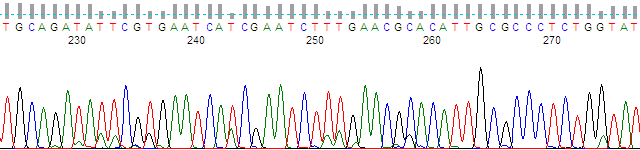
The same region processed by PeakTrace, with sharper peaks and small secondary peaks visible beneath many primary peaks
Figure 3. Standard PeakTrace processing and basecalling.

Figure 4 shows the same trace region but with the mixed peak threshold set to 40% with clean baseline and extra baseline used. While only the large secondary peaks are retained the basecall contains degenerate/mixed basecalls.
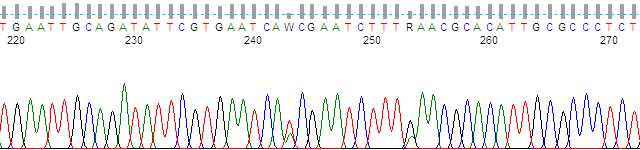
The same region with minor secondary peaks removed; two positions with large secondary peaks are called as mixed bases W and R
Figure 4. PeakTrace with mixed basecalling at 40% with clean baseline and extra baseline.

Figure 5 shows the same region but using a mixed peak threshold of 140% along with clean baseline and extra baseline. The trace looks the same as the 40% trace (i.e. only the major peaks are retained), but the basecall does not contain any degenerate/mixed basecalls. The basecall at the degenerate position is set to the primary peak call.
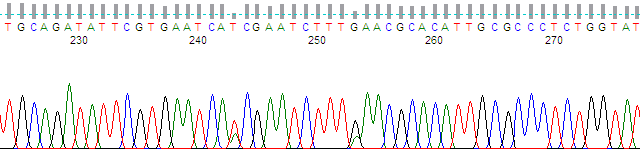
The same region with minor secondary peaks removed and the two large secondary peaks kept, but called as single bases with no mixed codes
Figure 5. PeakTrace with mixed basecalling at 140% with clean baseline and extra baseline.


Filed Under: How-to, In Depth, PeakTrace

Primary Sidebar

DNA Sequencing Help

We have added a guide on troubleshooting automated DNA sequencing problems.

DNA Sequencing Service Facilities Reviews

Please see our review of 325 DNA sequencing core facilities and commercial services for more information on selecting the right sequencing service for your needs.

QualTrace III Online

Try the free online version of the QualTrace DNA sequencing QC software and see how real time quality control tracking can improve your read lengths and lower sequencing failure rates.

Contact Details

email. information@nucleics.com
phone. +61 489 152 658
  • home
  • peaktrace
  • software & reagents
  • forum
  • tools
  • services
  • support
  • about

Nucleics

Sanger Sequencing Software

Already have RP units? Run batches in your browser with PeakTrace Online Pro.

©Nucleics 1999 - 2026