• Skip to main content
  • Skip to primary sidebar

Nucleics

  • PeakTrace
    • About PeakTrace
    • PeakTrace Online
    • PeakTrace Online Pro
    • PeakTrace 6
    • PeakTrace:Box
    • PeakTrace RP
    • PeakTrace for Chromas
    • Buy PeakTrace
    • Why use PeakTrace?
    • Validation of PeakTrace
    • PeakTrace FAQ
    • PeakTrace In Depth
  • DNA Sequencing Products
    • PeakTrace Basecaller
    • PeakTrace:Box
    • PeakTrace RP
    • PeakTrace for Chromas
    • QualTrace
    • LongTrace
    • CounterTrace
    • dLUTE SEQ
    • UniSeq
    • ASIN
  • Support & Services
    • PeakTrace Online Pro Registration
    • QualTrace III Online
    • DNA Sequencing Troubleshooting Guide
    • PeakTrace RP Downloads
    • PeakTrace:Box Downloads
    • Trace Viewers
    • User Manuals
    • Help Guides
      • How to Install Auto PeakTrace 6
      • How to Upgrade to Auto PeakTrace 6
      • How to Update the PeakTrace License on Linux
      • How to Generate a cmDust File
      • Online Activation of Auto PeakTrace 6
      • Auto PeakTrace 6 Online Activation Guide
      • DNA Sequencing Protocols
        • DNA Sequencing Protocol Tips
        • Exonuclease I – Shrimp Alkaline Phosphatase Clean Up of PCR Products
        • Tris EDTA DNA Sequencing Resuspension Buffer
        • DNA Sequencing Reaction Clean-up using Phenol & Butanol
    • DNA Sequencing Service Reviews
    • Software Downloads
    • MSDS
    • Services
      • Genomics Sequencing
      • Bioinformatics
  • Forum
    • Register
    • Login
    • PeakTrace Basecaller Forum
    • PeakTrace:Box Forum
    • Auto PeakTrace RP Forum
    • QualTrace Forum
    • DNA Sequencing Forum
    • DNA Sequencing Software
    • PCR Forum
    • DNA Isolation Forum
    • LongTrace Forum
    • dLUTE SEQ Forum
  • About
    • Contact
    • News
    • Jobs
    • Nucleics Privacy Policy
Buy PeakTrace

commercial users

In Depth: Stealth Mode

August 6, 2018 By Samuel

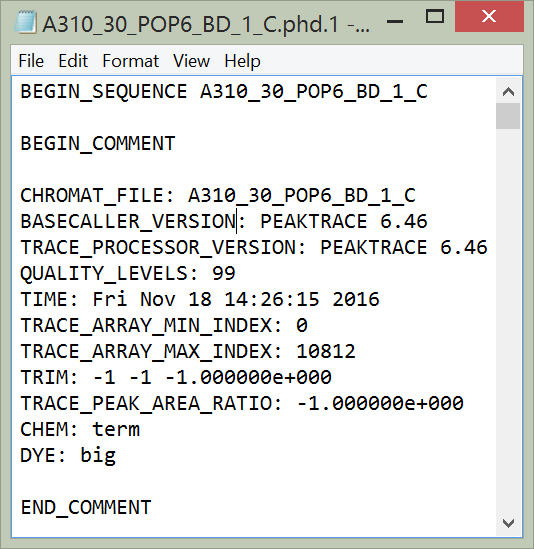
One of the most commonly misunderstood options of the PeakTrace™ Basecaller is stealth mode. The specification of the .phd.1 and .scf file requires that the basecaller and trace processor used are recorded. If PeakTrace is used then PeakTrace should be noted in these files (Figure 1).
phd1nostealth
Figure 1. .phd.1 file generated by PeakTrace when not using stealth mode.

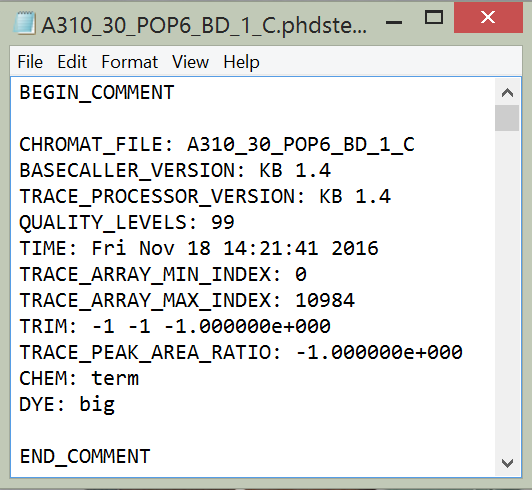
If stealth mode is selected then the trace processor and basecaller recorded within the .phd.1 and .scf files will be KB™ 1.4, hiding that the trace was processed with PeakTrace (Figure 2).
phd1stealth
Figure 2. .phd.1 file generated using stealth mode.

Why use Stealth Mode?

We would prefer that nobody uses stealth mode. Not only is it misleading, it avoid end users knowing that they have got a better trace from their facility using PeakTrace.

The reason why we offer this mode is that one of the major benefits of PeakTrace for commercial users is that it provides a huge competitive advantage over other Sanger DNA sequencing facilities that only use the KB Basecaller – the end user gets more accurate basecalling, longer reads and improved trace chromatograms. Stealth mode allows commercial users to maintain this competitive advantage without letting the competition know how they are able to win so much new business. The bottom line is that this is a feature requested by our customers (the DNA sequencing facilities), not one that we want anyone to use.

Having said this, if your competitors are so keen for you to not find out about PeakTrace then maybe it is a very good idea to investigate what PeakTrace can do. The facilities using PeakTrace are not doing so because they like to waste money, they are doing it because every time one of your customers sees the quality of the sequencing data they switch to their service. The good news is you can use PeakTrace too.

Filed Under: In Depth, PeakTrace Tagged With: commercial, commercial users, in depth, stealth, stealth mode

Primary Sidebar

DNA Sequencing Help

We have added a guide on troubleshooting automated DNA sequencing problems.

DNA Sequencing Service Facilities Reviews

Please see our review of 325 DNA sequencing core facilities and commercial services for more information on selecting the right sequencing service for your needs.

QualTrace III Online

Try the free online version of the QualTrace DNA sequencing QC software and see how real time quality control tracking can improve your read lengths and lower sequencing failure rates.

Contact Details

email. information@nucleics.com
phone. +61 3 9016 9373
  • home
  • peaktrace
  • software & reagents
  • forum
  • tools
  • services
  • support
  • about

Nucleics

Sanger Seqencing Software

©Nucleics 1999 - 2026