• Skip to main content
  • Skip to primary sidebar

Nucleics

  • PeakTrace
    • About PeakTrace
    • PeakTrace Online
    • PeakTrace Online Pro
    • PeakTrace 6
    • PeakTrace:Box
    • PeakTrace RP
    • PeakTrace for Chromas
    • Buy PeakTrace
    • Why use PeakTrace?
    • Validation of PeakTrace
    • PeakTrace FAQ
    • PeakTrace In Depth
  • DNA Sequencing Products
    • PeakTrace Basecaller
    • PeakTrace:Box
    • PeakTrace RP
    • PeakTrace for Chromas
    • QualTrace
    • LongTrace
    • CounterTrace
    • dLUTE SEQ
    • UniSeq
    • ASIN
  • Support & Services
    • PeakTrace Online Pro Registration
    • QualTrace III Online
    • DNA Sequencing Troubleshooting Guide
    • PeakTrace RP Downloads
    • PeakTrace:Box Downloads
    • Trace Viewers
    • User Manuals
    • Help Guides
      • How to Install Auto PeakTrace 6
      • How to Upgrade to Auto PeakTrace 6
      • How to Update the PeakTrace License on Linux
      • How to Generate a cmDust File
      • Online Activation of Auto PeakTrace 6
      • Auto PeakTrace 6 Online Activation Guide
      • DNA Sequencing Protocols
        • DNA Sequencing Protocol Tips
        • Exonuclease I – Shrimp Alkaline Phosphatase Clean Up of PCR Products
        • Tris EDTA DNA Sequencing Resuspension Buffer
        • DNA Sequencing Reaction Clean-up using Phenol & Butanol
    • DNA Sequencing Service Reviews
    • Software Downloads
    • MSDS
    • Services
      • Genomics Sequencing
      • Bioinformatics
  • Forum
    • Register
    • Login
    • PeakTrace Basecaller Forum
    • PeakTrace:Box Forum
    • Auto PeakTrace RP Forum
    • QualTrace Forum
    • DNA Sequencing Forum
    • DNA Sequencing Software
    • PCR Forum
    • DNA Isolation Forum
    • LongTrace Forum
    • dLUTE SEQ Forum
  • About
    • Contact
    • News
    • Jobs
    • Nucleics Privacy Policy
Buy PeakTrace

in depth

In Depth: Stealth Mode

August 6, 2018 By Samuel

.phd.1 file generated by PeakTrace without stealth mode, recording PeakTrace 6.46 as the basecaller and trace processor

One of the most commonly misunderstood options of the PeakTrace™ Basecaller is stealth mode. The specification of the .phd.1 and .scf file requires that the basecaller and trace processor used are recorded. If PeakTrace is used then PeakTrace should be noted in these files (Figure 1).
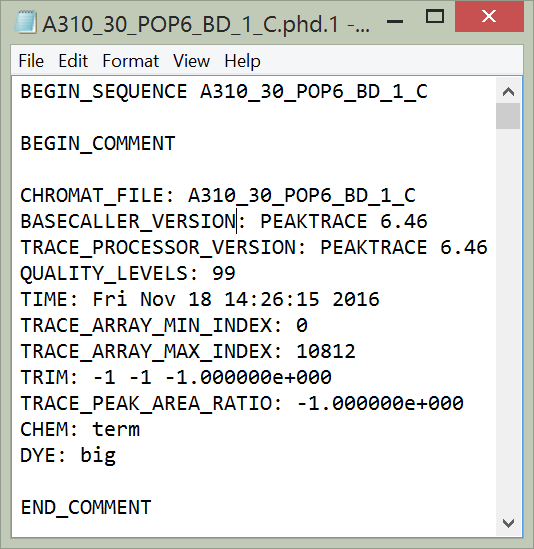
.phd.1 file generated by PeakTrace without stealth mode, recording PeakTrace 6.46 as the basecaller and trace processor
Figure 1. .phd.1 file generated by PeakTrace when not using stealth mode.

If stealth mode is selected then the trace processor and basecaller recorded within the .phd.1 and .scf files will be KB™ 1.4, hiding that the trace was processed with PeakTrace (Figure 2).
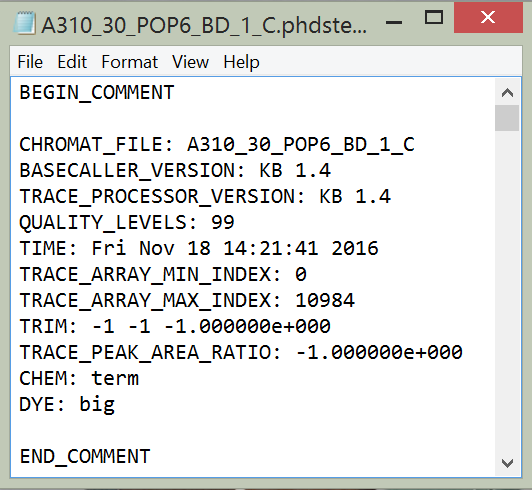
.phd.1 file generated using stealth mode, recording KB 1.4 as the basecaller and trace processor
Figure 2. .phd.1 file generated using stealth mode.

Why use Stealth Mode?

We would prefer that nobody uses stealth mode. Not only is it misleading, it avoids end users knowing that they have got a better trace from their facility using PeakTrace.

The reason why we offer this mode is that one of the major benefits of PeakTrace for commercial users is that it provides a huge competitive advantage over other Sanger DNA sequencing facilities that only use the KB Basecaller – the end user gets more accurate basecalling, longer reads and improved trace chromatograms. Stealth mode allows commercial users to maintain this competitive advantage without letting the competition know how they are able to win so much new business. The bottom line is that this is a feature requested by our customers (the DNA sequencing facilities), not one that we want anyone to use.

Having said this, if your competitors are so keen for you to not find out about PeakTrace then maybe it is a very good idea to investigate what PeakTrace can do. The facilities using PeakTrace are not doing so because they like to waste money, they are doing it because every time one of your customers sees the quality of the sequencing data they switch to their service. The good news is you can use PeakTrace too.

Filed Under: In Depth, PeakTrace Tagged With: commercial, commercial users, in depth, stealth, stealth mode

In Depth: Force Processing

July 4, 2018 By Samuel

Auto PeakTrace 6 with force processing off, reporting TestTrace1.ab1 as a failed trace and TestTrace2.ab1 as a weak trace

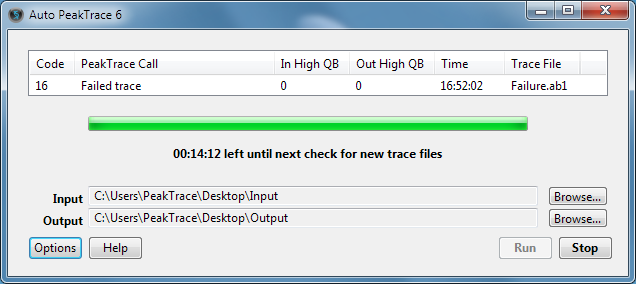
One of the more commonly misunderstood settings within PeakTrace™ is the force processing option. This option will allow you to force PeakTrace basecalling of files that would normally be rejected by PeakTrace for poor quality under normal circumstances (Figures 1 & 2).

Auto PeakTrace 6 reporting code 16, Failed trace, for Failure.ab1
Figure 1. An example low quality trace that PeakTrace fails under default conditions.


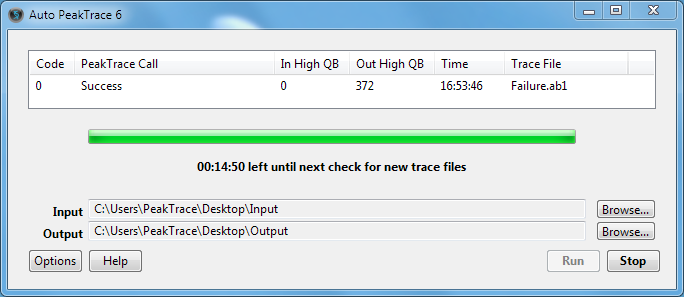
Auto PeakTrace 6 reporting Success for Failure.ab1 with force processing on
Figure 2: Successful PeakTrace basecalling of the same trace after force processing has been toggled on.

Advantages

  • Force processing may be useful when you wish to proceed with processing poor quality traces that are not able to be basecalled by PeakTrace under standard basecalling settings.
  • Forced processing may allow PeakTrace to rescue some usable data from an otherwise unusable trace (Figures 2 & 3).


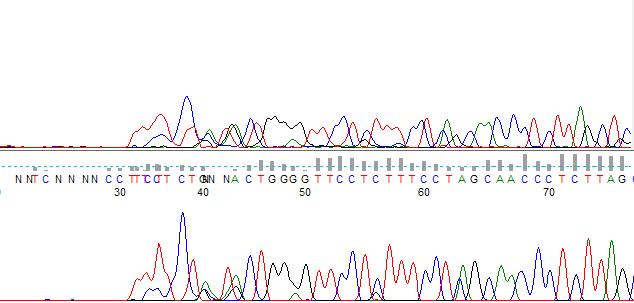
Original failed trace above the force-processed trace, which has basecalls from about base 30
Figure 3. A side by side comparison of the original trace, and the force processed trace. The original trace failed to be basecalled by KB, and was also rejected by PeakTrace under the default settings due to poor quality. Force processing has allowed the PeakTrace basecalling and trace processing to proceed.


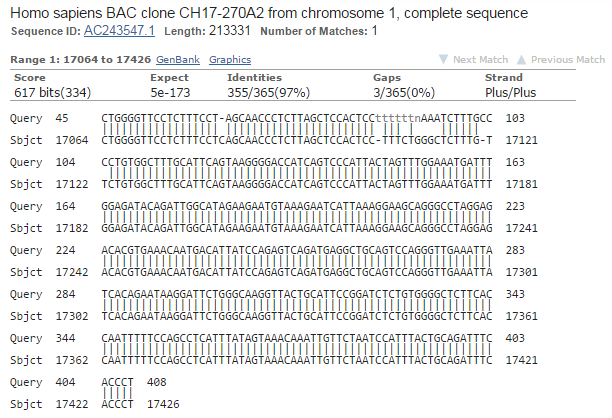
BLAST result showing 97% identity over 365 bases to Homo sapiens BAC clone CH17-270A2 from chromosome 1
Figure 4: Blast alignment of the extracted data reveals a sequence match. Force processing has allowed useful data to be obtained.

Potential Pitfalls

While force processing can be useful to rescue some traces, there are risks with using it on all traces.

  • Force processing may produce nonsensical or corrupted trace files. It is advised that you use this feature only as a last resort, and that you do so with additional caution.
  • Force processing is not magic. It can not create a high quality trace from a failed reaction. In most cases, a poor quality trace indicates that the sample will need to be sequenced again under improved sequencing conditions.
  • Force processing may result in PeakTrace crashing. While PeakTrace can automatically recover from a crash and restart, you may notice the program closing and restarting.

It is advised that force processing is only used if needed and not by default on all traces.

Filed Under: In Depth, PeakTrace, PeakTrace RP Tagged With: force processing, in depth, low quality trace

In Depth: Q Average Trace Trimming

January 12, 2017 By Samuel

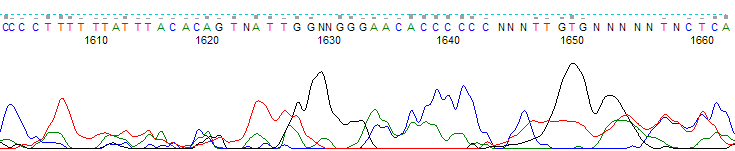
Untrimmed trace end from bases 1605 to 1665, with broad low-quality peaks and many N basecalls

The q average trim option allows you to select a quality score average clipping threshold and window size, so that traces are clipped at their 5′ and 3′ ends when the average quality score in a sliding window of defined base number falls below the clipping threshold. The default values are a quality score average clipping threshold of 12, and a sliding window of 20 bases. This means that by default, all traces are clipped when the average quality score falls below 12 within a window of 20 bases.

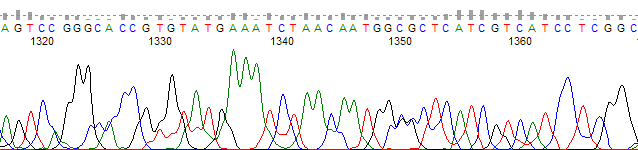
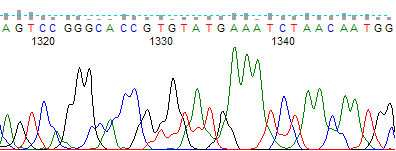
This option is especially useful for removing low quality regions at the 5′ and 3′ ends of your traces. Figure 1 shows an unclipped trace with a poor quality 3′ region and Figure 2 shows the same trace processed using the q average trim to remove the low quality region.

Untrimmed trace from bases 1315 to 1365 with broad, overlapping low-quality peaks
Figure 1. An unclipped trace showing a poor quality 3′ region.
The same trace after Q average trimming, ending at about base 1345
Figure 2. The same trace as in Figure 1, but trimmed with the Q average trim function. Selected parameter values were an average clipping threshold of 15, a sliding window of 20 and the trim 3′ end only function toggled on.

The q average trimming option is compatible with the set ABI limits option, which will perform a soft or “virtual” trim of low quality end regions.

If you have untrimmed traces that have already been processed through PeakTrace and you would like to trim them without being charged more units, you can perform post-process trimming by selecting abi/kb as the basecaller and choosing the appropriate trimming method. Remember to turn off the clean baseline, extra baseline and extra normalization options or else you will be charged for trimming the traces.

Filed Under: In Depth, PeakTrace, PeakTrace RP Tagged With: in depth, q average trim, trimming

Primary Sidebar

DNA Sequencing Help

We have added a guide on troubleshooting automated DNA sequencing problems.

DNA Sequencing Service Facilities Reviews

Please see our review of 325 DNA sequencing core facilities and commercial services for more information on selecting the right sequencing service for your needs.

QualTrace III Online

Try the free online version of the QualTrace DNA sequencing QC software and see how real time quality control tracking can improve your read lengths and lower sequencing failure rates.

Contact Details

email. information@nucleics.com
phone. +61 3 9016 9373
  • home
  • peaktrace
  • software & reagents
  • forum
  • tools
  • services
  • support
  • about

Nucleics

Sanger Seqencing Software

©Nucleics 1999 - 2026