• Skip to main content
  • Skip to primary sidebar

Nucleics

  • PeakTrace
    • About PeakTrace
    • PeakTrace Online
    • PeakTrace Online Pro
    • Online Pro for RP customers
    • PeakTrace 6
    • PeakTrace:Box
    • PeakTrace RP
    • PeakTrace for Chromas
    • Buy PeakTrace
    • Why use PeakTrace?
    • Validation of PeakTrace
    • PeakTrace FAQ
    • PeakTrace In Depth
  • DNA Sequencing Products
    • PeakTrace Basecaller
    • PeakTrace:Box
    • PeakTrace RP
    • PeakTrace for Chromas
    • QualTrace
    • LongTrace
    • CounterTrace
    • dLUTE SEQ
    • UniSeq
    • ASIN
  • Support & Services
    • PeakTrace Online Pro Registration
    • QualTrace III Online
    • DNA Sequencing Troubleshooting Guide
    • PeakTrace RP Downloads
    • PeakTrace:Box Downloads
    • Trace Viewers
    • User Manuals
    • Help Guides
      • How to Install Auto PeakTrace 6
      • How to Upgrade to Auto PeakTrace 6
      • How to Update the PeakTrace License on Linux
      • How to Generate a cmDust File
      • Online Activation of Auto PeakTrace 6
      • Auto PeakTrace 6 Online Activation Guide
      • DNA Sequencing Protocols
        • DNA Sequencing Protocol Tips
        • Exonuclease I – Shrimp Alkaline Phosphatase Clean Up of PCR Products
        • Tris EDTA DNA Sequencing Resuspension Buffer
        • DNA Sequencing Reaction Clean-up using Phenol & Butanol
    • DNA Sequencing Service Reviews
    • Software Downloads
    • MSDS
    • Services
      • Genomics Sequencing
      • Bioinformatics
  • Forum
    • Register
    • Login
    • PeakTrace Basecaller Forum
    • PeakTrace:Box Forum
    • Auto PeakTrace RP Forum
    • QualTrace Forum
    • DNA Sequencing Forum
    • DNA Sequencing Software
    • PCR Forum
    • DNA Isolation Forum
    • LongTrace Forum
    • dLUTE SEQ Forum
  • About
    • Contact
    • News
    • Jobs
    • Nucleics Privacy Policy
Buy PeakTrace

How to Upgrade to PeakTrace 5.90

June 5, 2015 By Daniel

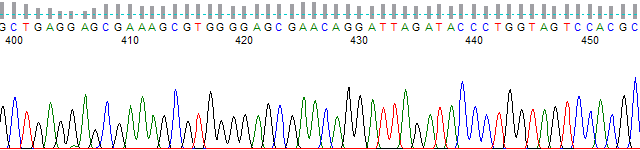
PeakTrace-processed chromatogram from bases 400 to 450

If you want to upgrade to the PeakTrace 5.90 series (the most recent release in this series is 5.92) there are a few steps that you need to do first.

  1. Check if you are running a version of PeakTrace prior to 5.70. The version number is shown at the top of the options window of Auto PeakTrace or use peaktrace -v if you are using the PeakTrace command line version. If your version is after 5.70 (or you are using Auto PeakTrace RP)  then you can skip straight to Step 7.
  2. If you are running a version of PeakTrace before 5.70 then you will need to obtain a free update for your license. You will need to generate a license request file and email it to Nucleics (or your local supplier). Nucleics will update the license and send it back to you. If you have received a license update since April 2015 then you can also skip this step.
  3. Update your CodeMeter Runtime to the latest version (6.30 as of July 2016).
  4. Update the PeakTrace USB Key Firmware to the latest version (2.04 as of July 2016).
  5. Update the PeakTrace USB Key Time.
  6. Install the updated license file you have received from Nucleics (or your local supplier).
  7. Download the latest version of Auto PeakTrace (or peaktrace for linux) from the Nucleics Downloads page. You will need a password to access the downloads page which will be supplied to you with the updated license file.
  8. Install Auto PeakTrace by double clicking on the installer and following the prompts.
  9. Once installed check the Auto PeakTrace Option settings. It is a good idea to also read through the supplied help manual as there are new features and changes that will likely be of interest to you. If you are unsure of what settings to use then just use the defaults and/or get in contact with Nucleics (or your local supplier) for advice on what is best for your needs.

Filed Under: How-to, linux, PeakTrace, windows

Primary Sidebar

DNA Sequencing Help

We have added a guide on troubleshooting automated DNA sequencing problems.

DNA Sequencing Service Facilities Reviews

Please see our review of 325 DNA sequencing core facilities and commercial services for more information on selecting the right sequencing service for your needs.

QualTrace III Online

Try the free online version of the QualTrace DNA sequencing QC software and see how real time quality control tracking can improve your read lengths and lower sequencing failure rates.

Contact Details

email. information@nucleics.com
phone. +61 489 152 658
  • home
  • peaktrace
  • software & reagents
  • forum
  • tools
  • services
  • support
  • about

Nucleics

Sanger Sequencing Software

Already have RP units? Run batches in your browser with PeakTrace Online Pro.

©Nucleics 1999 - 2026