• Skip to main content
  • Skip to primary sidebar

Nucleics

  • PeakTrace
    • About PeakTrace
    • PeakTrace Online
    • PeakTrace Online Pro
    • PeakTrace 6
    • PeakTrace:Box
    • PeakTrace RP
    • PeakTrace for Chromas
    • Buy PeakTrace
    • Why use PeakTrace?
    • Validation of PeakTrace
    • PeakTrace FAQ
    • PeakTrace In Depth
  • DNA Sequencing Products
    • PeakTrace Basecaller
    • PeakTrace:Box
    • PeakTrace RP
    • PeakTrace for Chromas
    • QualTrace
    • LongTrace
    • CounterTrace
    • dLUTE SEQ
    • UniSeq
    • ASIN
  • Support & Services
    • PeakTrace Online Pro Registration
    • QualTrace III Online
    • DNA Sequencing Troubleshooting Guide
    • PeakTrace RP Downloads
    • PeakTrace:Box Downloads
    • Trace Viewers
    • User Manuals
    • Help Guides
      • How to Install Auto PeakTrace 6
      • How to Upgrade to Auto PeakTrace 6
      • How to Update the PeakTrace License on Linux
      • How to Generate a cmDust File
      • Online Activation of Auto PeakTrace 6
      • Auto PeakTrace 6 Online Activation Guide
      • DNA Sequencing Protocols
        • DNA Sequencing Protocol Tips
        • Exonuclease I – Shrimp Alkaline Phosphatase Clean Up of PCR Products
        • Tris EDTA DNA Sequencing Resuspension Buffer
        • DNA Sequencing Reaction Clean-up using Phenol & Butanol
    • DNA Sequencing Service Reviews
    • Software Downloads
    • MSDS
    • Services
      • Genomics Sequencing
      • Bioinformatics
  • Forum
    • Register
    • Login
    • PeakTrace Basecaller Forum
    • PeakTrace:Box Forum
    • Auto PeakTrace RP Forum
    • QualTrace Forum
    • DNA Sequencing Forum
    • DNA Sequencing Software
    • PCR Forum
    • DNA Isolation Forum
    • LongTrace Forum
    • dLUTE SEQ Forum
  • About
    • Contact
    • News
    • Jobs
    • Nucleics Privacy Policy
Buy PeakTrace

trimming

In Depth: Q Average Trace Trimming

January 12, 2017 By Samuel

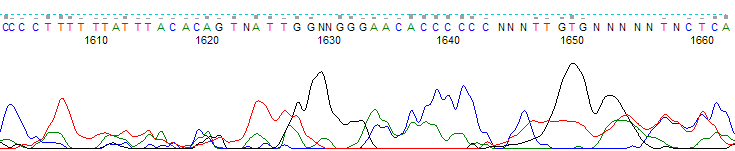
Untrimmed trace end from bases 1605 to 1665, with broad low-quality peaks and many N basecalls

The q average trim option allows you to select a quality score average clipping threshold and window size, so that traces are clipped at their 5′ and 3′ ends when the average quality score in a sliding window of defined base number falls below the clipping threshold. The default values are a quality score average clipping threshold of 12, and a sliding window of 20 bases. This means that by default, all traces are clipped when the average quality score falls below 12 within a window of 20 bases.

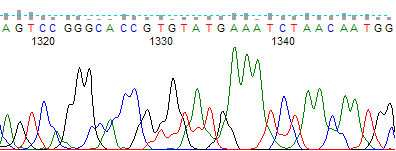
This option is especially useful for removing low quality regions at the 5′ and 3′ ends of your traces. Figure 1 shows an unclipped trace with a poor quality 3′ region and Figure 2 shows the same trace processed using the q average trim to remove the low quality region.
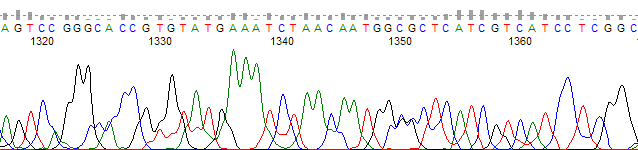
Untrimmed trace from bases 1315 to 1365 with broad, overlapping low-quality peaks
Figure 1. An unclipped trace showing a poor quality 3′ region.
The same trace after Q average trimming, ending at about base 1345
Figure 2. The same trace as in Figure 1, but trimmed with the Q average trim function. Selected parameter values were an average clipping threshold of 15, a sliding window of 20 and the trim 3′ end only function toggled on.

The q average trimming option is compatible with the set ABI limits option, which will perform a soft or “virtual” trim of low quality end regions.

If you have untrimmed traces that have already been processed through PeakTrace and you would like to trim them without being charged more units, you can perform post-process trimming by selecting abi/kb as the basecaller and choosing the appropriate trimming method. Remember to turn off the clean baseline, extra baseline and extra normalization options or else you will be charged for trimming the traces.

Filed Under: In Depth, PeakTrace, PeakTrace RP Tagged With: in depth, q average trim, trimming

Primary Sidebar

DNA Sequencing Help

We have added a guide on troubleshooting automated DNA sequencing problems.

DNA Sequencing Service Facilities Reviews

Please see our review of 325 DNA sequencing core facilities and commercial services for more information on selecting the right sequencing service for your needs.

QualTrace III Online

Try the free online version of the QualTrace DNA sequencing QC software and see how real time quality control tracking can improve your read lengths and lower sequencing failure rates.

Contact Details

email. information@nucleics.com
phone. +61 3 9016 9373
  • home
  • peaktrace
  • software & reagents
  • forum
  • tools
  • services
  • support
  • about

Nucleics

Sanger Seqencing Software

©Nucleics 1999 - 2026