• Skip to main content
  • Skip to primary sidebar

Nucleics

  • PeakTrace
    • About PeakTrace
    • PeakTrace Online
    • PeakTrace Online Pro
    • Online Pro for RP customers
    • PeakTrace 6
    • PeakTrace:Box
    • PeakTrace RP
    • PeakTrace for Chromas
    • Buy PeakTrace
    • Why use PeakTrace?
    • Validation of PeakTrace
    • PeakTrace FAQ
    • PeakTrace In Depth
  • DNA Sequencing Products
    • PeakTrace Basecaller
    • PeakTrace:Box
    • PeakTrace RP
    • PeakTrace for Chromas
    • QualTrace
    • LongTrace
    • CounterTrace
    • dLUTE SEQ
    • UniSeq
    • ASIN
  • Support & Services
    • PeakTrace Online Pro Registration
    • QualTrace III Online
    • DNA Sequencing Troubleshooting Guide
    • PeakTrace RP Downloads
    • PeakTrace:Box Downloads
    • Trace Viewers
    • User Manuals
    • Help Guides
      • How to Install Auto PeakTrace 6
      • How to Upgrade to Auto PeakTrace 6
      • How to Update the PeakTrace License on Linux
      • How to Generate a cmDust File
      • Online Activation of Auto PeakTrace 6
      • Auto PeakTrace 6 Online Activation Guide
      • DNA Sequencing Protocols
        • DNA Sequencing Protocol Tips
        • Exonuclease I – Shrimp Alkaline Phosphatase Clean Up of PCR Products
        • Tris EDTA DNA Sequencing Resuspension Buffer
        • DNA Sequencing Reaction Clean-up using Phenol & Butanol
    • DNA Sequencing Service Reviews
    • Software Downloads
    • MSDS
    • Services
      • Genomics Sequencing
      • Bioinformatics
  • Forum
    • Register
    • Login
    • PeakTrace Basecaller Forum
    • PeakTrace:Box Forum
    • Auto PeakTrace RP Forum
    • QualTrace Forum
    • DNA Sequencing Forum
    • DNA Sequencing Software
    • PCR Forum
    • DNA Isolation Forum
    • LongTrace Forum
    • dLUTE SEQ Forum
  • About
    • Contact
    • News
    • Jobs
    • Nucleics Privacy Policy
Buy PeakTrace

Daniel

Christmas & New Year’s Holiday at Nucleics 2019

December 2, 2019 By Daniel

Stylized painting of a beach below a green headland on a sunny day

Stylized painting of a beach below a green headland on a sunny day

What another huge year 2019 has been! Nucleics will be shutting down for our annual company holiday (vacation) break over the Christmas/New Year period while we all relax at the beach. We will be closed from the 17th December 2019 until 6th January 2020. I (Daniel) will be checking my emails occasionally over this time, but it might take us longer than usual to get back to you.
Filed Under: news

How to update the CodeMeter Runtime

September 6, 2019 By Daniel

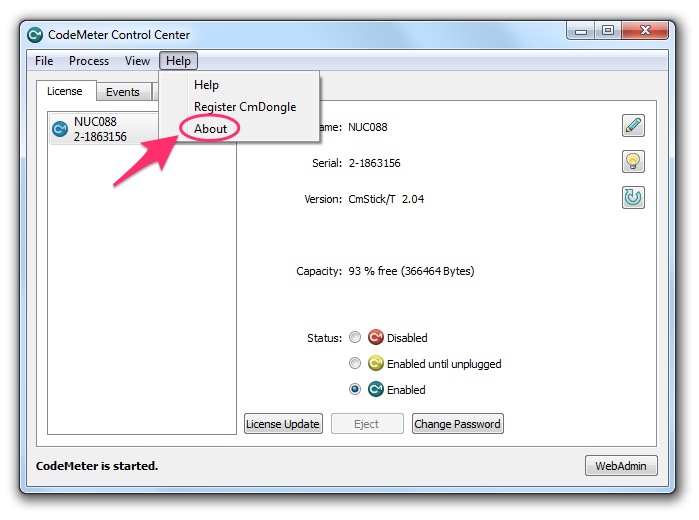
CodeMeter Control Center with the Help menu open and About highlighted

All versions of Auto PeakTrace above 5.70 require the latest CodeMeter Runtime (check PeakTrace:Box Downloads for the currently recommended version; 9.10 is current for modern Windows/Linux, while legacy Windows XP/7 require CodeMeter 6.80). To update you first need to check which version of the CodeMeter Runtime you have installed on your computer. To do this:

1. Open the CodeMeter Control Center from the Windows Start menu (search for CodeMeter Control Center). Please make sure that the USB Key supplied by Nucleics is plugged into your computer.

CodeMeter Control Center with the Help menu open and About highlighted

2. Click on the Help menu and then on About.

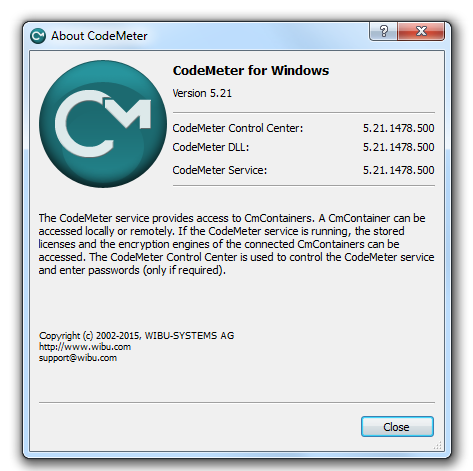
About CodeMeter window showing the installed CodeMeter version numbers

3. The version number will be shown on the About window. If your runtime version is less than 6.80 then you need to update the CodeMeter Runtime. The latest CodeMeter runtime can be downloaded from Wibu. If you are running PeakTrace on Windows XP you will need to use CodeMeter 6.80. This version can be downloaded from the PeakTrace:Box downloads page.

4. Run the Codemeter Runtime Installer following the prompts. After it finishes restart your computer.

After updating CodeMeter, you may also want to run Update Time Certificates on your USB key.

Filed Under: How-to, PeakTrace, windows

Auto PeakTrace 6.936 & PeakTrace 6.936 Released

September 4, 2019 By Daniel

Auto PeakTrace 6.936 Overview

We have released Auto PeakTrace 6.936 and PeakTrace 6.936 for Windows & Linux. This is a minor release that squashes a few bugs that have been uncovered over the last couple of months. This update is recommended for all users of the 6.93 series of PeakTrace.

The Auto PeakTrace RP and PeakTrace for Chromas changes are all on the server side so there will not be a corresponding update for these programs at this stage.

PeakTrace:Box customers can download the latest update from the PeakTrace:Box Downloads page. If you do not know the password to access the PeakTrace:Box Downloads page please contact us @support@nucleics.com or contact your local supplier for the update.

Filed Under: linux, New Release, PeakTrace, windows

Auto PeakTrace 6.935 & PeakTrace 6.935 Released

July 17, 2019 By Daniel

Auto PeakTrace 6 main window with the Options dialogue for version 6.935 open
Auto PeakTrace 6.935 Overview

We have released Auto PeakTrace 6.935 and PeakTrace 6.935 for Windows & Linux. This is a minor release that improves the basecalling when large or late air bubble spikes are present in the raw data. This update is optional, but if you have noticed issues with extra bases being called in traces with large bubble spikes then you may wish to upgrade.

The Auto PeakTrace RP and PeakTrace for Chromas changes are all on the server side so there will not be a corresponding update for these programs.

PeakTrace:Box customers can download the latest update from the PeakTrace:Box Downloads page. If you do not know the password to access the PeakTrace:Box Downloads page please contact us @support@nucleics.com or contact your local supplier for the update.

Filed Under: linux, New Release, PeakTrace, PeakTrace RP, windows

Auto PeakTrace 6.934 & PeakTrace 6.934 Released

June 13, 2019 By Daniel

Auto PeakTrace 6 main window with the Options window for version 6.934 open
Auto PeakTrace 6.934 Overview

We have released Auto PeakTrace 6.934 and PeakTrace 6.934 for Windows & Linux. This is a small bug fix release that corrects an issue with the simple mixed basecall as well as a rare thread race issue when archive traces and auto start are both selected. Unless you are using simple mixed basecall (nobody should be as it is inferior to standard mixed basecalling), this update is optional.

The Auto PeakTrace RP and PeakTrace for Chromas changes are all on the server side so there will not be a corresponding update for these programs.

PeakTrace:Box customers can download the latest update from the PeakTrace:Box Downloads page. If you do not know the password to access the PeakTrace:Box Downloads page please contact us @support@nucleics.com or contact your local supplier for the update.

Filed Under: linux, New Release, news, PeakTrace, windows

How to Update the PeakTrace License on Linux

April 22, 2019 By Daniel

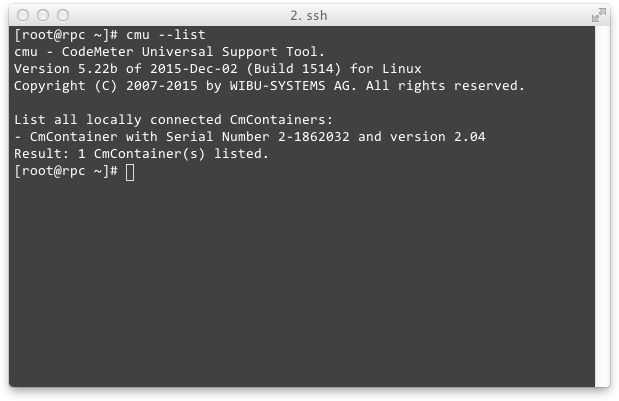
Terminal output of cmu --list showing the CmContainer serial number and version

A common question is how to generate a license request and install a license update from the Linux command line for PeakTrace. Follow these steps with your PeakTrace USB Key plugged in:

  1. Open a shell window and list the CmContainer serial number:
    cmu --list

    Terminal output of cmu --list showing the CmContainer serial number and version

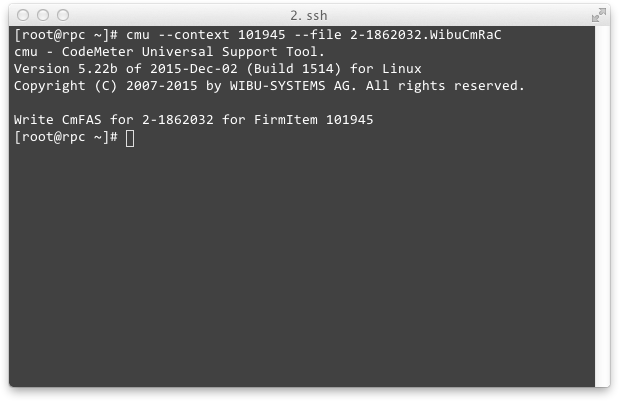
  2. Generate the PeakTrace License Request file:
    cmu --context 101945 --file [serial number].WibuCmRaC

    Terminal output of cmu --context 101945 --file writing the license request file

  3. Email the resulting .WibuCmRaC file to {This email is obscured. Your must have javascript enabled to see it} (or your local supplier).
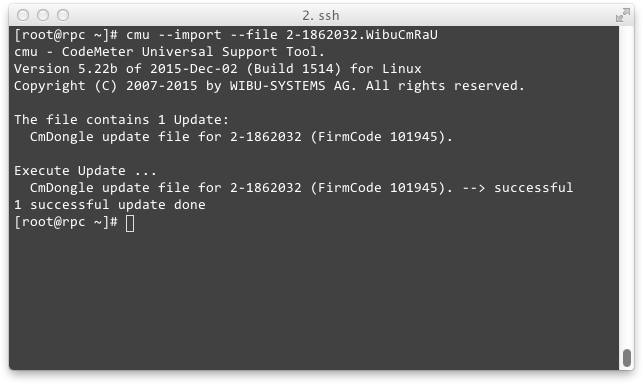
  4. Once you receive the .WibuCmRaU update file, import it into the PeakTrace USB Key:
    cmu --import --file [serial number].WibuCmRaU

    Terminal output of cmu --import confirming the license update was successful

  5. Update the clock on the USB key (see also How to Update the PeakTrace USB Key Time):
    cmu --time-update

For the Windows GUI equivalent, see How to Install PeakTrace License Update and PeakTrace:Box Downloads.

Filed Under: How-to, linux, PeakTrace

Auto PeakTrace 6.933 & PeakTrace 6.933 Released

April 9, 2019 By Daniel

Auto PeakTrace 6.933 Overview

We have released Auto PeakTrace 6.933 and PeakTrace 6.933 for Windows. This is a small bug fix release that fixes rare issues identified by some of our customers. If you are not experiencing any issues with your traces then this update is optional. We aim to always have no known bugs in the latest versions of PeakTrace and will release an update as soon as any issues are identified and fixed.

The Linux version will be released in the coming days and the improvements will be incorporated automatically into the Auto PeakTrace RP and PeakTrace for Chromas versions as the changes are all on the server side.

PeakTrace:Box users can download the latest update from the PeakTrace:Box Downloads page. If you do not know the password to access the PeakTrace:Box Downloads page please contact us @support@nucleics.com or contact your local supplier for the update.

Filed Under: New Release, news, PeakTrace, windows

Auto PeakTrace 6.932 & PeakTrace 6.932 Released

March 19, 2019 By Daniel

Auto PeakTrace 6.932 Options

We have released Auto PeakTrace 6.932 and PeakTrace 6.932 for Linux and Windows. This is a small bug fix release that resolves issues on rare trace types, especially short PCR reads. We would like to thank those of our customers who sent us example .ab1 files containing potential issues. Our policy is to never have known bugs in the latest release and once we are made aware of an issue we aim to rectify it as soon as possible (usually within weeks). If you notice any trace not being processed and basecalled as you expect, or any other issue of concern, then please get in contact with us.

For users of PeakTrace RP the changes have been automatically made on the remote server side so there is no need to upgrade.

PeakTrace:Box users can download the latest update from the PeakTrace:Box Downloads page. If you do not know the password to access the PeakTrace:Box Downloads page please contact us @support@nucleics.com or contact your local supplier for the update.

Filed Under: linux, New Release, news, PeakTrace, PeakTrace RP, windows

Auto PeakTrace RP 6.93 Released

February 4, 2019 By Daniel

Auto PeakTrace RP 6.93 Overview

We have released Auto PeakTrace RP 6.93. This release improves the calling of Auto PeakTrace RP from the command line. The full list of changes includes

  • New Feature. Command line control of the proxy server settings.
  • New feature. Custom PeakTrace log file names and paths can be set from the command line.
  • New feature. Auto PeakTrace RP can be run in watch mode checking for new .ab1 file in input folder from the command line.
  • New feature. Control of message output to the command line window via -sl option switch.
  • New Feature. Header line can be removed from log files with -sh option on the command line.
  • New Feature. Support added for ABI3130 80cm array POP7 runs.
  • If Auto PeakTrace RP crashes in command line mode it will restart in command line mode, but not output any message to the command window.
  • Bug fixes.

Auto PeakTrace RP 6.93 can be downloaded from the PeakTrace RP Downloads page. If you do not know the password to access the PeakTrace RP Downloads page please contact us or your local supplier for the update. The MacOS X version will be released in the coming days along with the automatic update function.

Filed Under: New Release, news, PeakTrace RP, windows

Auto PeakTrace 6.931 Released

January 30, 2019 By Daniel

Auto PeakTrace 6 processing a batch of traces, with the Options dialogue for version 6.931 open

Auto PeakTrace 6 processing a batch of traces, with the Options dialogue for version 6.931 open

We have released Auto PeakTrace 6.931 and PeakTrace.exe 6.921 for Windows. This minor update fixes two issues that can cause PeakTrace to crash on rare occasions.

These bug fixes have been made possible by customers sending us example .ab1 files that have caused issues. If you experience any issues please send us example trace(s) as tracking down bugs that cause a crash once every 100,000 traces is much easier for us if we have an example file. Our aim is to always have zero known bugs in all new releases.

This update is a recommended upgrade for all PeakTrace customers since the bugs that were fixed have been present for more than 12 months.

Auto PeakTrace 6.931 can be downloaded from the PeakTrace:Box Downloads page. If you do not know the password to access the PeakTrace:Box Downloads page please contact us @support@nucleics.com or contact your local supplier for the update.

Filed Under: New Release, news, PeakTrace, windows

  • « Go to Previous Page
  • Page 1
  • Page 2
  • Page 3
  • Page 4
  • Page 5
  • Interim pages omitted …
  • Page 22
  • Go to Next Page »

Primary Sidebar

DNA Sequencing Help

We have added a guide on troubleshooting automated DNA sequencing problems.

DNA Sequencing Service Facilities Reviews

Please see our review of 325 DNA sequencing core facilities and commercial services for more information on selecting the right sequencing service for your needs.

QualTrace III Online

Try the free online version of the QualTrace DNA sequencing QC software and see how real time quality control tracking can improve your read lengths and lower sequencing failure rates.

Contact Details

email. information@nucleics.com
phone. +61 489 152 658
  • home
  • peaktrace
  • software & reagents
  • forum
  • tools
  • services
  • support
  • about

Nucleics

Sanger Sequencing Software

Already have RP units? Run batches in your browser with PeakTrace Online Pro.

©Nucleics 1999 - 2026