• Skip to main content
  • Skip to primary sidebar

Nucleics

  • PeakTrace
    • About PeakTrace
    • PeakTrace Online
    • PeakTrace Online Pro
    • Online Pro for RP customers
    • PeakTrace 6
    • PeakTrace:Box
    • PeakTrace RP
    • PeakTrace for Chromas
    • Buy PeakTrace
    • Why use PeakTrace?
    • Validation of PeakTrace
    • PeakTrace FAQ
    • PeakTrace In Depth
  • DNA Sequencing Products
    • PeakTrace Basecaller
    • PeakTrace:Box
    • PeakTrace RP
    • PeakTrace for Chromas
    • QualTrace
    • LongTrace
    • CounterTrace
    • dLUTE SEQ
    • UniSeq
    • ASIN
  • Support & Services
    • PeakTrace Online Pro Registration
    • QualTrace III Online
    • DNA Sequencing Troubleshooting Guide
    • PeakTrace RP Downloads
    • PeakTrace:Box Downloads
    • Trace Viewers
    • User Manuals
    • Help Guides
      • How to Install Auto PeakTrace 6
      • How to Upgrade to Auto PeakTrace 6
      • How to Update the PeakTrace License on Linux
      • How to Generate a cmDust File
      • Online Activation of Auto PeakTrace 6
      • Auto PeakTrace 6 Online Activation Guide
      • DNA Sequencing Protocols
        • DNA Sequencing Protocol Tips
        • Exonuclease I – Shrimp Alkaline Phosphatase Clean Up of PCR Products
        • Tris EDTA DNA Sequencing Resuspension Buffer
        • DNA Sequencing Reaction Clean-up using Phenol & Butanol
    • DNA Sequencing Service Reviews
    • Software Downloads
    • MSDS
    • Services
      • Genomics Sequencing
      • Bioinformatics
  • Forum
    • Register
    • Login
    • PeakTrace Basecaller Forum
    • PeakTrace:Box Forum
    • Auto PeakTrace RP Forum
    • QualTrace Forum
    • DNA Sequencing Forum
    • DNA Sequencing Software
    • PCR Forum
    • DNA Isolation Forum
    • LongTrace Forum
    • dLUTE SEQ Forum
  • About
    • Contact
    • News
    • Jobs
    • Nucleics Privacy Policy
Buy PeakTrace

Daniel

In Depth: Mixed Peak Threshold over 100%

January 25, 2019 By Daniel

Standard PeakTrace processing and basecalling.

One of the less obvious settings in PeakTrace is using a mixed peak threshold value over 100%. The mixed peak threshold controls the value at which a basecall with a secondary peak is called as a mixed base. For example, if the mixed peak threshold is set to 40% then any peaks with a secondary peak 40% or greater than the height of the primary peak will be called as a mixed (degenerate) base.

A secondary function of the mixed peak threshold value is controlling the removal of secondary peaks smaller than the threshold value when using the clean baseline and extra baseline options. If a mixed peak threshold value of 20% is used along with extra baseline and clean baseline then those secondary peaks smaller than 20% of the primary peak will be removed from the trace. Any peaks with a secondary peak higher than the threshold value will be called as a mixed base.

If it is desired to keep the secondary peaks above a certain size, but not call the peaks as mixed/degenerate then using a mixed peak threshold over 100% will enable both the minor secondary peaks to be removed and the major secondary peaks to be kept while the primary peak is called as the base.

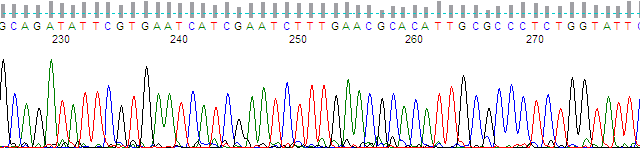
Figure 1 shows an example of a trace with a significant amount of noise, but also some true mixed peaks. These can be very difficult to detect in noisy traces as the processing KB performs on the raw data can remove or change the height of both true peaks and noise peaks.
Chromatogram of about bases 225 to 275 basecalled by KB, with sharp peaks and few visible secondary peaks
Figure 1. KB Basecaller™ processed region

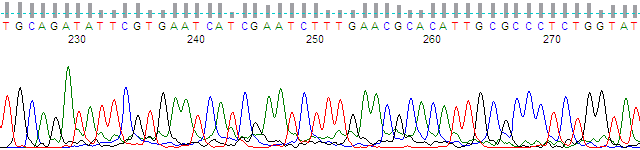
Figure 2 shows the same peak region but processed with PeakTrace no peak resolution processing. This processing mode outputs the raw data with minimal processing (signal baseline and dye mobility shift correction) enabling the true peak data to be examined. A complex pattern of secondary peaks is observed in Figure 2 that are missing from the KB trace.
The same region as raw data, with broader peaks and many small secondary peaks beneath the primary peaks
Figure 2. Raw data (no peak resolution).

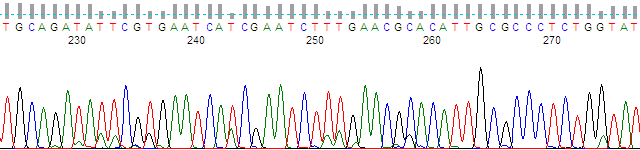
Figure 3 shows the same region processed with standard PeakTrace basecalling and processing. While the secondary peaks are better separated from the noise peaks and have heights that correspond to the peak heights seen in the raw data, many of these secondary peaks are small and not significant mixed bases.
The same region processed by PeakTrace, with sharper peaks and small secondary peaks visible beneath many primary peaks
Figure 3. Standard PeakTrace processing and basecalling.

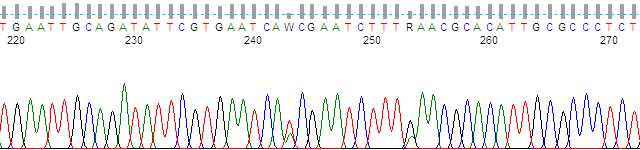
Figure 4 shows the same trace region but with the mixed peak threshold set to 40% with clean baseline and extra baseline used. While only the large secondary peaks are retained the basecall contains degenerate/mixed basecalls.
The same region with minor secondary peaks removed; two positions with large secondary peaks are called as mixed bases W and R
Figure 4. PeakTrace with mixed basecalling at 40% with clean baseline and extra baseline.

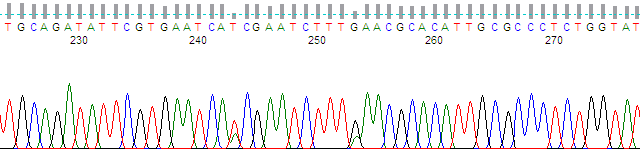
Figure 5 shows the same region but using a mixed peak threshold of 140% along with clean baseline and extra baseline. The trace looks the same as the 40% trace (i.e. only the major peaks are retained), but the basecall does not contain any degenerate/mixed basecalls. The basecall at the degenerate position is set to the primary peak call.
The same region with minor secondary peaks removed and the two large secondary peaks kept, but called as single bases with no mixed codes
Figure 5. PeakTrace with mixed basecalling at 140% with clean baseline and extra baseline.


Filed Under: How-to, In Depth, PeakTrace

Auto PeakTrace 6.93 Released

January 23, 2019 By Daniel

Auto PeakTrace 6 main window with the Options dialogue for version 6.93 open
Auto PeakTrace 6.93 Options

We have released Auto PeakTrace 6.93. This update improves the control of Auto PeakTrace from the command line and brings it into parity with the peaktrace.exe command line version. It is recommended that all users of peaktrace.exe change to using Auto PeakTrace as peaktrace.exe will not be updated in the next major release of PeakTrace. The full list of changes includes.

  • New Feature. Command line control of QualTrace III options.
  • New Feature. Command line control of the manual override settings.
  • New Feature. Command line control of the proxy server settings.
  • New Feature. Custom PeakTrace and QualTrace log file names and paths can be set from the command line.
  • New Feature. Auto PeakTrace can be run in watch mode checking for new .ab1 file in input folder from the command line.
  • New Feature. Control of message output to the command line window via -sl option switch.
  • New Feature. The header line can be removed from log files with -sh option on the command line.
  • New Feature. Support added for ABI3130 80cm array POP7 runs.
  • If Auto PeakTrace crashes in command line mode it will restart in command line mode, but not output any message to the command window.
  • CodeMeter runtime requirement upgraded to 6.80.
  • Minor bug fixes

Auto PeakTrace 6.93 can be downloaded from the PeakTrace:Box Downloads page. If you do not know the password to access the PeakTrace:Box Downloads page please contact us @support@nucleics.com or contact your local supplier for the update.

Filed Under: New Release, news, PeakTrace, windows

Christmas & New Year’s Holiday at Nucleics 2018

December 20, 2018 By Daniel

Stylized painting of waves breaking on a sandy beach

Stylized painting of waves breaking on a sandy beach

What a great year 2018 has been! Nucleics will be shutting down for our annual company holiday (vacation) break over the Christmas/New Year period and all relaxing at the beach. We will be closed from the 22nd December 2018 until 7th January 2019. I (Daniel) will check my emails occasionally over this time, but it might take us longer than usual to get back to you.

Filed Under: news

PeakTrace 6.92 Command line Versions Released

December 10, 2018 By Daniel

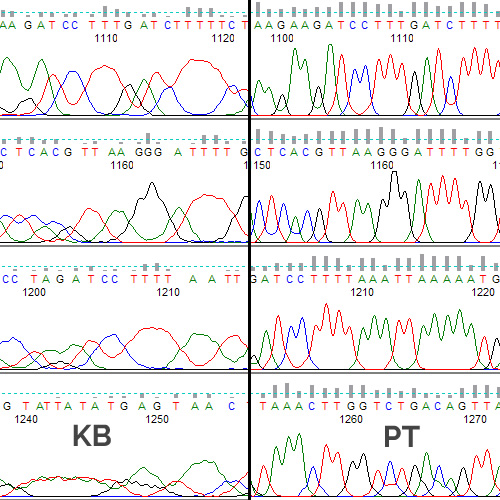
Comparison between the KB & PeakTrace Basecaller

We have released the PeakTrace 6.92 command line versions for Windows and Linux. The full list of changes include

  • New Feature. Calculation of the signal start peak location directly from the trace.
  • New Feature. Controlled removal of minor peaks without mixed basecalling.
  • Support for additional run conditions including ultra low voltage runs.
  • ABI 377 support added.
  • Improved basecalling.
  • Improved basecalling of PCR product traces.
  • Improved mixed basecalling.
  • Improved processing of traces with polymorphic peaks.
  • Improved processing of traces with long single base runs.
  • Improved trace trimming.
  • Improved removal of air bubble spikes in the trace.
  • Improved clean baseline and extra baseline processing.
  • CodeMeter runtime requirement upgraded to 6.70a.

PeakTrace 6.92 can be downloaded from the PeakTrace:Box Downloads page. If you do not know the password to access the PeakTrace:Box Downloads page please contact us @support@nucleics.com or contact your local supplier for the update.

If you are using PeakTrace on windows it is highly recommended that users transition to using the command line feature of Auto PeakTrace 6.92.

Filed Under: linux, New Release, news, PeakTrace, windows

Auto PeakTrace 6.92 Released

December 7, 2018 By Daniel

Auto PeakTrace 6 main window with the Options window for version 6.92 open
Auto PeakTrace 6.92 Overview

We have released Auto PeakTrace 6.92. This update supports a new method of controlling the removal of minor peaks from under major peaks as well as hundreds of small changes that add up to a major improvement to trace appearance and basecalling. The full list of changes includes.

  • New Feature. Calculation of the signal start peak location directly from the trace.
  • New Feature. Controlled removal of minor peaks without mixed basecalling.
  • Support for additional run conditions including ultra low voltage runs.
  • ABI 377 support added.
  • Improved basecalling.
  • Improved basecalling of PCR product traces.
  • Improved mixed basecalling.
  • Improved processing of traces with polymorphic peaks.
  • Improved processing of traces with long single base runs.
  • Improved trace trimming.
  • Improved removal of air bubble spikes in the trace.
  • Improved clean baseline and extra baseline processing.
  • CodeMeter runtime requirement upgraded to 6.70a.

Auto PeakTrace 6.92 can be downloaded from the PeakTrace:Box Downloads page. If you do not know the password to access the PeakTrace:Box Downloads page please contact us @support@nucleics.com or contact your local supplier for the update.

The command line version of PeakTrace for Windows and Linux will be released in the coming days, however, it is highly recommended that all Windows command line users transition to using the command line feature of Auto PeakTrace 6.92.

Filed Under: New Release, news, PeakTrace, windows

Auto PeakTrace RP 6.92 Released

November 30, 2018 By Daniel

Auto PeakTrace RP 6.92

We have released Auto PeakTrace 6.92 for Windows. This update supports a new method of removing minor peaks from under the major peaks, as well as many changes on the server side to improve processing and basecalling. The full list of changes includes.

  • New Feature. Calculation of the signal start peak location directly from the trace.
  • New Feature. Controlled removal of minor peaks without mixed basecalling.
  • Support for additional run conditions including ultra low voltage runs.
  • ABI 377 support.
  • Improved basecalling.
  • Improved basecalling of PCR product traces.
  • Improved mixed basecalling.
  • Improved processing of traces with polymorphic peaks.
  • Improved processing of traces with long single base runs.
  • Improved trace trimming.
  • Improved removal of air bubble spikes in the trace.
  • Improved clean baseline and extra baseline processing.
  • Many additional small bug fixes and enhancements.

Auto PeakTrace RP 6.92 can be downloaded from the PeakTrace RP Downloads page. If you do not know the password to access the PeakTrace RP Downloads page please contact us or your local supplier for the update. The MacOS X version will be released in the coming days.

Filed Under: New Release, PeakTrace RP, windows

PeakTrace 6.92 Released

November 23, 2018 By Daniel

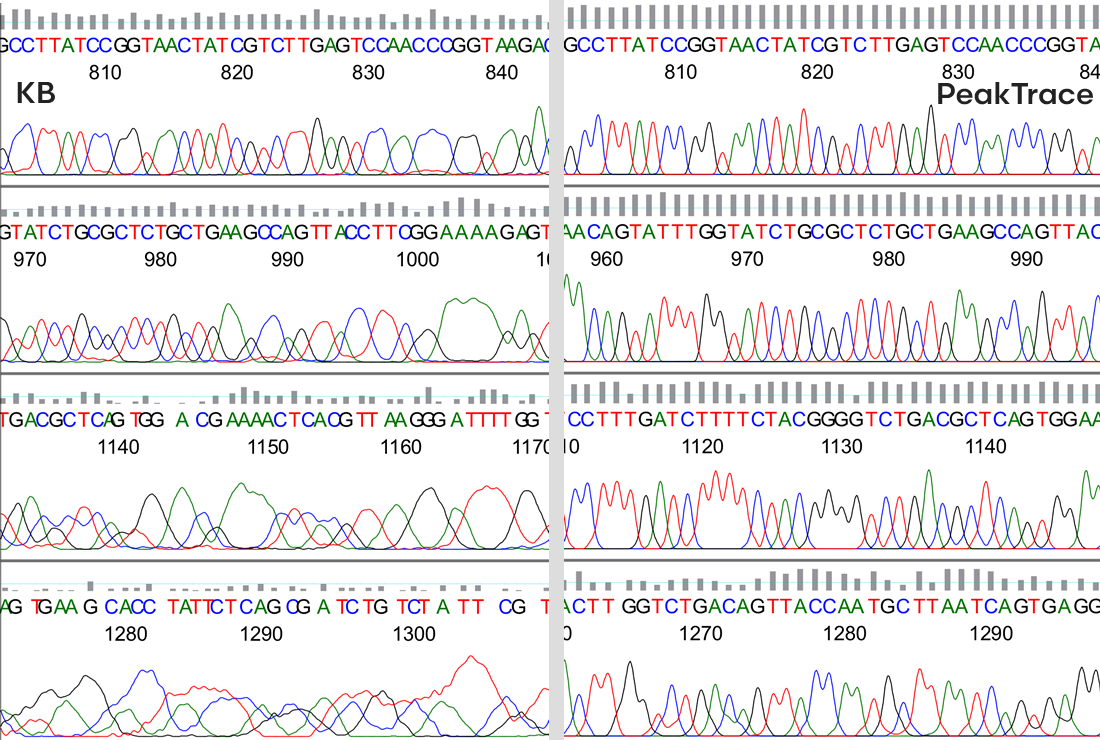
KB PeakTrace Comparison

KB PeakTrace Comparison

We have released PeakTrace 6.92. This is a bug fix and enhancement release and is the culmination of six months hard work by the team at Nucleics. We have gone through nearly every line of code within PeakTrace to improve and enhance the processing and basecalling of Sanger sequencing traces. While there is no single massive change from all this work, the cumulative effect of all these small changes adds up to a major improvement. The full list of changes includes.

  • Support for additional run conditions including ultra low voltage runs.
  • ABI 377 support.
  • Improved basecalling.
  • Improved basecalling and processing of PCR product traces.
  • Improved mixed basecalling.
  • Improved processing of traces with polymorphic peaks.
  • Improved processing of traces with long single base runs.
  • Improved trace trimming.
  • Improved removal of air bubble spikes in the trace.
  • Improved clean baseline and extra baseline processing.

PeakTrace 6.92 is live on our servers so our PeakTrace RP users will be automatically getting the benefits of 6.92. Over the coming week we will be releasing updates for the standalone PeakTrace:Box for Linux and Windows, along with an update for the Auto PeakTrace RP client program for Windows and MacOSX. We will make further announcements when these updates are released.

Filed Under: linux, macosx, New Release, news, PeakTrace, PeakTrace RP, windows

Updated Nucleics Website

June 29, 2018 By Daniel

PeakTrace: Simply better basecalling, beside a blue DNA sequencerWe have updated the Nucleics website to make it easier to navigate and find information. This will be a work in progress over the coming months so there should be plenty of changes to look forward to.

Filed Under: news

Support for purchasing PeakTrace in local currencies

June 8, 2018 By Daniel

Stylized painting of the Sydney Opera House sails at dusk

Stylized painting of the Sydney Opera House sails at dusk

We have recently added support for buying PeakTrace RP units in your local currency with local VAT/GST/Sales taxes included via paddle.com. The list of currencies that can be used includes: Euro (EUR), British Pound (GBP), Chinese Yuan (CNY), Polish Zloty (PLN), Swedish Krona (SEK), South African Rand (ZAR), Swiss Franc (CHF), Brazilian Real (BRL), Ruble (RUB), Australian Dollar (AUD), Canadian Dollar (CAD), Hong Kong Dollar (HKD), Singapore Dollar (SGD), New Zealand Dollar (NZD), Danish Krone (DKK), Hungarian Forint (HUF), Czech Koruna (CZK), Indian Rupee (INR).

While this new way of buying PeakTrace RP units can be advantageous in some situations, the downside is the cost is greater due to the extra fees charged by Paddle. The major use case is for customers located in India who can now use a local Indian credit card to buy PeakTrace RP units without the need for an international credit card. For most other customers the current US$ payment system (handled by Paypal) is likely to be the best option.

Filed Under: news, PeakTrace RP

Auto PeakTrace 6.91 and PeakTrace 6.91 released

May 22, 2018 By Daniel

Auto PeakTrace 6.91
Auto PeakTrace 6.91
Auto PeakTrace 6.91

We have released Auto PeakTrace 6.91 and PeakTrace 6.91 for Linux. This release is a minor bug fix release for 6.90 and is a recommended update for all users of PeakTrace 6.90. Other than bug fixes this release does not contain any changes from 6.90.

Auto PeakTrace 6.91 and PeakTrace 6.91 for Linux can be downloaded from the PeakTrace:Box Downloads page. If you do not know the password to access the PeakTrace:Box Downloads page please contact us @support@nucleics.com or contact your local supplier for the update.

The command line version of PeakTrace for Windows will be released in the coming days, however, it is highly recommended that all Windows command line users transition to using the command line feature of Auto PeakTrace 6.91.


Filed Under: linux, New Release, news, PeakTrace, windows

  • « Go to Previous Page
  • Page 1
  • Page 2
  • Page 3
  • Page 4
  • Page 5
  • Page 6
  • Interim pages omitted …
  • Page 22
  • Go to Next Page »

Primary Sidebar

DNA Sequencing Help

We have added a guide on troubleshooting automated DNA sequencing problems.

DNA Sequencing Service Facilities Reviews

Please see our review of 325 DNA sequencing core facilities and commercial services for more information on selecting the right sequencing service for your needs.

QualTrace III Online

Try the free online version of the QualTrace DNA sequencing QC software and see how real time quality control tracking can improve your read lengths and lower sequencing failure rates.

Contact Details

email. information@nucleics.com
phone. +61 489 152 658
  • home
  • peaktrace
  • software & reagents
  • forum
  • tools
  • services
  • support
  • about

Nucleics

Sanger Sequencing Software

Already have RP units? Run batches in your browser with PeakTrace Online Pro.

©Nucleics 1999 - 2026