• Skip to main content
  • Skip to primary sidebar

Nucleics

  • PeakTrace
    • About PeakTrace
    • PeakTrace Online
    • PeakTrace Online Pro
    • Online Pro for RP customers
    • PeakTrace 6
    • PeakTrace:Box
    • PeakTrace RP
    • PeakTrace for Chromas
    • Buy PeakTrace
    • Why use PeakTrace?
    • Validation of PeakTrace
    • PeakTrace FAQ
    • PeakTrace In Depth
  • DNA Sequencing Products
    • PeakTrace Basecaller
    • PeakTrace:Box
    • PeakTrace RP
    • PeakTrace for Chromas
    • QualTrace
    • LongTrace
    • CounterTrace
    • dLUTE SEQ
    • UniSeq
    • ASIN
  • Support & Services
    • PeakTrace Online Pro Registration
    • QualTrace III Online
    • DNA Sequencing Troubleshooting Guide
    • PeakTrace RP Downloads
    • PeakTrace:Box Downloads
    • Trace Viewers
    • User Manuals
    • Help Guides
      • How to Install Auto PeakTrace 6
      • How to Upgrade to Auto PeakTrace 6
      • How to Update the PeakTrace License on Linux
      • How to Generate a cmDust File
      • Online Activation of Auto PeakTrace 6
      • Auto PeakTrace 6 Online Activation Guide
      • DNA Sequencing Protocols
        • DNA Sequencing Protocol Tips
        • Exonuclease I – Shrimp Alkaline Phosphatase Clean Up of PCR Products
        • Tris EDTA DNA Sequencing Resuspension Buffer
        • DNA Sequencing Reaction Clean-up using Phenol & Butanol
    • DNA Sequencing Service Reviews
    • Software Downloads
    • MSDS
    • Services
      • Genomics Sequencing
      • Bioinformatics
  • Forum
    • Register
    • Login
    • PeakTrace Basecaller Forum
    • PeakTrace:Box Forum
    • Auto PeakTrace RP Forum
    • QualTrace Forum
    • DNA Sequencing Forum
    • DNA Sequencing Software
    • PCR Forum
    • DNA Isolation Forum
    • LongTrace Forum
    • dLUTE SEQ Forum
  • About
    • Contact
    • News
    • Jobs
    • Nucleics Privacy Policy
Buy PeakTrace

Daniel

In Depth: .poly file output

May 23, 2023 By Daniel

.poly file format

One of the new features of PeakTrace 6.96 is the ability to generate PHRED .poly files.

The .poly file has the name [filename].poly where [filename] is the name of the input .ab1 file. The first line of
the .poly file consists of a header line containing the file name, the smallest amplitude normalization factor, and the amplitude normalization factors for the A, C, G, and T channels.

On each line after the header line is the basecall, the position of the basecall (in scans), the area of the basecalled peak, the relative area of the basecalled peak, the uncalled base, the position of the uncalled base, the area of the uncalled base, the relative area of the uncalled base, and the amplitudes of the four
channels (A, C, G, T) at the position of the basecall. An example of a .poly file output is shown below.
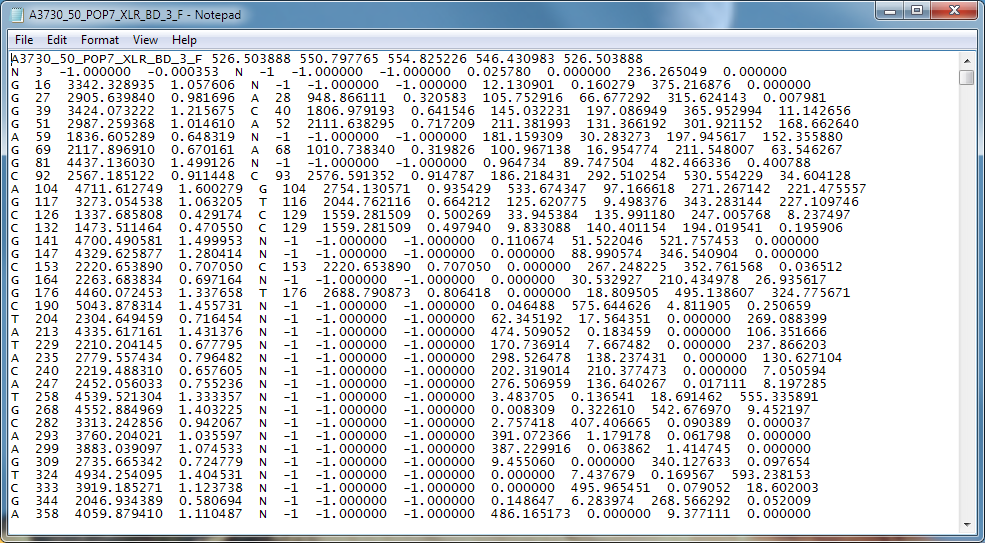
.poly file format
.poly file format

The .poly file provides information on the relative height of each peak in the trace and can be useful for detecting polymorphisms or secondary peaks in traces.

To generate .poly files choose one of the two alternatives under .phd.1 file output option, poly or poly+phd.
Filed Under: In Depth, New Release, news, PeakTrace

Auto PeakTrace 6.96 & PeakTrace 6.96 Released

May 23, 2023 By Daniel

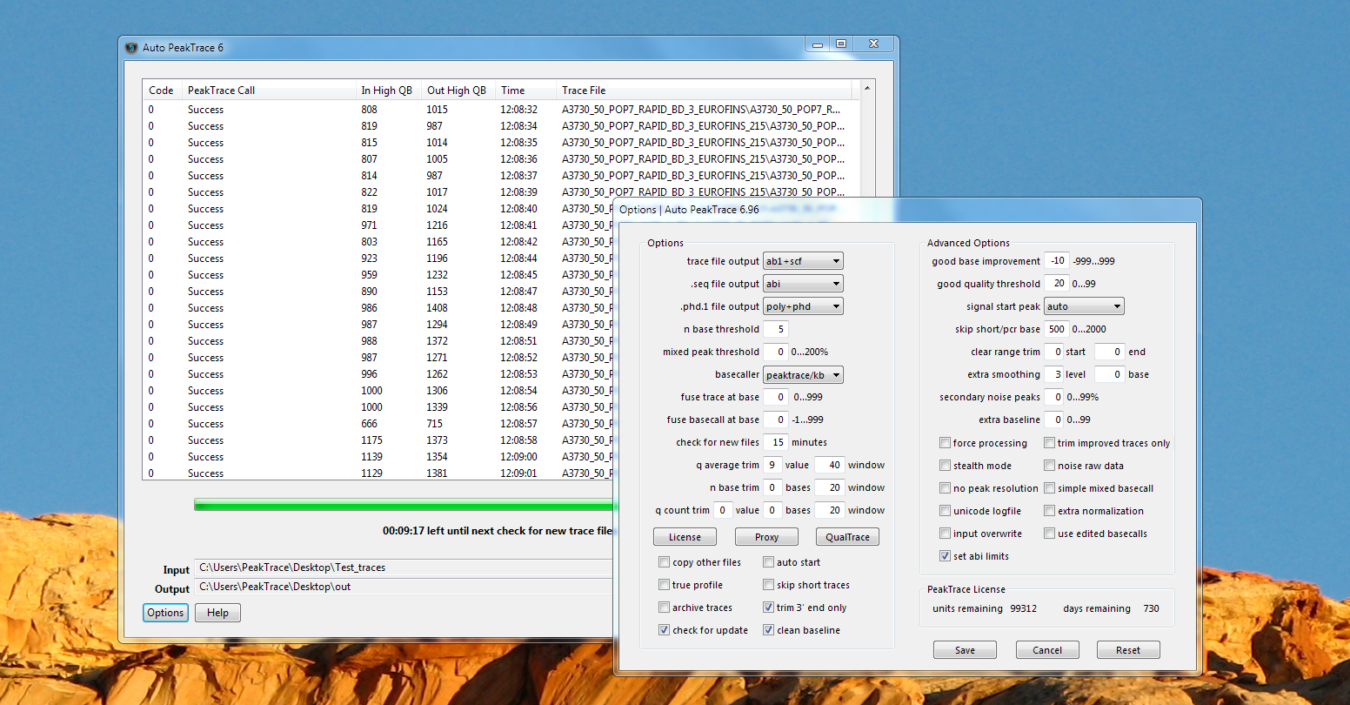
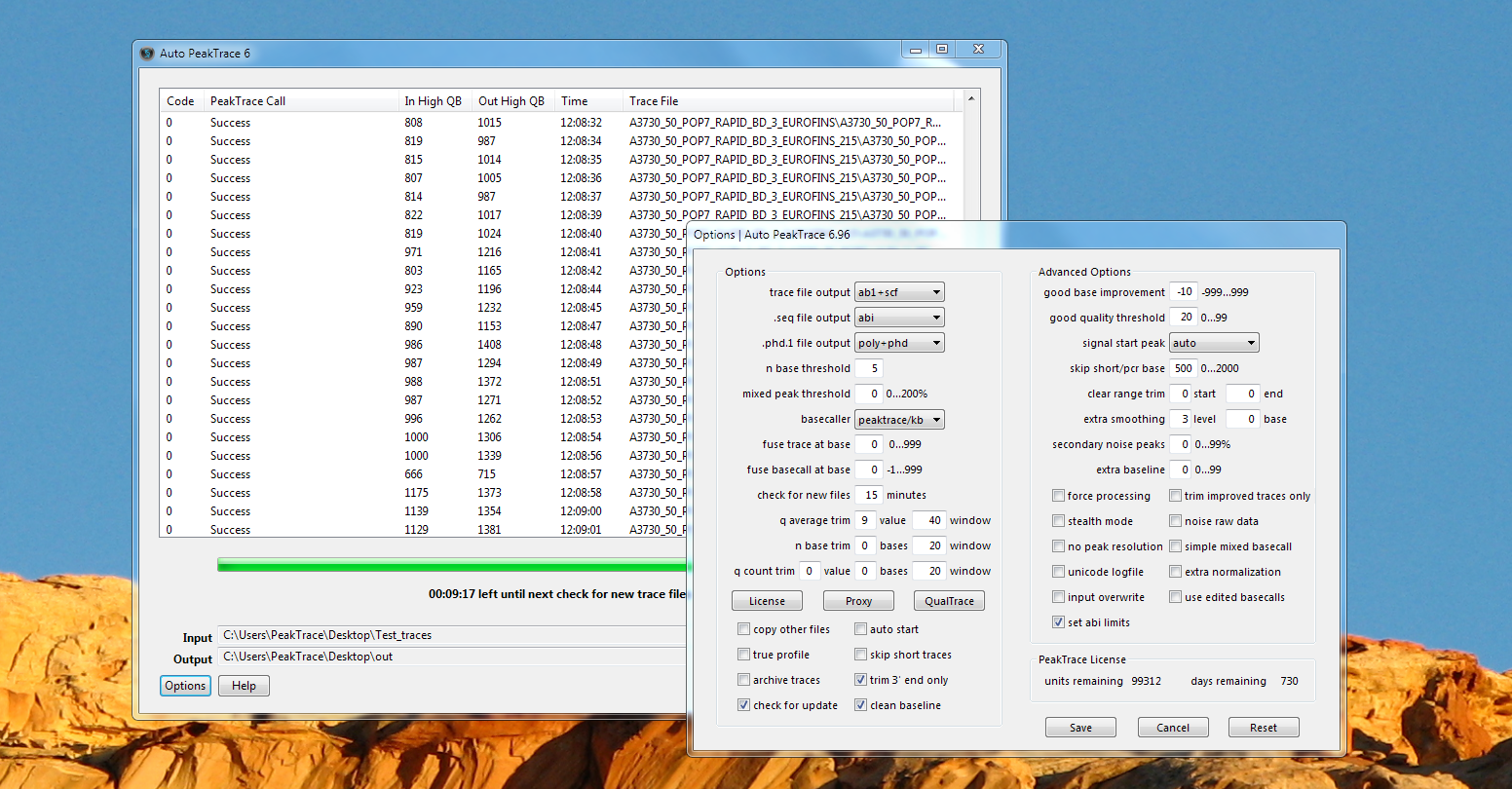
Auto PeakTrace 6 main window listing successfully processed 3730 traces, with the Options window for version 6.96 open
Auto PeakTrace 6.96

We have released Auto PeakTrace 6.96 and PeakTrace 6.96 for Windows & Linux. This is a major release that improves PeakTrace and is recommended for all users of the 6.952 or earlier series of PeakTrace. This release also includes updates and bug fixes for QualTrace.

The full list of changes include.

  • New Feature. .poly file output support.
  • New Feature. Support added for the following run conditions and instruments:
    • ABI 310
      50cm POP7 BigDye 3
      36cm POP4 Rapid BigDye 3
      30cm POP4 Rapid BigDye 3
    • ABI 3200 (SeqStudio)
      12kV POP1 BigDye 3
      9kV POP1 BigDye 3
      4kV POP1 BigDye 3
    • ABI 3500
      50cm POP6 BigDye 3
      50cm POP6 BigDye 1
    • ABI 3600 (SeqStudio Flex)
      RapidSeq50 POP7 BigDye 3
      FastSeq50 POP7 BigDye 3
  • Processing threads are limited to number of physical CPU cores.
  • If .scf is chosen as the file output the logfile will now show a filename with .scf and not an .ab1 extension.
  • Bug fixes

PeakTrace:Box customers can download the latest update from the PeakTrace:Box Downloads page.

If you do not know the password to access the PeakTrace:Box Downloads page please contact us at support@nucleics.com or contact your local supplier for the update.

Filed Under: linux, New Release, news, PeakTrace, QualTrace, windows

Auto PeakTrace RP 6.96 Released

May 22, 2023 By Daniel

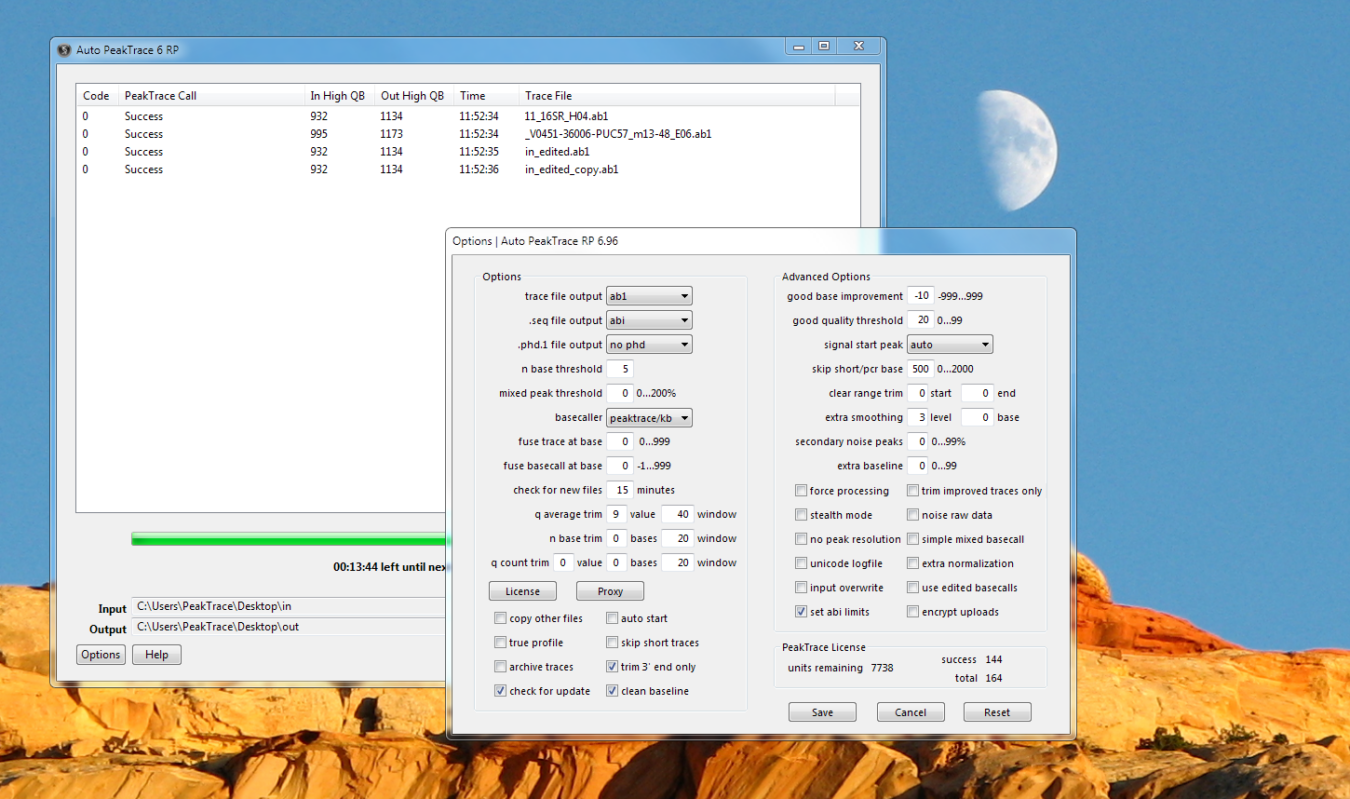
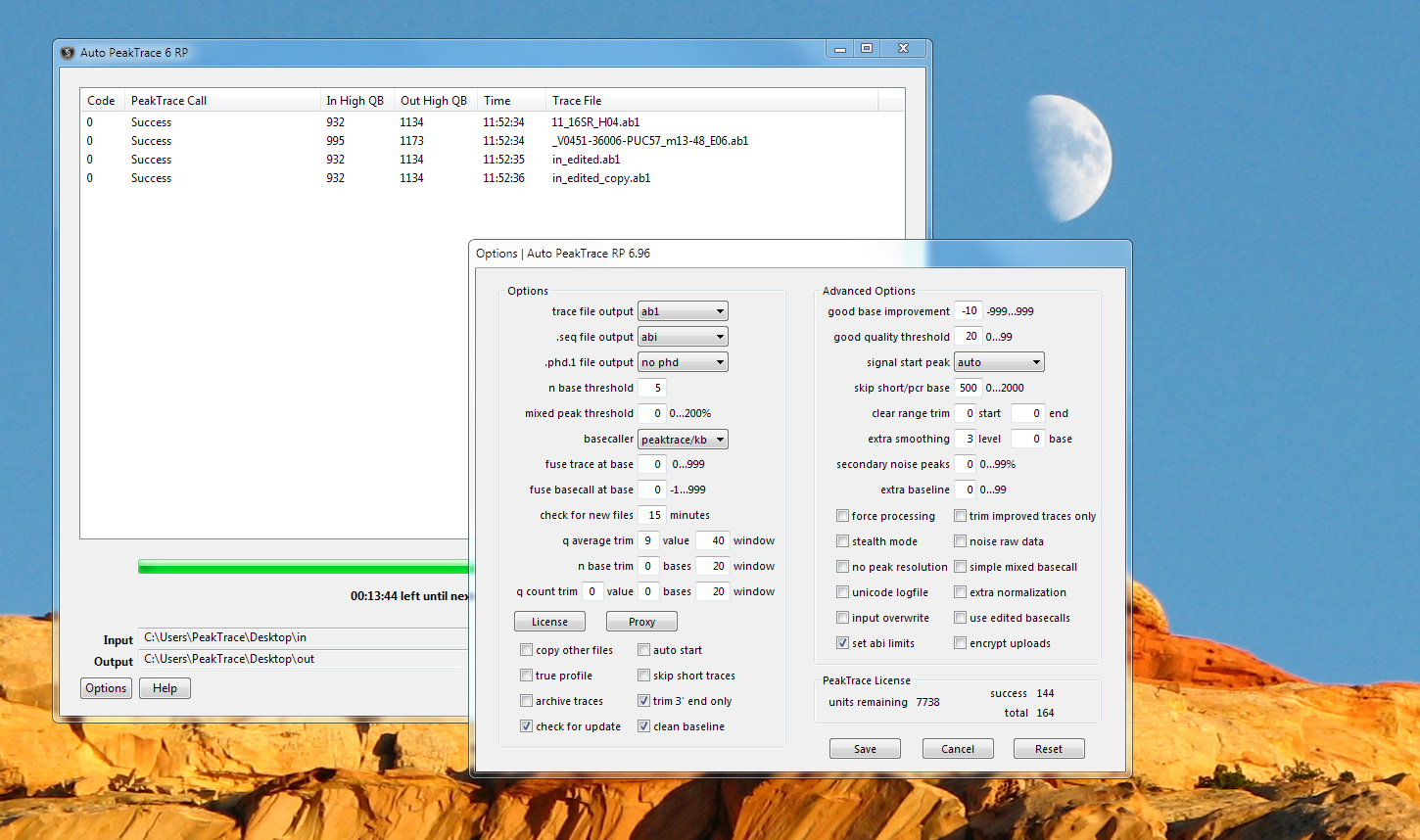
Auto PeakTrace 6 RP main window listing successfully processed traces, with the Options window for version 6.96 open
Auto PeakTrace RP 6.96

We have released Auto PeakTrace 6 RP 6.96 for Windows. This update incorporates a large number of changes and enhancements.

  • New Feature. .poly file output support.
  • New Feature. Support added for the following run conditions and instruments:
    • ABI 310
      50cm POP7 BigDye 3
      36cm POP4 Rapid BigDye 3
      30cm POP4 Rapid BigDye 3
    • ABI 3200 (SeqStudio)
      12kV POP1 BigDye 3
      9kV POP1 BigDye 3
      4kV POP1 BigDye 3
    • ABI 3500
      50cm POP6 BigDye 3
      50cm POP6 BigDye 1
    • ABI 3600 (SeqStudio Flex)
      RapidSeq50 POP7 BigDye 3
      FastSeq50 POP7 BigDye 3
  • If .scf is chosen as the file output the logfile will now show a filename with .scf and not an .ab1 extension.
  • Bug fixes and code improvements.

Auto PeakTrace 6 RP 6.96 can be downloaded from the PeakTrace RP Downloads page. If you do not know the password to access the PeakTrace RP Downloads page please contact us or your local supplier for the update.

Filed Under: New Release, news, PeakTrace, PeakTrace RP, windows

Why use PeakTrace?

May 14, 2023 By Daniel

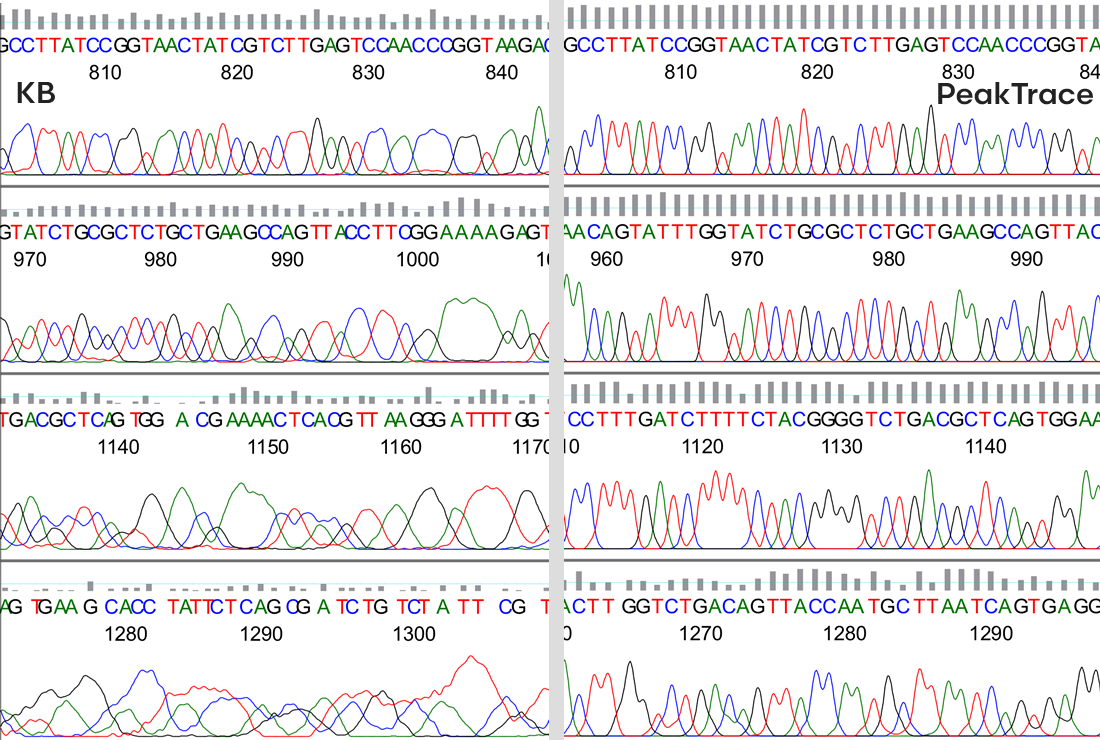
Comparison between the KB & PeakTrace Basecaller

A question we get asked frequently is why should a core facility or sequencing service company use the PeakTrace Basecaller™ — after all the KB Basecaller™ works well and is effectively free since it comes with the DNA sequencer?

This is a really good question, because although the PeakTrace Basecaller is very cheap (a few cents per trace at scale), it is still an extra cost and most facilities are always looking for ways to save every cent they can.

The simple answer is that not only will PeakTrace give your customers longer reads and better traces, it will make you money if used intelligently.

You can run PeakTrace directly in your browser with PeakTrace Online Pro (up to 96 traces per batch via a free trial or paid RP account), on Windows via Auto PeakTrace RP or PeakTrace for Chromas, or in-house for high volume with PeakTrace:Box.

Here are the top ten reasons everyone performing Sanger DNA sequencing should be using PeakTrace.

1. The improved appearance and longer reads provided by PeakTrace attract new customers and retain old customers

Facilities that use PeakTrace have happier customers who send them more samples. Given that most of the costs of running a DNA sequencing service are fixed, it only takes a small increase in sequencing volume to make a big difference to your bottom line. We have seen time and time again that keeping your customers happy by providing them with the best results possible will bring in additional business. It only takes a couple of extra trays a month to more than pay for PeakTrace.

2. Sanger DNA sequencing is not going away any time soon

Despite all the interest and investment in Next-Gen sequencing, Sanger is here to stay. If you are doing Sanger sequencing, you should be using the best tools available and PeakTrace is the best basecaller. If you are currently using the KB Basecaller because you think it is better than the old ABI Basecaller, then you care about sequencing quality. If you care about quality, you should be using PeakTrace.

3. Your competitors are already using PeakTrace (mostly in secret) to gain a massive advantage in the market place

The DNA sequencing market is extremely competitive. If you don’t offer the best basecalling results to your customers by using PeakTrace, they will leave you for a service that does use PeakTrace. Do you really want to lose your customers over something that is so easy and cheap to fix? Once again, the high fixed costs involved in offering a sequencing service make the loss of any business very expensive to your bottom line.

4. You pay only for success

Unlike everything else in DNA sequencing, you only pay for those traces that are improved by PeakTrace. ThermoFisher (ABI) won’t give you a refund on the BigDye™ or the POP7™ polymer if your sequencing reaction fails, but we do. Because not every reaction is a success, the actual cost of using PeakTrace is even cheaper than it appears (a few cents per trace) when used at volume.

5. PeakTrace can rescue low quality sequence data

While PeakTrace is designed to make good traces better, it can also improve some bad traces enough to make them acceptable. Any trace that can be rescued by PeakTrace is one sequencing sample that does not need to be repeated, thus saving your facility and customers time and money.

6. PeakTrace’s polymorphic base (mixed peaks) detection is better

One important feature of PeakTrace is it can more accurately identify and quantify polymorphic (mixed peak) positions. The mixed base detection in PeakTrace makes fewer errors differentiating true mixed peaks from false mixed peaks caused by noise or overlap than the KB Basecaller. Traces with the true (raw channel) relative peak heights can also be output easily from PeakTrace using the no peak resolution option. This option enables accurate quantification of the peak height ratios. Since PeakTrace 6.96, .poly files can be generated aiding in the detection of polymorphic basecalls.

7. PeakTrace can be used on instruments where KB is not available

If you own an ABI 310 (or even ABI 377) you can still use PeakTrace. You not only get the improved read length and trace appearance, but also quality scores for all the basecalls. Why pay to update to a new sequencer to just use the KB Basecaller when your current machine can be upgraded cheaply by just using PeakTrace?

8. PeakTrace can be used to increase DNA sequencer throughput

Nucleics has developed a set of run modules that enable a user of PeakTrace to obtain the same read length provided by KB, but in less than half the run time. This effectively doubles the number of sequencing instruments you have on demand, or enables you to reduce the number of sequencers you need to meet your demand. If you now have two machines, you can sell one and still get the same throughput out of just one single machine. This could save you tens of thousands of dollars a year or allow you to meet demand spikes quickly.

9. PeakTrace can extend the life of the array

One little known feature of PeakTrace is it can allow you to get more runs out of the array before it needs a change. While of course it will depend on the actual lab condition and standards, but many of our customers are using the arrays for twice the number of runs they can achieve using the KB Basecaller.

10. PeakTrace comes with a 60 day, full money back guarantee

If you find that the PeakTrace Basecaller does not meet your expectations for any reason you can return it within 60 days for a full refund – all we ask is that you tell us why you chose to cancel. Try PeakTrace without fear that it won’t work in your facility.

If you would like to learn more about how PeakTrace can save you money and increase your DNA sequencing business then please contact our team at {This email is obscured. Your must have javascript enabled to see it} or try PeakTrace Online Pro.

Filed Under: In Depth, news, PeakTrace, PeakTrace RP

Auto PeakTrace 6.952 & PeakTrace 6.952 Released

October 10, 2022 By Daniel

PeakTrace 6.95 Overview
PeakTrace 6.952 Overview

We have released Auto PeakTrace 6.952 and PeakTrace 6.952 for Windows & Linux. This is a minor update release that is recommended for all users of the PeakTrace 6.95 or earlier series of PeakTrace. PeakTrace RP users do not need to update.

PeakTrace:Box customers can download the latest update from the PeakTrace:Box Downloads page. If you do not know the password to access the PeakTrace:Box Downloads page please contact us at support@nucleics.com or contact your local supplier for the update.

Filed Under: linux, New Release, PeakTrace, windows

Christmas New Year Holidays 2020

December 17, 2020 By Daniel

Stylized painting of a rainbow over a curving beach and headland

Stylized painting of a rainbow over a curving beach and headland

What a year 2020 has been! Nucleics will be closing for our annual break over the Christmas/New Year period. We will be closed from the 21st December 2020 to the 4th January 2021.

Filed Under: news

Auto PeakTrace 6.951 & PeakTrace 6.951 Released

September 9, 2020 By Daniel

Auto PeakTrace 6.951 Overview

We have released Auto PeakTrace 6.951 and PeakTrace 6.951 for Windows & Linux. This is a minor bug fix release that is recommended for all users of the PeakTrace 6.95 or earlier series of PeakTrace. The server backend for Auto PeakTrace RP has also been updated to the latest release of PeakTrace.

PeakTrace:Box customers can download the latest update from the PeakTrace:Box Downloads page. If you do not know the password to access the PeakTrace:Box Downloads page please contact us at support@nucleics.com or contact your local supplier for the update.

Filed Under: linux, New Release, PeakTrace, PeakTrace RP, windows

Auto PeakTrace 6.95 & PeakTrace 6.95 Released

September 1, 2020 By Daniel

PeakTrace 6.95 Overview
 PeakTrace 6.95 Overview
PeakTrace 6.95 Overview

We have released Auto PeakTrace 6.95 and PeakTrace 6.95 for Windows & Linux. This is a major release that improves PeakTrace and is recommended for all users of the 6.94 or earlier series of PeakTrace. The server backend for Auto PeakTrace RP has also been updated to the latest release of PeakTrace.

The full list of changes.

  • New Feature. Keep bubble spikes in the processed trace using the -ks option.
  • New Feature. Auto PeakTrace 6 will check if you wish to save changes when exiting options window without manually saving.
  • Improved mixed basecalling.
  • Improved crosstalk correction on rare trace types.
  • Improved processing and basecalling of traces with bubble spikes.
  • Improved early basecalling.
  • Bug fixes.

PeakTrace:Box customers can download the latest update from the PeakTrace:Box Downloads page. If you do not know the password to access the PeakTrace:Box Downloads page please contact us at support@nucleics.com or contact your local supplier for the update.

Filed Under: linux, New Release, news, PeakTrace, PeakTrace RP, windows

Auto PeakTrace 6.94 & PeakTrace 6.94 Released

December 21, 2019 By Daniel

Auto PeakTrace 6.94 Overview

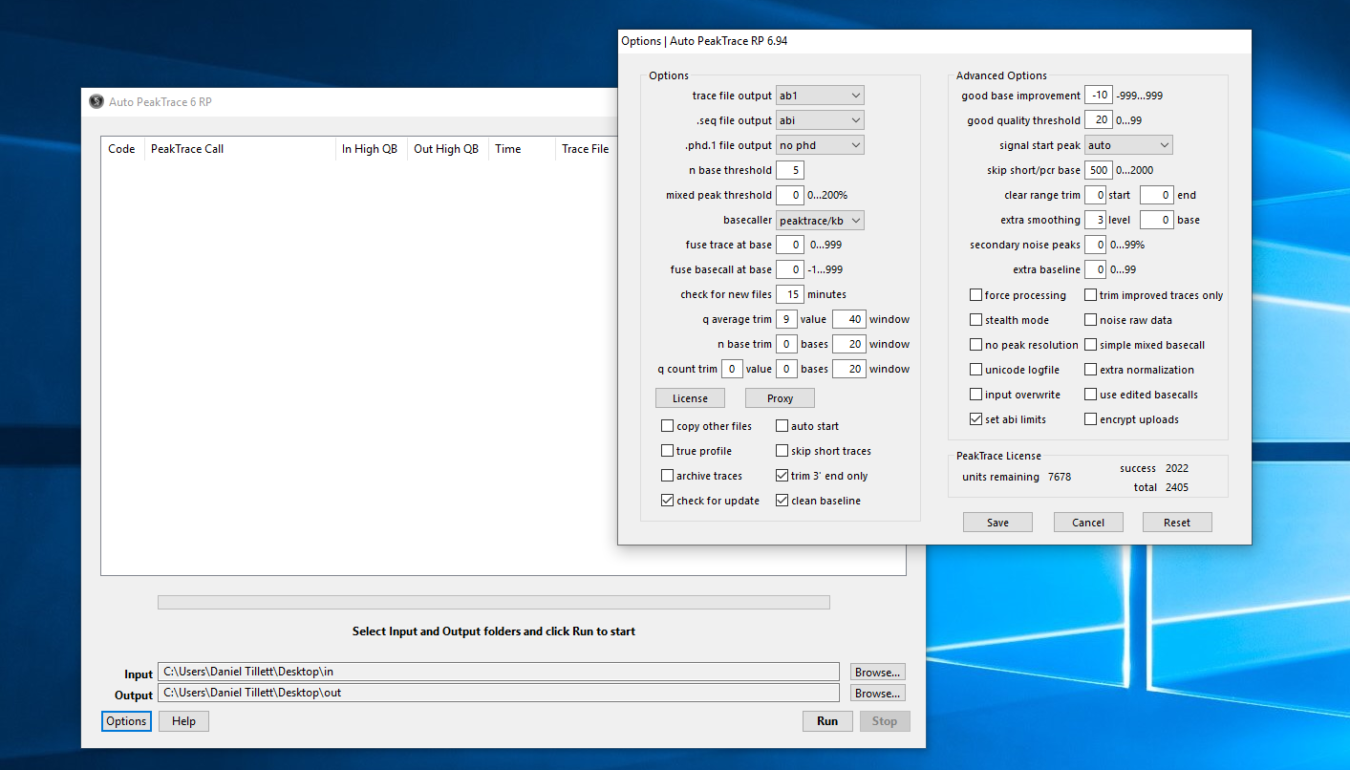
We have released Auto PeakTrace 6.94 and PeakTrace 6.94 for Windows & Linux. This is a major release that improves PeakTrace and is recommended for all users of the 6.93 or earlier series of PeakTrace. The full list of changes.

  • New feature. ABI377 and ABI310 .ab1 files are now output in .ab1 format with quality scores.
  • New feature. Trace files without basecall or processed trace data can be output in .ab1 format using force processing setting.
  • New feature. Support added for the following run conditions and instruments:
    • ABI310
      • 30cm POP4 BigDye 3 & 1
      • 30cm POP6 BigDye 3 & 1
      • 36cm POP4 BigDye 1
      • 50cm POP6 BigDye 3 & 1 Rapid Run
    • ABI3700
      • POP6 BigDye 3 & 1
      • POP5 BigDye 3 o ABI3130/3730
      • 50cm POP7 ET terminator
      • 50cm POP6 ET terminator
    • ABI3130
      • 80cm POP4 BigDye 3 & 1
    • ABI3200
      • 9kV BigDye 1
      • 4kV BigDye 1
    • MJResearch Biostation
  • Default value for q average trim changed to 9 in a window of 40 bases.
  • Default value for good base improvement changed to -10.
  • Error code 25 description changed from “normalization failed” to “overload trace” to make cause of this result clearer.
  • Improved mixed basecalling.
  • Improved basecalling through “Dye Blob” regions.
  • Improved processing of PCR product traces.
  • Bug fixes.

PeakTrace:Box customers can download the latest update from the PeakTrace:Box Downloads page. If you do not know the password to access the PeakTrace:Box Downloads page please contact us @support@nucleics.com or contact your local supplier for the update.

Filed Under: linux, New Release, news, PeakTrace, windows

Auto PeakTrace RP 6.94 Released

December 20, 2019 By Daniel

Auto PeakTrace RP 6.94

We have released Auto PeakTrace 6.94 for Windows & MacOSX (Mojave or earlier). This update incorporates a large number of changes and enhancements.

  • New feature. ABI377 and ABI310 .ab1 files are now output in .ab1 format with quality scores.
  • New feature. Trace files without basecall or processed trace data can be output in .ab1 format using force processing setting.
  • New feature. Support added for the following run conditions and instruments:
    • ABI310
      • 30cm POP4 BigDye 3 & 1
      • 30cm POP6 BigDye 3 & 1
      • 36cm POP4 BigDye 1
      • 50cm POP6 BigDye 3 & 1 Rapid Run
    • ABI3700
      • POP6 BigDye 3 & 1
      • POP5 BigDye 3 o ABI3130/3730
      • 50cm POP7 ET terminator
      • 50cm POP6 ET terminator
    • ABI3130
      • 80cm POP4 BigDye 3 & 1
    • ABI3200
      • 9kV BigDye 1
      • 4kV BigDye 1
    • MJResearch Biostation
  • Default value for q average trim changed to 9 in a window of 40 bases.
  • Default value for good base improvement changed to -10.
  • Error code 25 description changed from “normalization failed” to “overload trace” to make cause of this result clearer.
  • Improved mixed basecalling.
  • Improved basecalling through “Dye Blob” regions.
  • Improved processing of PCR product traces.
  • Bug fixes.

Auto PeakTrace RP 6.94 can be downloaded from the PeakTrace RP Downloads page. If you do not know the password to access the PeakTrace RP Downloads page please contact us or your local supplier for the update.

Filed Under: macosx, New Release, news, PeakTrace, PeakTrace RP, windows

  • « Go to Previous Page
  • Page 1
  • Page 2
  • Page 3
  • Page 4
  • Interim pages omitted …
  • Page 22
  • Go to Next Page »

Primary Sidebar

DNA Sequencing Help

We have added a guide on troubleshooting automated DNA sequencing problems.

DNA Sequencing Service Facilities Reviews

Please see our review of 325 DNA sequencing core facilities and commercial services for more information on selecting the right sequencing service for your needs.

QualTrace III Online

Try the free online version of the QualTrace DNA sequencing QC software and see how real time quality control tracking can improve your read lengths and lower sequencing failure rates.

Contact Details

email. information@nucleics.com
phone. +61 489 152 658
  • home
  • peaktrace
  • software & reagents
  • forum
  • tools
  • services
  • support
  • about

Nucleics

Sanger Sequencing Software

Already have RP units? Run batches in your browser with PeakTrace Online Pro.

©Nucleics 1999 - 2026