• Skip to main content
  • Skip to primary sidebar

Nucleics

  • PeakTrace
    • About PeakTrace
    • PeakTrace Online
    • PeakTrace Online Pro
    • PeakTrace 6
    • PeakTrace:Box
    • PeakTrace RP
    • PeakTrace for Chromas
    • Buy PeakTrace
    • Why use PeakTrace?
    • Validation of PeakTrace
    • PeakTrace FAQ
    • PeakTrace In Depth
  • DNA Sequencing Products
    • PeakTrace Basecaller
    • PeakTrace:Box
    • PeakTrace RP
    • PeakTrace for Chromas
    • QualTrace
    • LongTrace
    • CounterTrace
    • dLUTE SEQ
    • UniSeq
    • ASIN
  • Support & Services
    • PeakTrace Online Pro Registration
    • QualTrace III Online
    • DNA Sequencing Troubleshooting Guide
    • PeakTrace RP Downloads
    • PeakTrace:Box Downloads
    • Trace Viewers
    • User Manuals
    • Help Guides
      • How to Install Auto PeakTrace 6
      • How to Upgrade to Auto PeakTrace 6
      • How to Update the PeakTrace License on Linux
      • How to Generate a cmDust File
      • Online Activation of Auto PeakTrace 6
      • Auto PeakTrace 6 Online Activation Guide
      • DNA Sequencing Protocols
        • DNA Sequencing Protocol Tips
        • Exonuclease I – Shrimp Alkaline Phosphatase Clean Up of PCR Products
        • Tris EDTA DNA Sequencing Resuspension Buffer
        • DNA Sequencing Reaction Clean-up using Phenol & Butanol
    • DNA Sequencing Service Reviews
    • Software Downloads
    • MSDS
    • Services
      • Genomics Sequencing
      • Bioinformatics
  • Forum
    • Register
    • Login
    • PeakTrace Basecaller Forum
    • PeakTrace:Box Forum
    • Auto PeakTrace RP Forum
    • QualTrace Forum
    • DNA Sequencing Forum
    • DNA Sequencing Software
    • PCR Forum
    • DNA Isolation Forum
    • LongTrace Forum
    • dLUTE SEQ Forum
  • About
    • Contact
    • News
    • Jobs
    • Nucleics Privacy Policy
Buy PeakTrace

Daniel

Auto PeakTrace RP 6.90 Released

May 1, 2018 By Daniel

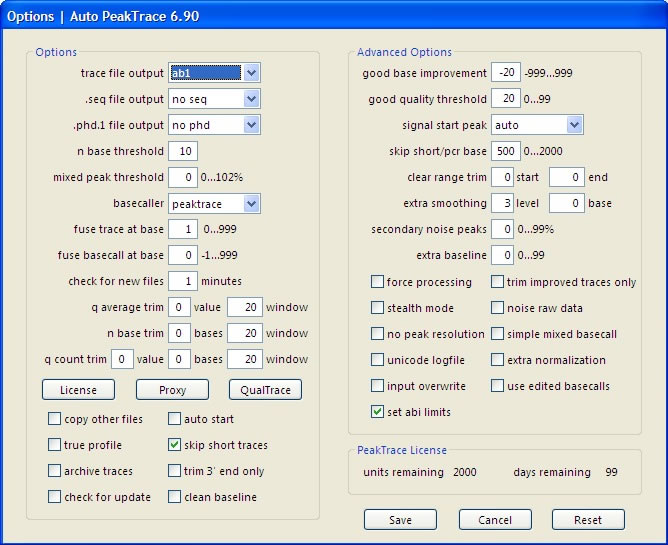
Auto PeakTrace 6.90 Options Window
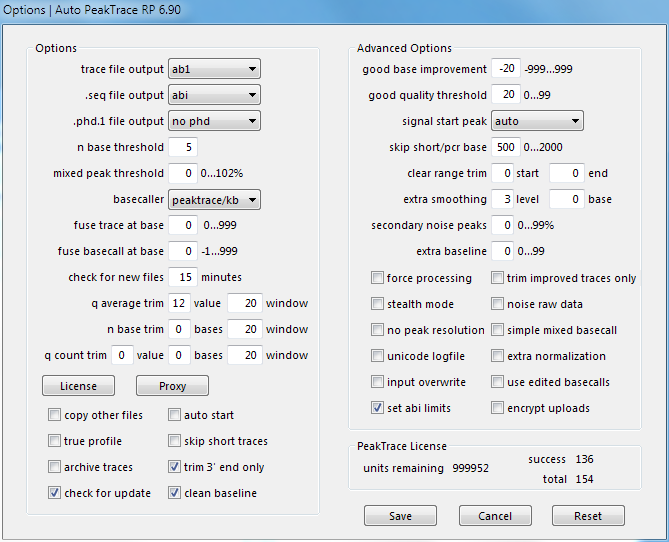
Auto PeakTrace RP 6.90 Options

We have released Auto PeakTrace RP 6.90. This is a very large upgrade and a significantly improved version of the PeakTrace Basecaller. We have spent the last 6 months optimizing all the algorithms and code focused on improving the read length and appearance of poor quality traces. We will be writing about the many improved features over the coming weeks.

The full list of changes includes.

  • New Feature. Support for the ThermoFisher SeqStudio™ Sequencer.
  • New Feature. Fuse trace at base default now 0.
  • Improved basecalling especially of low quality traces.
  • Improved trace processing.
  • Improved peak normalization.
  • Improved clean baseline.
  • Improved detection and basecalling of PCR product traces.
  • Improved PeakTrace processing and basecalling through “dye blobs” peaks.
  • The signal start peak auto now sets the start peak to the value closest to the model expected value.
  • The automatic fuse trace at base or fuse basecalling at base on traces with large dye blobs peaks can be turned off by setting fuse basecall to -1.
  • An additional secondary PeakTrace RP server established in China.
  • Unit data and build date can be written to a text file with the -rf options.
  • Support temporary removed for the following machines and run types. These run conditions are rarely used, but support will be returned in the next major update.
    • ABI 3700 runs
    • MegaBACE 1000 & 4000 runs
    • ABI 3130 80cm array runs
    • ABI 3730 runs below 6kV
    • ABI 310 36cm & 50cm array runs
    • ABI 310 30cm array runs with a voltage below 12 kV
    • All ET terminator runs
    • MJ Research Biostation runs
  • Bug fix that prevented clear range trim from being applied to the front of the trace.
  • Many other bug fixes and internal improvements.

Auto PeakTrace RP 6.90 can be downloaded from the PeakTrace RP Downloads page. If you do not know the password to access the PeakTrace RP Downloads page please contact us or your local supplier for the update. User of older versions should be notified by the automatic update feature.

This update is highly recommended for all users of the Auto PeakTrace RP or earlier.

An update for the standalone box versions of PeakTrace will be released in the next few days.
Filed Under: macosx, New Release, news, PeakTrace RP, windows

Auto PeakTrace & PeakTrace 6.82 Released

January 16, 2018 By Daniel

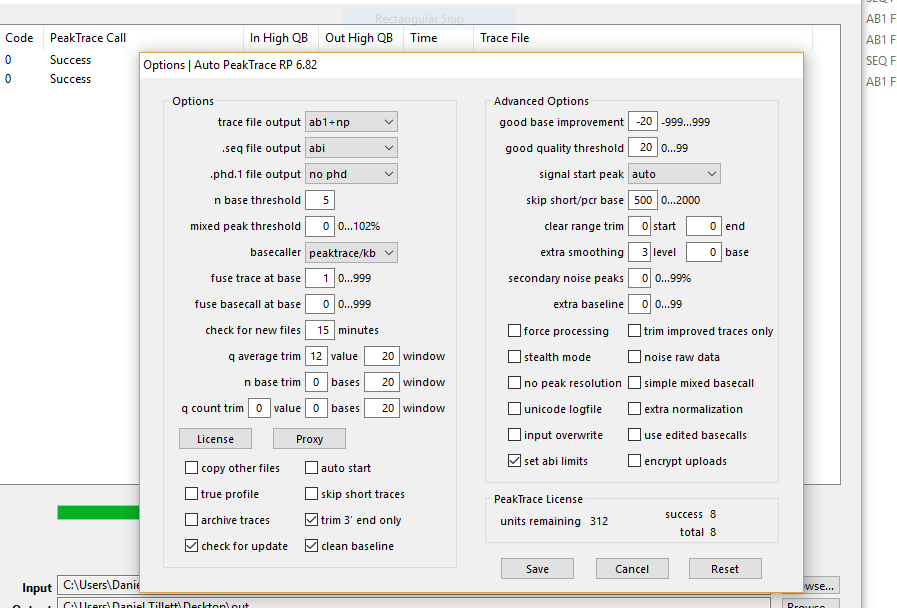
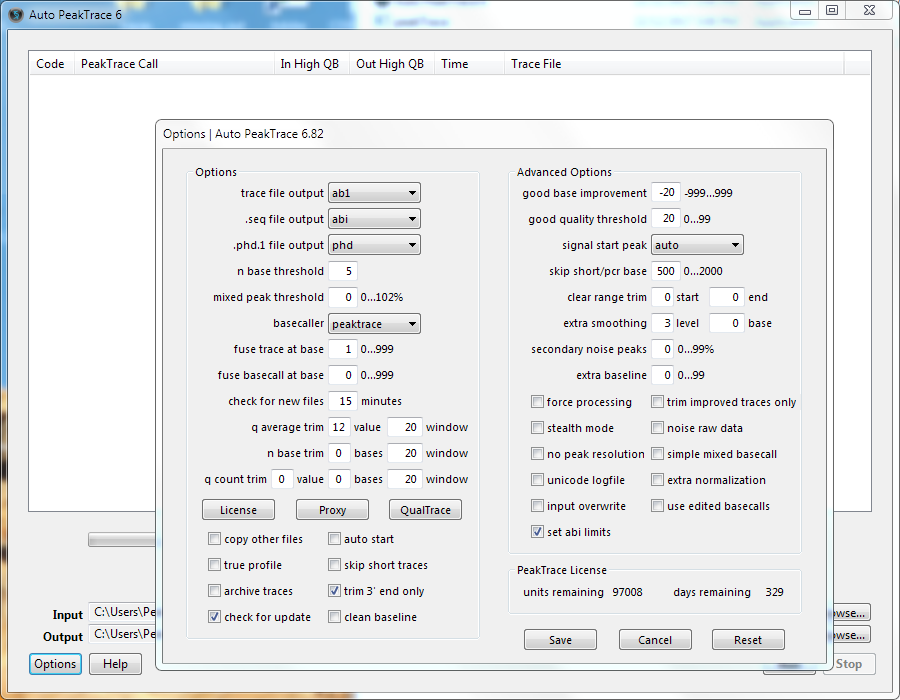
Auto PeakTrace 6.82
Auto PeakTrace 6.82
Auto PeakTrace 6.82

We have released Auto PeakTrace 6.82 and PeakTrace 6.82 for Linux and Windows. This release has large number of changes and improvements that normally would mean a major 0.1 release, but since the new features are of limited interest for most users we have kept it as as a minor 0.01 release.

The full list of changes include

  • New feature. Output both peaktrace processed and no peak resolution (raw data) .ab1 trace files at the same time.
  • New feature. Ultra-aggressive clean baseline cleaning when mixed peak threshold is set to 102.
  • Improvement to basecalling include G-peak dropouts.
  • Bug fix that prevented the input and output folders being updated from the Auto PeakTrace command line.
  • Version, build date, license code and license time and unit values now accessible from the Auto PeakTrace command line.
  • Errors and processing progress when using Auto PeakTrace from the command line are now output to the command line window.
  • Auto PeakTrace 6 now reports the time until license expiry. The avoids the issue when a license update is applied a period of time after it is generated reporting an incorrect license length.
  • Auto PeakTrace 6 is now valid (non-obsolete) for approximately 24 months rather than 18 months.
  • Update of the CodeMeter runtime to version 6.60.
  • Other bug fixes and enhancements.

Auto PeakTrace 6.82 can be downloaded from the PeakTrace:Box Downloads page. If you do not know the password to access the PeakTrace:Box Downloads page please contact us @support@nucleics.com or contact your local supplier for the update. The command line PeakTrace 6.82 version for Windows and Linux is also available on the PeakTrace:Box Downloads page.

This update is recommended for all users of the Auto PeakTrace or PeakTrace 6.81 and earlier.

Filed Under: linux, New Release, PeakTrace, windows

Auto PeakTrace RP 6.82 Released

January 12, 2018 By Daniel

Auto PeakTrace RP 6.82 Options Window

We have released an update for Auto PeakTrace RP (6.82). This is an intermediate release, mostly bug fixes and improvements, but it also has a couple of new features that are of interest for some of our customers. The full list of changes and improvements include:

  • New feature. Ultra-aggressive clean baseline cleaning when mixed peak threshold is set to 102.
  • New feature. Support added for:
    • ABI3730 ultra-rapid 50cm arrays runs
    • ABI3730 10.5kV50cm array runs
  • New Feature. European located secondary server ensuring data does not leave the EU.
  • New feature. Output both peaktrace processed and no peak resolution traces at the same time.
  • Improvement to basecalling include G-peak dropouts.
  • Bug fix that prevented the input and output folders being updated from the Auto PeakTrace RP 6 command line.
  • Improved basecalling and detection of low quality mixed peak traces.
  • Improved trace normalization.
  • Bug fix for trace trimming modules. On traces that are not improved, only soft trimming (abi limits) is applied. If the abi/kb basecaller is selected and set abi limit is unchecked then the trace will still be hard trimmed.
  • Version, build date are accessible from the Auto PeakTrace RP 6 command line.
  • Errors and processing progress when using Auto PeakTrace RP 6 from the command line are now output to the command line window.
  • Other bug fixes.

Auto PeakTrace RP 6.82 for Windows and (MacOS X will be released later) and can be downloaded from the PeakTrace RP downloads page. This release is also be available soon via the automatic update feature within Auto PeakTrace RP if you are using a recent version of Auto PeakTrace RP.

If you require the password to access the PeakTrace RP downloads page please contact us @{This email is obscured. Your must have javascript enabled to see it} or your local supplier.

We will be releasing an update for the PeakTrace:Box version in the next few days.

Filed Under: New Release, news, PeakTrace RP, windows

Happy New Year 2018

January 8, 2018 By Daniel

Arthur Streeton painting of a sunlit bay with red cliffs and a small sailing boat

Everyone here at Nucleics is back at work after a relaxing few weeks enjoying the Australian summer and recharging after a hectic 2017.

Looking forward, we have many new updates and products coming out in 2018 that we are excited to share with our old and new customers. Watch this space!

Filed Under: news

Christmas and New Year Holidays 2017

December 19, 2017 By Daniel

Busy surf beach below sandstone cliffs on a sunny summer day
Life at Nucleics over Christmas

What a year 2017 has been! It is hard to believe it is almost at an end. All of us here at Nucleics are looking forward to a relaxing break over the Christmas/New Year period, lazying around in the summer heat and enjoying the food, sun and sand.

Nucleics will be closing on the 22nd December and will re-open on the 8th January. We will be keeping a lazy eye on emails over this time, but expect that our response rate might be a bit slower than usual.

We wish all our customers a Merry Christmas and Happy New Year and are look forward to helping you all in 2018.

Filed Under: news

Auto PeakTrace & PeakTrace 6.81 Released

December 1, 2017 By Daniel

Auto PeakTrace RP 6.82 Options Window

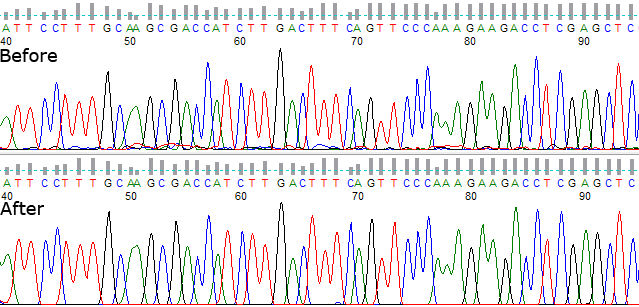
Chromatogram from bases 40 to 95 before and after PeakTrace processing

We have released a minor update for Auto PeakTrace and PeakTrace (6.81). The full list of changes and improvements include:

  • New Feature. Support added for
    • ABI 3730 ultra rapid 50cm arrays runs
    • ABI 3730 10.5kV 50cm array runs
  • Improved basecalling and detection of low quality mixed peak traces.
  • Improved trace normalization.
  • Bug fix for trace trimming modules.
  • With traces that are not improved, only soft trimming (abi limits) is applied. If the abi/kb basecaller is selected and set abi limits is unchecked then then the trace will still be hard trimmed.
  • Other bug fixes.

Auto PeakTrace 6.81 can be downloaded from the PeakTrace:Box Downloads page. If you do not have the password to access the PeakTrace:Box Downloads page please contact us @ {This email is obscured. Your must have javascript enabled to see it} or contact your local supplier for the update. The command line PeakTrace 6.81 for Windows and Linux is also available on the update pages.

This update is an optional update for all users of the Auto PeakTrace or PeakTrace 6.80. For user of Auto PeakTrace the changes are automatically applied on the server end.

Filed Under: linux, New Release, news, PeakTrace, PeakTrace RP, windows

Auto PeakTrace RP 6.80 Released

November 21, 2017 By Daniel

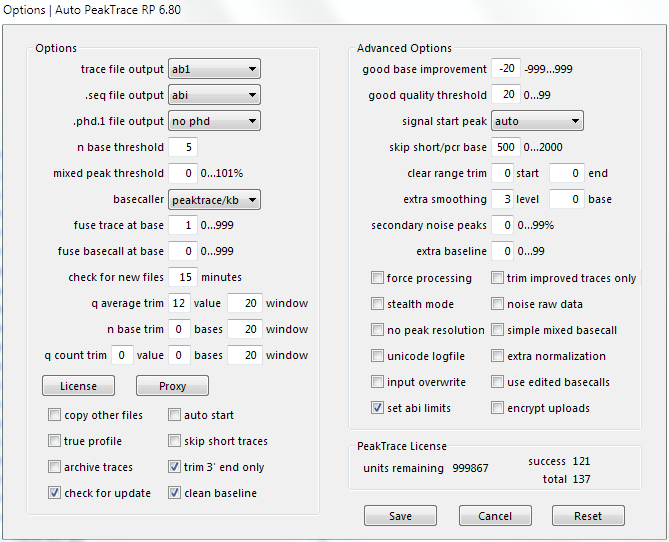
Auto PeakTrace RP 6.80 Options Window

We have released an major feature release for Auto PeakTrace RP (6.80). The full list of changes and improvements include:

  • New Feature. Total traces processed and success rate shown.
  • New Feature. Auto PeakTrace RP 6 can be used as a command line program.
  • Improvements to fuse basecall and fuse trace with difficult sequences.
  • Improvement of the basecalling of “drop out” peaks.
  • Improvements to extra normalization of PCR product traces.
  • More accurate estimated time for trace processing completion.
  • Other bug fixes and enhancements.

The major change of this release is that Auto PeakTrace RP 6.80 can now be used from the command line. This allows the easy integration of Auto PeakTrace RP 6.80 into various LIMS scripts.

If Auto PeakTrace RP 6.80 is used from the command line with no options it will use the settings (including the input and output directories) saved from the last use of Auto PeakTrace RP 6. The saved settings can be overwritten by the use of command line switches. If no switch value is provided on the command line then value in the save setting file will be used. Settings that are changed via the command line update the setting file for future runs of Auto PeakTrace RP 6.

It is recommend that if you wish to use Auto PeakTrace RP 6 in a command line script that you first contact Nucleics @ {This email is obscured. Your must have javascript enabled to see it} or your local supplier for advice.

Auto PeakTrace RP 6.70 for Windows and (MacOS X will be released later) and can be downloaded from the PeakTrace RP downloads page. This release is also available via the automatic update feature within Auto PeakTrace RP if you are currently using a recent version.

If you require the password to access the PeakTrace RP downloads page please contact us @{This email is obscured. Your must have javascript enabled to see it} or your local supplier.

Filed Under: macosx, New Release, PeakTrace, PeakTrace RP, windows

Auto PeakTrace 6.80 & PeakTrace 6.80 Released

November 17, 2017 By Daniel

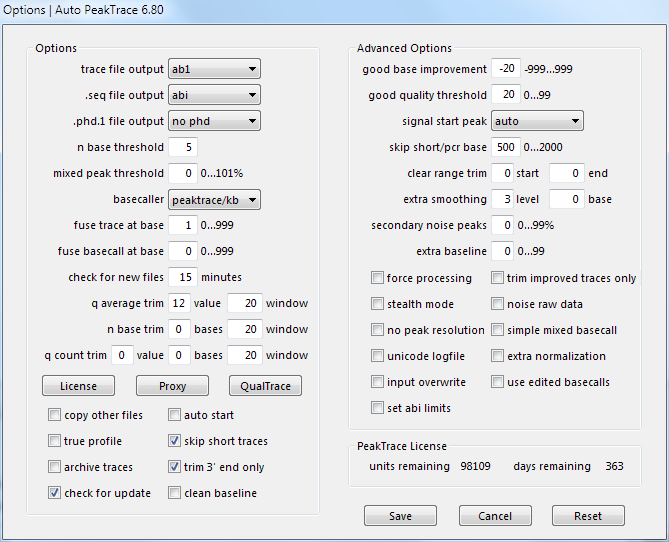
Auto PeakTrace 6.80 Options Window

We have released an major feature release for Auto PeakTrace and PeakTrace (6.80). The full list of changes and improvements include:

  • New Feature. Auto PeakTrace 6 can be used as a command line program.
  • Improvements to fuse basecall and fuse trace with difficult sequences.
  • Improvement of the basecalling of “drop out” peaks.
  • Improvements to extra normalization of PCR product traces.
  • Other bug fixes and enhancements.

The major change of this release is that Auto PeakTrace 6 can now be used from the command line. This allows the easy integration of Auto PeakTrace 6 into various LIMS scripts. The use of Auto PeakTrace over the standalone command line peaktrace.exe program makes it possible to set the input to be a directory rather than individual .ab1 files, as well as take advantage of multi-core systems making data processing up to 24x faster.

If Auto PeakTrace 6 is used from the command line with no options it will use the settings (including the input and output directories) saved from the last use of Auto PeakTrace 6. The saved settings can be overwritten by the use of command line switches. If no switch value is provided for a setting then value in the save setting file will be used. Settings that are changed via the command line update the setting file for future runs of Auto PeakTrace 6.

It is recommend that if you wish to use Auto PeakTrace 6 in a command line script that you first contact Nucleics @ {This email is obscured. Your must have javascript enabled to see it} or your local supplier for advice.

Auto PeakTrace 6.80 can be downloaded from the PeakTrace:Box Downloads page. If you do not have the password to access the PeakTrace:Box Downloads page please contact us @ {This email is obscured. Your must have javascript enabled to see it} or contact your local supplier for the update. The command line PeakTrace 6.80 for Windows and Linux is also available on the update pages.

This update is a recommended update for all users of the PeakTrace:Box System. For user of Auto PeakTrace RP an update will be released shortly.

Filed Under: linux, New Release, PeakTrace, windows

Auto PeakTrace 6.71 & PeakTrace 6.71 Released

November 7, 2017 By Daniel

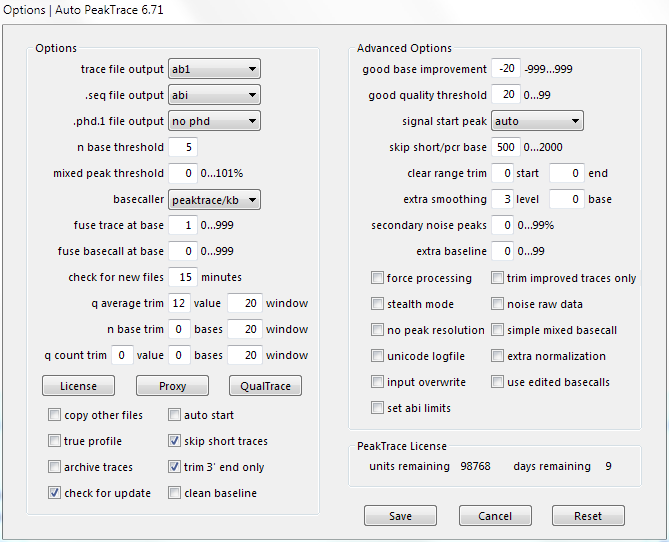
Auto PeakTrace 6.71 Options Window

We have released an improvement/bugfix release for Auto PeakTrace and PeakTrace (6.71). The full list of changes and improvements include:

  •  Improved processing of weak traces.
  • Improvement to q count trim and n base trim modules.
  • Fix of a bug that resulted in some good peaks being called as N.

Auto PeakTrace 6.71 can be downloaded from the PeakTrace:Box Downloads page. If you do not have the password to access the PeakTrace:Box Downloads page please contact us @ {This email is obscured. Your must have javascript enabled to see it} or contact your local supplier for the update. The command line PeakTrace 6.71 for Windows and Linux is also available on the update pages.

This update is a recommended update for all users of the PeakTrace:Box System. For user of Auto PeakTrace RP all changes are on the server side and so you have been automatically updated.

Filed Under: linux, New Release, PeakTrace, PeakTrace RP, windows

Auto PeakTrace 6.70 & PeakTrace 6.70 Released

October 10, 2017 By Daniel

Auto PeakTrace 6.70
Auto PeakTrace 6.70
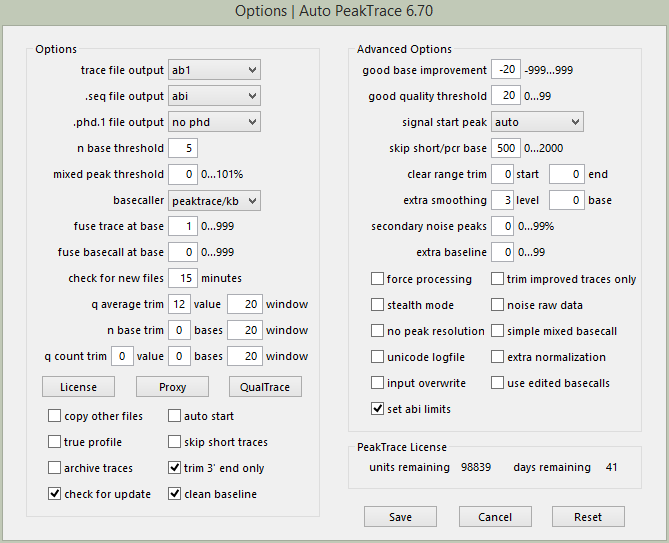
Auto PeakTrace 6.70 Options Window.

We have released a new update for Auto PeakTrace and PeakTrace (6.70). The full list of changes and improvements include:

  • Improved support for NanoPOP™-7 polymer traces.
  • Force processing now makes PeakTrace basecall the low quality data regions.
  • Improved support for more non-standard run conditions and voltages.
  • Improved basecalling.
  • Improved mixed basecalling.
  • Trace Reports now hide the use of PeakTrace or QualTrace when stealth mode used.
  • Bug fixes and enhancements of trace processing.

Auto PeakTrace 6.70 can be downloaded from the PeakTrace:Box Downloads page. If you do not have the password to access the PeakTrace:Box Downloads page please contact us @ {This email is obscured. Your must have javascript enabled to see it} or contact your local supplier for the update. The command line PeakTrace 6.70 for Windows and Linux is also available on the update pages.

This update is a recommended update for all users of the PeakTrace:Box System.

Filed Under: linux, New Release, PeakTrace, windows

  • « Go to Previous Page
  • Page 1
  • Interim pages omitted …
  • Page 3
  • Page 4
  • Page 5
  • Page 6
  • Page 7
  • Interim pages omitted …
  • Page 22
  • Go to Next Page »

Primary Sidebar

DNA Sequencing Help

We have added a guide on troubleshooting automated DNA sequencing problems.

DNA Sequencing Service Facilities Reviews

Please see our review of 325 DNA sequencing core facilities and commercial services for more information on selecting the right sequencing service for your needs.

QualTrace III Online

Try the free online version of the QualTrace DNA sequencing QC software and see how real time quality control tracking can improve your read lengths and lower sequencing failure rates.

Contact Details

email. information@nucleics.com
phone. +61 3 9016 9373
  • home
  • peaktrace
  • software & reagents
  • forum
  • tools
  • services
  • support
  • about

Nucleics

Sanger Seqencing Software

©Nucleics 1999 - 2026