• Skip to main content
  • Skip to primary sidebar

Nucleics

  • PeakTrace
    • About PeakTrace
    • PeakTrace Online
    • PeakTrace Online Pro
    • Online Pro for RP customers
    • PeakTrace 6
    • PeakTrace:Box
    • PeakTrace RP
    • PeakTrace for Chromas
    • Buy PeakTrace
    • Why use PeakTrace?
    • Validation of PeakTrace
    • PeakTrace FAQ
    • PeakTrace In Depth
  • DNA Sequencing Products
    • PeakTrace Basecaller
    • PeakTrace:Box
    • PeakTrace RP
    • PeakTrace for Chromas
    • QualTrace
    • LongTrace
    • CounterTrace
    • dLUTE SEQ
    • UniSeq
    • ASIN
  • Support & Services
    • PeakTrace Online Pro Registration
    • QualTrace III Online
    • DNA Sequencing Troubleshooting Guide
    • PeakTrace RP Downloads
    • PeakTrace:Box Downloads
    • Trace Viewers
    • User Manuals
    • Help Guides
      • How to Install Auto PeakTrace 6
      • How to Upgrade to Auto PeakTrace 6
      • How to Update the PeakTrace License on Linux
      • How to Generate a cmDust File
      • Online Activation of Auto PeakTrace 6
      • Auto PeakTrace 6 Online Activation Guide
      • DNA Sequencing Protocols
        • DNA Sequencing Protocol Tips
        • Exonuclease I – Shrimp Alkaline Phosphatase Clean Up of PCR Products
        • Tris EDTA DNA Sequencing Resuspension Buffer
        • DNA Sequencing Reaction Clean-up using Phenol & Butanol
    • DNA Sequencing Service Reviews
    • Software Downloads
    • MSDS
    • Services
      • Genomics Sequencing
      • Bioinformatics
  • Forum
    • Register
    • Login
    • PeakTrace Basecaller Forum
    • PeakTrace:Box Forum
    • Auto PeakTrace RP Forum
    • QualTrace Forum
    • DNA Sequencing Forum
    • DNA Sequencing Software
    • PCR Forum
    • DNA Isolation Forum
    • LongTrace Forum
    • dLUTE SEQ Forum
  • About
    • Contact
    • News
    • Jobs
    • Nucleics Privacy Policy
Buy PeakTrace

Daniel

PeakTrace Online Pro Released

May 2, 2017 By Daniel

PeakTrace Online Pro web page, with buttons to upload two .ab1 files and the basecalling options below

PeakTrace Online Pro web page, with buttons to upload two .ab1 files and the basecalling options below

We have released a new version of our free online PeakTrace service – PeakTrace Online Pro. This new version provides access to the full PeakTrace processing settings and better allows users to see what PeakTrace can do.

To use PeakTrace Online Pro please register at the PeakTrace Online Pro Registration page. You will be emailed the access password for the PeakTrace Online Pro page. This will allow you to process up to 250 traces per day for the week (the access password is changed every Sunday). You will only be able to register once to use PeakTrace Online Pro so please don’t register until you are ready to start testing PeakTrace on your traces.

As part of the release of PeakTrace Online Pro we have retired the old PeakTrace Online service. If you are already familiar with PeakTrace and just want to process your traces we recommend that you purchase some PeakTrace RP units. You can do this via the Buy PeakTrace Units page.
 

Filed Under: New Release, news, PeakTrace

Auto PeakTrace 6.53 Released

April 10, 2017 By Daniel

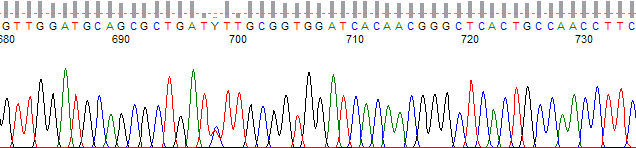
PeakTrace-processed chromatogram from bases 680 to 735, with a Y basecall at position 698

We have released an update for Auto PeakTrace (6.53). The release improves peak and trace normalization.

  • Improved peak normalization of traces especially those derived from PCR products and/or traces where set abi limits has been used.
  • Improved extra normalization of traces derived from PCR products to avoid normalization of the noise regions after the trace signal ends.

It is possible that the PeakTrace Serial Number will need to be entered again after installation. If so, just press the back button on the registration window and enter your existing serial number.

Auto PeakTrace 6.53 can be downloaded as usual from the PeakTrace:Box Downloads page. If you do not have the password to access the PeakTrace:Box Downloads page please contact us @ {This email is obscured. Your must have javascript enabled to see it} or contact your local supplier for the update. We will also be updating the commandline PeakTrace versions for Windows and Linux in the next few days.

Filed Under: New Release, PeakTrace, windows

Simpler Pricing for the PeakTrace Basecaller

March 22, 2017 By Daniel

PeakTrace-processed chromatogram from bases 1075 to 1125, with quality bars above the basecalls
PeakTrace Basecaller Example

We have introduced a new simplified and more flexible pricing model for both the PeakTrace RP and PeakTrace:Box systems. Our old pricing model lacked the flexibility to tailor the PeakTrace volumes to the needs of individual sequencing facilities. By simplifying the pricing model we have been able to lower our prices and provide greater flexibility to our customers.

Auto PeakTrace RP & Chromas for PeakTrace

For the RP based systems we have retained the pay-as-you-go model, but we have reduced the prices for the 500, 1000, 2000 and 5000 unit volumes by between 6% and 15% to make them more consistent. We have also replaced the 25,000 unit size with a 20,000 unit size and introduced a new 50,000 unit size. Customers will pay the same as (or less than) under the old pricing model.

The new pricing for PeakTrace RP.

100 units $0.18 per trace*
1000 units $0.13 per trace*
2000 units $0.11 per trace*
5000 units $0.09 per trace*
10 000 units $0.07 per trace*
20 000 units $0.06 per trace*
50 000 units $0.048 per trace*

*Assuming 60% of traces are improved by PeakTrace.

PeakTrace:Box

The PeakTrace:Box pricing model has been made more flexible so that you can now match the scale purchased to your exact volume needs. Under the old model you were limited to fixed sized volumes (i.e. 500, 1000, 2000, 5000, 10,000, or 25,000 traces per month). This meant, for example, if you only needed to basecall 15,000 traces per month you either had to pay for more units than you needed (i.e. 25,000) or renew early.

Under the new pricing model we have retained the “discount with volume” model (i.e. each unit is cheaper the more you buy), but you can now buy exactly the number of basecalling units that your facility needs. Each additional unit purchased reduces the overall price per unit. We have also retained the lease time discount (i.e. greater discounts with longer leases).

Since each quote is specific to the volume needed by the customer we can’t list all the prices, but the following table provides indicative prices at different volumes and lease times. If you would like a quote please contact our sales team @ {This email is obscured. Your must have javascript enabled to see it}.

Traces per Year* 1 month 6 month 12 month 24 month
 up to 10 000  $0.132  $0.122 $0.119  $0.112
 up to 30 000  $0.097  $0.090  $0.087  $0.082
 up to 100 000  $0.069 $0.064  $0.062 $0.059
 up to 300 000  $0.051  $0.047  $0.046 $0.043
 up to 3 000 000  $0.027  $0.025 $0.024  $0.023

The bottom line is the majority of our customers will save, but to ensure no customer pays more, all existing PeakTrace:Box customers can choose to remain on their current pricing if they wish.

Filed Under: news, PeakTrace, PeakTrace RP

Nucleics Exhibiting at ABRF 2017

March 21, 2017 By Daniel

ABRF 2017 Annual Meeting, San Diego, CA, USA, March 25 to 28, 2017, Town and Country Resort and Convention Center

ABRF 2017 Annual Meeting, San Diego, CA, USA, March 25 to 28, 2017, Town and Country Resort and Convention Center

Nucleics will be exhibiting at the Association of Biomolecular Resource Facilities 2017 Annual Conference in San Diego from March 25th to 28th. Please drop by and see the Nucleics team at Booth #125 as we would love to chat to you about your research and introduce you to some of our exciting new products we will be releasing this year.

Filed Under: news, PeakTrace, PeakTrace RP, QualTrace

Auto PeakTrace 6.52 Released

March 5, 2017 By Daniel

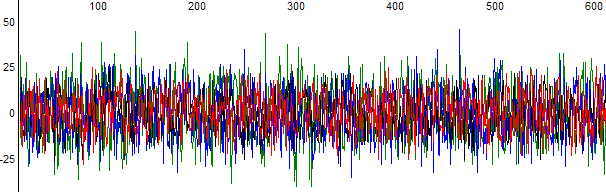
Raw data containing only low-level noise in all four dye channels

We have released a small update for Auto PeakTrace (6.52) to fix a bug in the copy other files option introduced in Auto PeakTrace 6.47 that prevented the non .ab1 files from being copied to the output folder when located in sub-folders. This bug only affects Auto PeakTrace on Windows and is optional if you are not using the copy other files setting.

This release also updates the required CodeMeter Runtime to 6.40b. This release from Wibu fixes a bug specific for Windows XP users that may cause the license to no longer work.

It is possible that the PeakTrace Serial Number will need to be entered again after installation. If so, just press the back button on the registration window and enter your existing license serial number.

Auto PeakTrace 6.52 can be downloaded as usual from the PeakTrace:Box Downloads page. If you do not have the password to access the PeakTrace:Box Downloads page please contact us @ {This email is obscured. Your must have javascript enabled to see it} or contact your local supplier for the update.

Filed Under: New Release, news, PeakTrace, windows

Position Open. Graduate Scientific Product Specialist

February 6, 2017 By Daniel

We have a new opening for a graduate scientific product specialist to help educate more of the world about our software. If you love science, international travel and people then check out our new position. All the details and selection criteria are on our Jobs page – Graduate Scientific Product Specialist.

Filed Under: news

Auto PeakTrace 6.51 Released

January 30, 2017 By Daniel

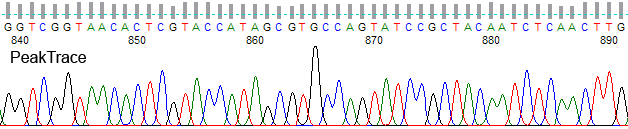
PeakTrace-processed chromatogram from bases 840 to 890

We have released a small optional update to Auto PeakTrace (6.51) as a work around to a bug recently introduced in the CodeMeter runtime. This bug only affects Auto PeakTrace on Windows.

If you have already upgraded to Auto PeakTrace 6.50 then you only need to install this update if we advise you to do so. For anyone using a version of Auto PeakTrace before 6.50 we strongly encourage you to update to this release.

Auto PeakTrace 6.51 can be downloaded as usual from the PeakTrace:Box Downloads page. If you do not have the password to access the PeakTrace:Box Downloads page please contact us @ {This email is obscured. Your must have javascript enabled to see it} or contact your local supplier for the update.

Filed Under: New Release, news, PeakTrace, windows

Auto PeakTrace 6.50 & PeakTrace 6.50 Released

January 17, 2017 By Daniel

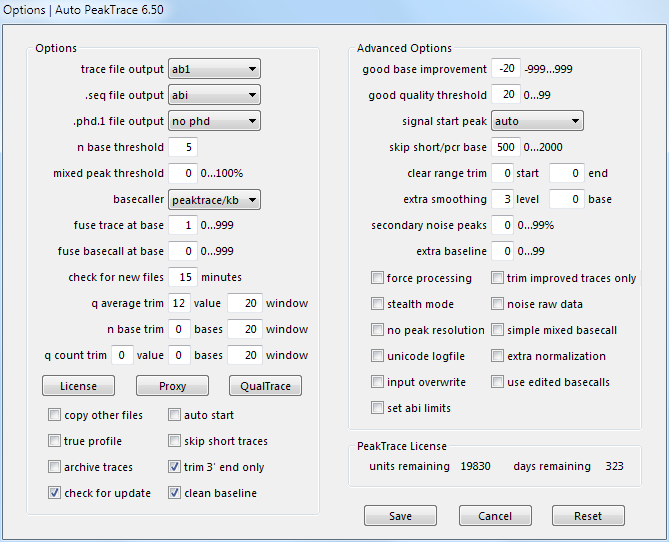
Auto PeakTrace 6.50 Options Window

PeakTrace 6.50 for Linux, PeakTrace 6.50 for Windows, and Auto PeakTrace 6.50 have been released. This update improves the performance and accuracy of PeakTrace and incorporates improvements to the QualTrace III Trace Reports to make them independent of PeakTrace. This release is a recommended update for all users of PeakTrace. The full list of changes

  • New Feature. QualTrace III only Trace Reports.
  • Improvements to mixed basecalling to reduce the false negative rate.
  • Improvements to the processing of short traces to increase trace read length.
  • Improvements to the fuse trace module.
  • The .scf file now records the correct basecaller if stealth mode or abi/kb basecaller options are used.
  • Update of CodeMeter runtime to 6.40a.

PeakTrace 6.50 for Linux, PeakTrace 6.50 for Windows, and Auto PeakTrace 6.50 can be downloaded as usual from the PeakTrace:Box Downloads page. The automatic update for Auto PeakTrace will be released in the coming days.

The two command line versions (PeakTrace 6.50 for Windows or Linux) require a password to unzip the files so please contact us @ {This email is obscured. Your must have javascript enabled to see it} or your local supplier for the archive password (this is different to the password to access the downloads page). You will need to download and use the free program 7zip to unzip the archives.

If you do not have the password to access the PeakTrace:Box Downloads page please contact us @ {This email is obscured. Your must have javascript enabled to see it} or contact your local supplier for the update. This update will also be available via the automatic update system soon if you are using PeakTrace 6.20 or higher.

If you are currently running a version of PeakTrace from before 6.10 you will also need a license upgrade and/or the PeakTrace Serial Number. Please contact us to obtain these updates.

The changes and improvements of this release have also been provided to the RP servers so users of Auto PeakTrace RP will obtain them automatically.

Filed Under: linux, New Release, news, PeakTrace, windows

Auto PeakTrace & PeakTrace 6.47 Released

December 2, 2016 By Daniel

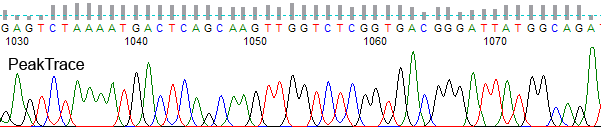
PeakTrace chromatogram of an ABI 3730 trace from bases 1030 to 1075

Auto PeakTrace 6.47, PeakTrace 6.47 for Windows, and PeakTrace 6.47 for Linux x86_64 have been released. This update is a bug fix and optimization release that resolves a number of outstanding bugs and small annoyances. It is a recommended update for all users of PeakTrace 6.40 or greater.

  • Improvements to Auto PeakTrace prevent the reading of the empty dot file created when copying files from Mac OS to Windows drive.
  • Improvements to no peak resolution option.
  • Improvements to the mixed basecalling module.
  • QualTrace III analysis is not turned off by corrupt .ab1 files.
  • Force processing will now PeakTrace basecall traces where the fuse trace or fuse basecall fails.
  • Fixed a bug which prevented TraceTuner basecalling working on Windows 8.1 and higher.
  • Fixed a bug which caused input overwrite to not work with Auto PeakTrace.
  • Fixed a bug which caused an inaccurate basecall improvement when using set abi limits.
  • Fixed a bug that prevents short traces being reprocessed through KB after PeakTrace basecalling.
  • Fixed a bug with the trace processor reported in .phd.1 files.
  • Update of the required CodeMeter runtime to 6.40.

Auto PeakTrace 6.47, PeakTrace 6.47 for Windows, and PeakTrace 6.47 for Linux x86_64 can be downloaded from the PeakTrace:Box Downloads page.

The two command line versions (PeakTrace 6.47 for Windows or Linux) require a password to unzip the files so please contact us @ {This email is obscured. Your must have javascript enabled to see it} or your local supplier for the archive password (this is different to the password to access the downloads page). You will need to download and use the free program 7zip to unzip the archives.

If you do not have the password to access the PeakTrace:Box Downloads page please contact us @ {This email is obscured. Your must have javascript enabled to see it} or contact your local supplier for the update. This update will also be available via the automatic update system soon if you are using PeakTrace 6.20 or higher.

If you are currently running a version of PeakTrace from before 6.10 you may also need a license upgrade and/or the PeakTrace Serial Number.

Filed Under: linux, New Release, PeakTrace, QualTrace, windows

Auto PeakTrace RP 6.47 Released

November 30, 2016 By Daniel

PeakTrace chromatogram of an ABI 3730 trace from bases 1030 to 1075

We have released Auto PeakTrace RP 6.47. We have spent the last month chasing down and fixing a series of annoying bugs with the aim of improving PeakTrace. The full list of fixes and improvements are:

  • Improvements to prevent the reading of the empty dot file created when copying files from a MacOS X to Windows drive.
  • Improvements to the no peak resolution module.
  • Improvements to the mixed basecalling module.
  • Force processing will now force the use of the PeakTrace basecaller where the fuse trace or fuse basecall fails due to major differences between the KB and PeakTrace basecalls.
  • Fixed a bug which caused an inaccurate basecall improvement value to be reported when using set abi limits.
  • Fixed a bug that prevents short traces (under 250 bases) being reprocessed through KB after PeakTrace basecalling.
  • Fixed a bug with the trace processor that was reported in the .phd.1 files.
  • Fixed bug where an error message was displayed if the RP license code had not yet been entered.
  • Update of cURL to 7.51 and 7za to 16.04.

Auto PeakTrace RP 6.47 for Windows and MacOS X can be downloaded from the PeakTrace RP downloads page. This release will soon be available via automatic update and is a recommended upgrade for all users of Auto PeakTrace RP.

If you require the password to access the PeakTrace RP downloads page please contact us @{This email is obscured. Your must have javascript enabled to see it} or your local supplier.

Filed Under: macosx, New Release, PeakTrace RP, windows

  • « Go to Previous Page
  • Page 1
  • Interim pages omitted …
  • Page 5
  • Page 6
  • Page 7
  • Page 8
  • Page 9
  • Interim pages omitted …
  • Page 22
  • Go to Next Page »

Primary Sidebar

DNA Sequencing Help

We have added a guide on troubleshooting automated DNA sequencing problems.

DNA Sequencing Service Facilities Reviews

Please see our review of 325 DNA sequencing core facilities and commercial services for more information on selecting the right sequencing service for your needs.

QualTrace III Online

Try the free online version of the QualTrace DNA sequencing QC software and see how real time quality control tracking can improve your read lengths and lower sequencing failure rates.

Contact Details

email. information@nucleics.com
phone. +61 489 152 658
  • home
  • peaktrace
  • software & reagents
  • forum
  • tools
  • services
  • support
  • about

Nucleics

Sanger Sequencing Software

Already have RP units? Run batches in your browser with PeakTrace Online Pro.

©Nucleics 1999 - 2026