• Skip to main content
  • Skip to primary sidebar

Nucleics

  • PeakTrace
    • About PeakTrace
    • PeakTrace Online
    • PeakTrace Online Pro
    • Online Pro for RP customers
    • PeakTrace 6
    • PeakTrace:Box
    • PeakTrace RP
    • PeakTrace for Chromas
    • Buy PeakTrace
    • Why use PeakTrace?
    • Validation of PeakTrace
    • PeakTrace FAQ
    • PeakTrace In Depth
  • DNA Sequencing Products
    • PeakTrace Basecaller
    • PeakTrace:Box
    • PeakTrace RP
    • PeakTrace for Chromas
    • QualTrace
    • LongTrace
    • CounterTrace
    • dLUTE SEQ
    • UniSeq
    • ASIN
  • Support & Services
    • PeakTrace Online Pro Registration
    • QualTrace III Online
    • DNA Sequencing Troubleshooting Guide
    • PeakTrace RP Downloads
    • PeakTrace:Box Downloads
    • Trace Viewers
    • User Manuals
    • Help Guides
      • How to Install Auto PeakTrace 6
      • How to Upgrade to Auto PeakTrace 6
      • How to Update the PeakTrace License on Linux
      • How to Generate a cmDust File
      • Online Activation of Auto PeakTrace 6
      • Auto PeakTrace 6 Online Activation Guide
      • DNA Sequencing Protocols
        • DNA Sequencing Protocol Tips
        • Exonuclease I – Shrimp Alkaline Phosphatase Clean Up of PCR Products
        • Tris EDTA DNA Sequencing Resuspension Buffer
        • DNA Sequencing Reaction Clean-up using Phenol & Butanol
    • DNA Sequencing Service Reviews
    • Software Downloads
    • MSDS
    • Services
      • Genomics Sequencing
      • Bioinformatics
  • Forum
    • Register
    • Login
    • PeakTrace Basecaller Forum
    • PeakTrace:Box Forum
    • Auto PeakTrace RP Forum
    • QualTrace Forum
    • DNA Sequencing Forum
    • DNA Sequencing Software
    • PCR Forum
    • DNA Isolation Forum
    • LongTrace Forum
    • dLUTE SEQ Forum
  • About
    • Contact
    • News
    • Jobs
    • Nucleics Privacy Policy
Buy PeakTrace

Daniel

New Settings for the free version of PeakTrace Basecaller

May 5, 2016 By Daniel

Auto PeakTrace 6.30 Options Window

With the release of Auto PeakTrace RP 6.30 we have updated the basecalling parameters used by the free version of PeakTrace to take advantage of the new options available within PeakTrace 6.30. The PeakTrace command line options settings now used are:

-t abi -ft 300 -c -40 -wq 12 20 -xb yes -cb yes -bc pk -ts no -xs 1000 2 -sm 700

These values correspond to the following Auto PeakTrace and Auto PeakTrace RP Option settings.
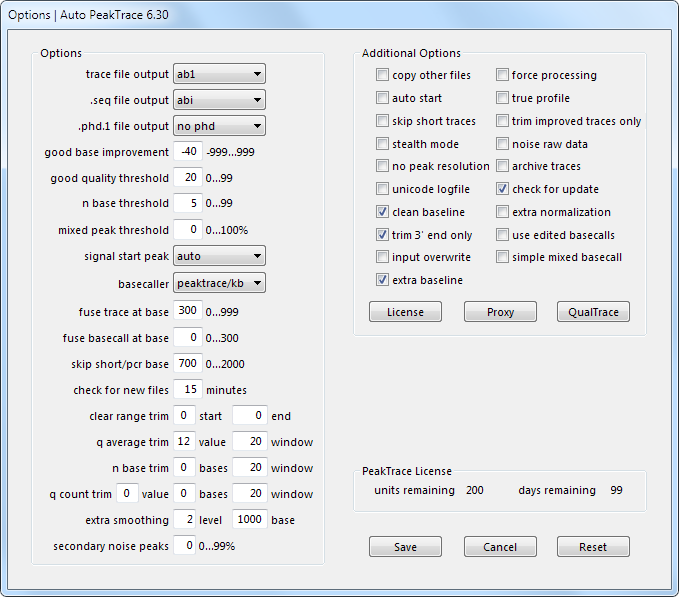
Options window of Auto PeakTrace 6.30 showing the PeakTrace Online settings listed in the post
The Auto PeakTrace setting corresponding to PeakTrace Online settings.

These settings are designed to optimize the read length and appearance of the trace, but not the detection of polymorphic sites. If you wish to detect polymorphic sites (mixed bases) raise the mixed peak threshold above 25%.

If you would like further advice on the best PeakTrace settings to use with your sequencing data, please don’t hesitate to contact us at {This email is obscured. Your must have javascript enabled to see it}.

Note: See also our later Update to the Free PeakTrace Online Settings, or use PeakTrace Online Pro for batch processing with custom settings.

Filed Under: How-to, news, PeakTrace, PeakTrace RP

Auto PeakTrace RP 6.30 Released

April 29, 2016 By Daniel

Options window of Auto PeakTrace RP 6.30, including the new extra baseline and secondary noise peaks settings

Options window of Auto PeakTrace RP 6.30, including the new extra baseline and secondary noise peaks settings

We have released Auto PeakTrace RP 6.30. This is a major update with two new features – extra baseline and secondary noise peaks. These two settings can improve the appearance of the traces and help to better match the appearance of PeakTrace basecalled traces to that obtained from the KB Basecaller. These new features are explained in the user help manual, but we will also be writing in depth articles on each of these new features. The full list of changes include.

  • New Feature. Extra baseline option for improved appearance of trace files.
  • New Feature. Secondary noise peak option to add peak noise to the traces.
  • Unsupported run types now output .seq and .phd.1 files based on the KB sequence if these file types are requested.
  • The logfile now records the local time rather than the server time of processing.
  • Further improvements to increase the robustness of the software on very fast networks.
  • Additional check that the archive folder can be created when using the archive traces option.
  • Improved handling of traces processing when manually starting and stopping processing.
  • If the n base threshold is set to 1 or 0 and the fuse basecall value is greater than 0, then any N bases from the original KB sequence will be basecalled.
  • Upgrade of 7za to 15.14.
  • Bug fixes and other enhancements.

This PeakTrace RP release can be downloaded as per usual from the PeakTrace RP Downloads page for both MacOS X (10.6+) and Windows (XP, Windows 7, Windows 8 and Windows 10). It will also be available via the in-app update function in a few days. If you do not have the password to access the downloads page please contact us @ {This email is obscured. Your must have javascript enabled to see it}.

If you are not a user of Auto PeakTrace RP 6 then please visit the Auto PeakTrace 6 RP registration page.

Filed Under: macosx, New Release, news, PeakTrace RP, windows

In Depth: QualTrace III Trace Reports

April 28, 2016 By Daniel

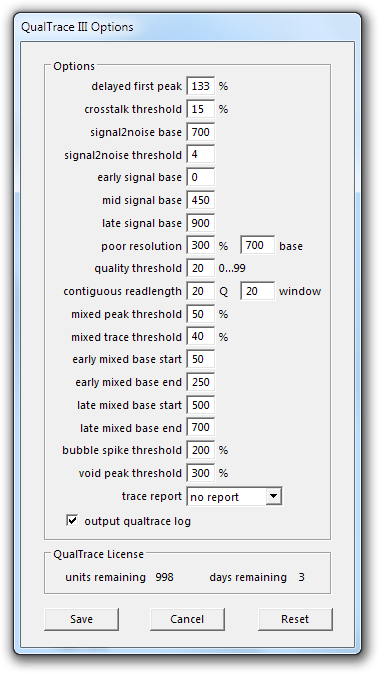
QualTrace III Options window, with the trace report drop-down set to no reportThe QualTrace III module in PeakTrace 6 can generate text based Trace Report files on each trace file basecalled by PeakTrace. These files can be supplied to final customers to help them understand why their trace is not to the quality level they might wish and also what they might do to correct the problems.
The Trace Report files can be generated with increasing levels of report detail, depending on the user needs. The report files are named after the trace file with “_report.txt” added (e.g. if the trace file name is “trace_abc.ab1” then the trace report file will be named “trace_abc_report.txt”) and saved to the same folder as the output trace file.

The Trace Reports can be generated with increasing levels of detail as desired. Trace Reports are only available with the PeakTrace:Box version of the PeakTrace Basecaller and are not available with the Auto PeakTrace RP system. The details of what each output means are described in the QualTrace III User manual.

Auto PeakTrace 6.50 introduced QualTrace III only trace reports, allowing them to function independently of PeakTrace. When qualtrace is selected as the basecaller, all references to PeakTrace (e.g. PeakTrace class, PT Good Bases, and Improvement) are omitted from the trace report. In addition, the PeakTrace settings section will not be included in the full report.

The four Trace Report options and outputs are:

No Report

This option prevents the output of a trace report. This is the default value.

Brief

Outputs a short description of the most important QualTrace III analysis results. An example is shown below.

SUMMARY
Trace File: ABI_3130_1200_B.ab1
PeakTrace Class: Success
Total Bases: 1367
KB Good Bases: 1333
PT Good Bases: 1340
Improvement: 0.5%
Date: 2015/08/11 10:55:00
Trace Score: 50
Contiguous Read Length: 1344

Standard

Outputs a summary and detailed description of the important QualTrace III analysis results. An example is shown below.

SUMMARY
Trace File: ABI_3130_1200_B.ab1
PeakTrace Class: Success
Total Bases: 1367
KB Good Bases: 1333
PT Good Bases: 1340
Improvement: 0.5%
Date: 2015/08/11 10:57:38
DETAILS
QualTrace Class: Excellent trace
Average Peak Spacing: 14.41
Run Time: 9000 sec.
Total Scans: 17960
Detector Overload: 0
Trace Score: 50
Contiguous Read Length: 1344
Dye Signal: 0.94
Bubble Spike(s): 0
Void Peak(s): 0
First Peak at Scan: 1276
Early Signal to Noise: 80
Mid Signal to Noise: 64
Late Signal to Noise: 46
Signal at Noise Level at Base: 1406
InDel(s): 0
Early Mixed Peaks: 0.00
Late Mixed Peaks:0.00
Peak Width at Base 700: 13.29

Full

Outputs the summary and full details of the QualTrace III analysis in text form including the PeakTrace and QualTrace III settings used for the analysis. An example is shown below.

SUMMARY
Trace File: ABI_3130_1200_B.ab1
PeakTrace Class: Success
PeakTrace Code: 0
Total Bases: 1367
KB Good Bases: 1333
PT Good Bases: 1340
Improvement: 0.5%
Date: 2015/08/11 11:00:21
DETAILS
QualTrace Class: Excellent trace
QualTrace Code: 40
Sequencer: 3730-16112-027-16112-027
Run Module: XLRSeq50_POP7_1
Run: Run_3730-16112-027_2007-03-17_16-00_0297
Run Date: 2007/03/17 17:00:52
Original Basecaller: PT 5.51
Capillary Number: 23
Capillary Length: 50
Polymer Lot: 0701015
Tray: 343
Tray Well: B5
Sample ID: 58e5d004d3f311ebaabf000d56d7a0f8
Sample Name: 23997
Sample Comment: <ID:23997>
Sample Owner: Daniel_Tillett
Sequencer User: Daniel_Tillett
Run Temperature Set: 60 deg.C
Run Voltage Set: 6.10 kV
Scan Rate: 0.25 sec.
Measured Run Voltage: 6.0 kV
Measured Run Current: 143.0 mA
Measured Run Power: 25.0 mW
Measured Run Temperature: 60.0 deg.C
Injection Voltage: 15.0 kV
Injection Time: 15 sec.
Average Peak Spacing: 14.41
Run Time: 9000 sec.
Total Scans: 17960
Detector Overload: 0
Trace Score: 50
Contiguous Read Length: 1344
Average Detector Noise: 5.21
Spectral Calibration: 0.08
Dye Signal: 0.94
Bubble Spike(s): 0
Void Peak(s): 0
First Peak at Scan: 1276
Early Signal to Noise: 80
Mid Signal to Noise: 64
Late Signal to Noise: 46
Input Total Bases: 1406
Signal at Noise Level at Base: 1406
Quality Score Threshold: 20
InDel(s): 0
Early Mixed Peaks: 0.00
Late Mixed Peaks: 0.00
Peak Width at Base 700: 13.29

PEAKTRACE SETTINGS
Trace File Output: ab1
Seq File Output: abi
.phd.1 file output: no phd
Good Base Improvement: -20
Good Quality Threshold: 20
N Base Threshold: 5
Mixed Peak Threshold: 0
Signal Start Peak: auto
Basecaller: peaktrace
Fuse Trace at Base: 20
Q Average Trim: 12 20
Force Processing: no
True Profile: no
Skip Short Traces: no
Trim Improved Traces: yes
Stealth Mode: no
Noise Raw Data: no
No Peak Resolution: no
Clean Baseline: no
Extra Normalization: no

QUALTRACE SETTINGS
Delayed First Peak: 133%
Crosstalk Threshold: 15%
Signal to Noise Base: 700
Signal to Noise Threshold: 4
Early Signal Base: 80
Mid Signal Base: 64
Late Signal Base: 46
Poor Resolution Threshold: 300%
Poor Resolution Base: 700
Quality Threshold: 20
Contiguous Readlength: 20 20
Mixed Peak Threshold: 50%
Mixed Trace Threshold: 40%
Early Mixed Base Start: 50
Early Mixed Base End: 250
Late Mixed Base Start: 500
Late Mixed Base End: 700
Bubble Spike Threshold: 200%
Void Peak Threshold: 300%

Filed Under: How-to, In Depth, PeakTrace, QualTrace

Why Keep PeakTrace Up-To-Date?

April 27, 2016 By Daniel

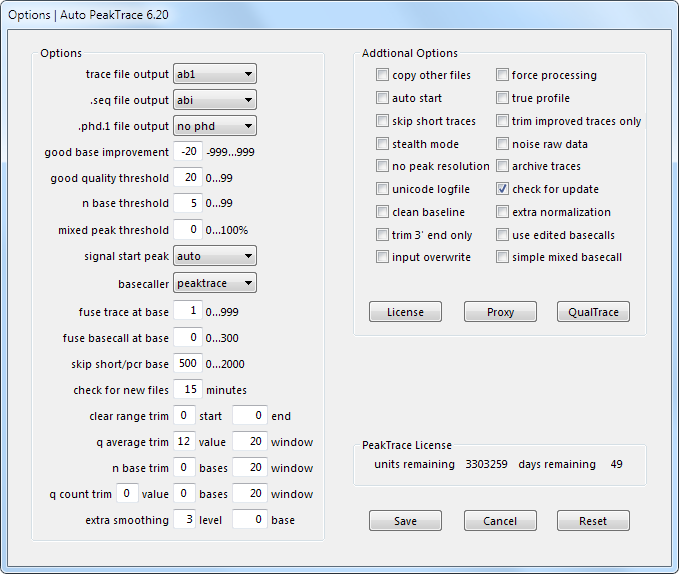
Auto PeakTrace Options MenuOne thing we have noticed is many people are running old versions of PeakTrace. While it is in general a good idea to use software you are familiar with, with PeakTrace it is best to keep up to date as much as possible. There are a number of very good reasons to use the latest version
  1. PeakTrace will stop working correctly approximately 18 months after it is first released. It will still run, but the quality of the results will be very poor. Anyone running a version of PeakTrace from before 5.70 should upgrade today.
  2. PeakTrace is actively being developed and improved. Unlike most Sanger sequencing software companies, Nucleics is continuing to invest significant resources in improving PeakTrace. By running the latest version you get access to all these improvements. Some of the great new features of PeakTrace 6 are described in the PeakTrace 6 In Depth articles.
  3. Bugs are only fixed in the latest version. If you run into an issue or bug with an older version of PeakTrace then there is a good chance it has been fixed in a later release.  If the issue is new then we will be able to fix in the next release. If the bug is specific to an older release then it will not be fixed.
  4. It is free. If you have a current license you can upgrade at anytime at no cost.

Filed Under: news, PeakTrace, PeakTrace RP

In Depth: Mixed Basecalling and Simple Mixed Basecalling

April 12, 2016 By Daniel

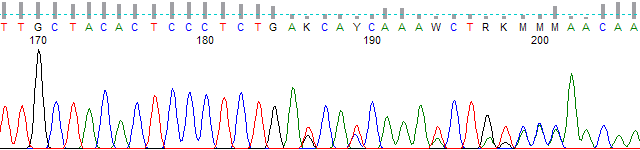
Figure 1. Polymorphic region basecalled with KB.

One of the major internal changes within Auto PeakTrace 6 is an improvement to how mixed basecalling (detection of polymorphic sites)  is performed. PeakTrace 5 used a similar algorithm to the KB Basecaller. Both called a base as mixed if the secondary signal beneath the primary peak of the processed data exceeds the mixed peak threshold. For example, if the mixed peak threshold is set to 30% then any peak with secondary signal greater than 30% of the primary peak height is called as a mixed base. Mixed basecalling is switched on by using a mixed peak threshold of greater than 0.

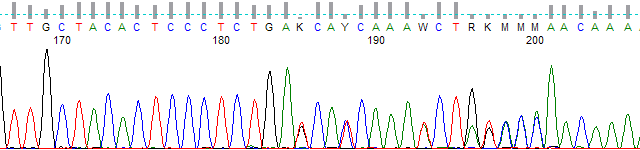
Chromatogram of bases 167 to 206; from about base 185 the trace becomes polymorphic and KB calls mixed bases K, Y, W, R, K and M
Figure 1. Polymorphic region basecalled with KB with a mixed peak threshold of 30%

While this approach closely replicates how KB works, it does suffer from two major issues. First, the primary and secondary peaks do not always align perfectly. This can result in secondary peaks that are more than the threshold not being called as mixed if the secondary peak location is offset from the primary. Second, the relative processed peak heights do not always correspond to the relative signal strength seen in the raw data channel. This is an issue for both KB and PeakTrace 5, but it is a larger issue with PeakTrace 5.

To overcome both of these problems the algorithm used for mixed basecalling in PeakTrace 6 was improved to ensure that the secondary and primary peaks are aligned before making the relative signal height comparisons. The new algorithm also uses the relative signal heights from the raw data channel to make the peak height comparisons.

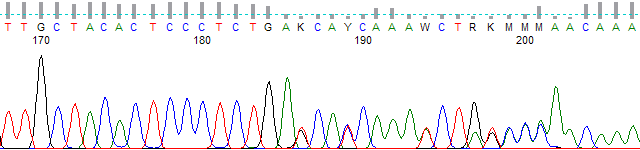
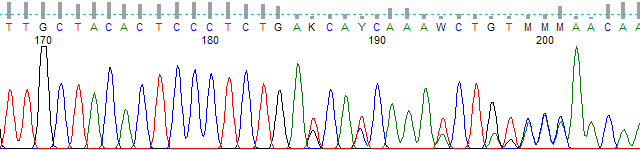
The same region basecalled by PeakTrace 5; positions 196 and 197 are called as G and T rather than mixed bases
Figure 2. Polymorphic region basecalled using PeakTrace 5 and a 30% threshold.
The same region basecalled by PeakTrace 6; positions 196 and 197 are called as mixed bases R and K
Figure 3. Polymorphic region basecalled using PeakTrace 6 and a 30% threshold.

The effect of these changes can be seen in Figures 2 & 3. The mixed bases at positions 196 and 197 were not detected as mixed basecalls by PeakTrace 5 due to the peak offsets and secondary peak height suppression in the processed data channel. These problems do not occur with the new mixed basecall algorithm introduced in PeakTrace 6 and both positions are now called as mixed.

This problem of secondary peak height suppression is very obvious when the no peak resolution PeakTrace output is used (Figure 4). This setting outputs the raw data smoothed, baselined and mobility shifted. The peaks while not as well resolved in the late regions of the trace show the raw data relative peak heights.

The same region as no peak resolution output, with broader peaks showing the raw relative peak heights; positions 196 and 197 are called R and K
Figure 4. Polymorphic region basecalled using no peak resolution and a 30% threshold.

If desired the old PeakTrace 5 mixed basecalling module can be used by checking simple mixed basecalling in the Additional Options window along with using the appropriate mixed peak threshold. This will make PeakTrace 6 perform the same mixed basecalling as was done in PeakTrace 5.

Potential Pitfalls with Mixed Basecalling

The major factor to be aware of when using the new PeakTrace 6 mixed basecall setting is the best mixed peak threshold to use will likely have changed. If you had previously been using a mixed peak threshold value of 50% then you may wish to reduce the value to 30%. It is hard to give a precise mixed peak threshold level to use for mixed basecalling, but setting the mixed peak threshold high (over 50%) will result in fewer false positives at the expense of more false negatives and vice versa. A good starting point for the mixed peak threshold is 30%, but you may wish to change this threshold on the basis of your needs.

Filed Under: How-to, In Depth, PeakTrace, PeakTrace RP

Discontinued support for Auto PeakTrace RP earlier than 5.70

April 6, 2016 By Daniel

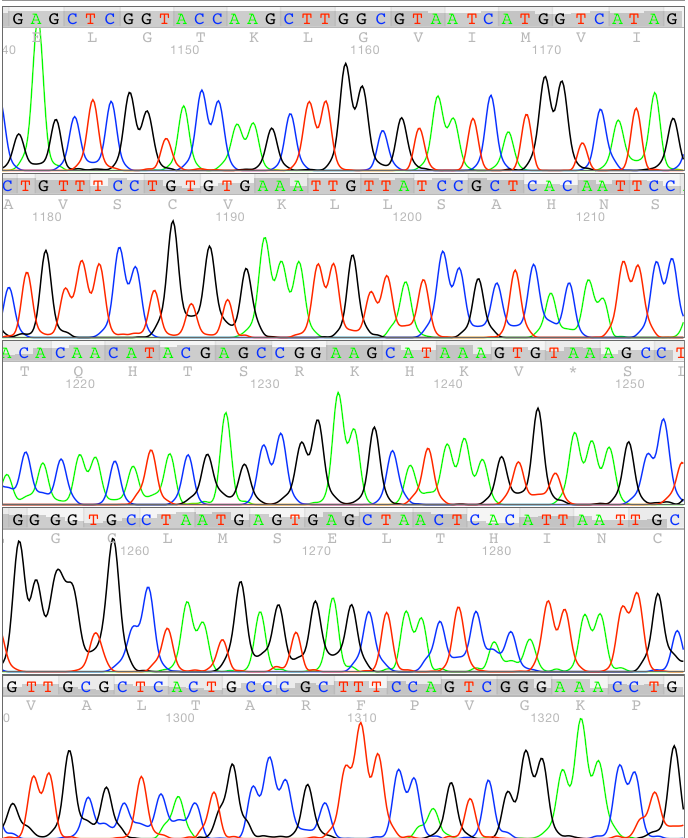
PeakTrace-basecalled chromatogram shown in five rows, from about base 1140 to 1330

We are discontinuing support for Auto PeakTrace RP for all versions released before 5.70 (i.e. released before February 2015) from the 15th of April 2016. This change is required to improve the security, speed and reliability of the PeakTrace RP servers.

You can upgrade to the latest version of Auto PeakTrace RP (6.24) for free and continue to use your current license. If you need the password to access the PeakTrace RP downloads page please contact us @ {This email is obscured. Your must have javascript enabled to see it}.

Filed Under: news, PeakTrace RP

Auto PeakTrace RP 6.24 Released

April 5, 2016 By Daniel

Animated banner in which a KB-basecalled chromatogram with many N basecalls changes into a sharper PeakTrace chromatogram, ending with a Free Trial button and the Nucleics logo

We have released Auto PeakTrace RP 6.24. This update improves the robustness of Auto PeakTrace RP especially for users with fast networks. It is recommended  that all users upgrade to this release. The full list of changes are

  • Improvements to increase the robustness of the software on very fast networks.
  • Improved cleaning of temporary files from the Application Data folder.
  • Upgrade of cURL to 7.48.0.
  • Other minor bug fixes and enhancements.

This release can be downloaded from the PeakTrace RP Downloads page for both Windows (XP, Windows 7, Windows 8 and Windows 10) and MacOS X (10.6+) and automatically via the in-app update function. If you do not have the password to access the downloads page please contact us @ {This email is obscured. Your must have javascript enabled to see it}.

If you are not a current user of Auto PeakTrace RP 6 then please register on the Auto PeakTrace 6 RP registration page.

Filed Under: macosx, New Release, news, PeakTrace RP, windows

In Depth: Picket Fence Basecalling

March 31, 2016 By Daniel

Chromatogram of a polymorphic region basecalled by KB, with primary peak heights varying more than four-fold

One of the new features introduced in PeakTrace 6.10 is the “picket fence” basecalling option. This option is normal PeakTrace basecalling with an extreme peak normalization applied that makes all the trace peaks approximately the same height. This output can be very useful if you wish to post-process the trace file to detect and quantify polymorphic regions.

Figure 1 shows an example KB basecalled trace containing a polymorphic region resulting in mixed base calls. The primary peaks vary by more than 4-fold in height making the quantification of the relative heights of the mixed positions more complex.

Chromatogram of a polymorphic region basecalled by KB, with primary peak heights varying more than four-fold
Figure 1. KB basecalled trace. Mixed peak threshold 30%.

Figure 2 shows the same trace file basecalled using the standard PeakTrace basecalling option. A similar primary peak height variation can be seen with PeakTrace basecalled trace as is observed with the KB trace which is a reflection of the underlying raw peak heights.

The same region basecalled by PeakTrace, with similar variation in primary peak heights
Figure 2. PeakTrace basecalled trace. Mixed peak threshold 30%.

Figure 3 shows the same trace basecalled using the “Picket Fence” basecalling option. The peaks display an extreme normalization making it easier to quantify the secondary peak heights at each of the polymorphic positions.

The same region basecalled with the picket fence option, with all primary peaks normalized to about the same height
Figure 3. PeakTrace picket fence basecalled trace. Mixed peak threshold 30%.

The picket fence basecaller is not recommended for normal basecalling applications as it creates a very artificial looking trace file, however, the very even primary peak heights can make identification and quantification of polymorphic sites more robust. The picket fence basecaller is available in Auto PeakTrace 6.10 and higher, PeakTrace 6.10 and higher, and Auto PeakTrace RP 6.10 and higher.

Filed Under: How-to, In Depth, linux, PeakTrace, PeakTrace RP

Auto PeakTrace RP 6.23 Released

March 29, 2016 By Daniel

PeakTrace-basecalled chromatogram shown in five rows, from about base 1140 to 1330

We have released Auto PeakTrace RP 6.23. This is a minor update that helps the software overcome network issues. We have found that some of our users have poorly configured networks that prevent the Auto PeakTrace RP software from being able to upload trace files to the remote RP server. This update improves the robustness of the software to such networks.

This update is only recommended for users of Auto PeakTrace RP 6.22 if you are having trouble connecting to the remote RP server. It can be downloaded from the PeakTrace RP Downloads page for both Windows (XP, Win7, Win8 and Win 10) and MacOS X (10.6+). If you do not have the password to access this page please contact@ {This email is obscured. Your must have javascript enabled to see it}. If you are a new user of Auto PeakTrace RP 6 then please register at our Auto PeakTrace 6 RP registration page.

Filed Under: macosx, New Release, news, PeakTrace RP, windows

In Depth: PCR Trim Base

March 18, 2016 By Daniel

PeakTrace Basecalled PCR Trim Base 500

One of the new features of PeakTrace 6.20 is user adjustment of the PCR trim base. In previous releases of PeakTrace the PCR trim base was set automatically using the skip short base setting value. Since skip short base could not be set to higher than 500, it meant that the PeakTrace basecalling of large PCR products (i.e. those larger than 500 bases) could result in traces with additional bases after the PCR product if there was low level template contamination and/or signal bleed through from an adjacent capillary present. This effect is shown below.

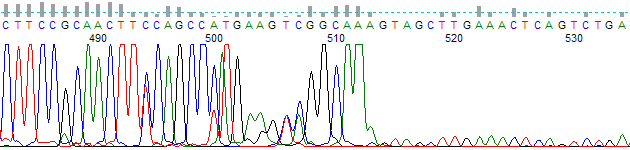
Figure 1 shows a KB basecalled trace of a ~530 base-pair PCR fragment. The KB Basecaller™ ends the basecalling at 3 A bases corresponding to the end of the PCR fragment sequence.

Original KB basecalled PCR trace
Figure 1. KB Basecalled Trace

Figure 2 shows the same trace as in Figure 1, but basecalled using PeakTrace and the default skip short/PCR trim base of 500. Due to low-level template contamination the sequencing continues past the last 3 A bases of the PCR fragment. This extra trace signal is real, but is not wanted by the end user.

PeakTrace Basecalled PCR Trim Base 500
Figure 2. PeakTrace Basecalling with a PCR Trim Base of 500

Figure 3 shows the same trace as in Figures 1 & 2, but basecalled using PeakTrace and a skip short/PCR trim base of 700. The trace is now trimmed to the last 3 A bases of the PCR fragment (as in Figure 1), thus removing the contamination sequence.

PeakTrace basecalled trace using PCR trim base of 700
Figure 3. PeakTrace Basecalling with a PCR Trim Base of 700

Pitfalls with using skip short/PCR trim

  1. Setting the skip short/PCR trim base to any value greater than 500 will turn off the skip short traces option, resulting in more traces being basecalled by PeakTrace (this may or may not be a desirable outcome).
  2. Setting the skip short/PCR trim base to a high value (i.e over 850) may result in weak signal traces being falsely detected as PCR product traces resulting in premature trimming.

For these two reasons it is recommended that the skip short/PCR trim base only be adjusted when sequencing large PCR fragments larger than 500 bases.

See also: An In-Depth Look at the Features of PeakTrace 6 | PeakTrace Online Pro Help | Open PeakTrace Online Pro.

Filed Under: In Depth, PeakTrace, PeakTrace RP

  • « Go to Previous Page
  • Page 1
  • Interim pages omitted …
  • Page 8
  • Page 9
  • Page 10
  • Page 11
  • Page 12
  • Interim pages omitted …
  • Page 22
  • Go to Next Page »

Primary Sidebar

DNA Sequencing Help

We have added a guide on troubleshooting automated DNA sequencing problems.

DNA Sequencing Service Facilities Reviews

Please see our review of 325 DNA sequencing core facilities and commercial services for more information on selecting the right sequencing service for your needs.

QualTrace III Online

Try the free online version of the QualTrace DNA sequencing QC software and see how real time quality control tracking can improve your read lengths and lower sequencing failure rates.

Contact Details

email. information@nucleics.com
phone. +61 489 152 658
  • home
  • peaktrace
  • software & reagents
  • forum
  • tools
  • services
  • support
  • about

Nucleics

Sanger Sequencing Software

Already have RP units? Run batches in your browser with PeakTrace Online Pro.

©Nucleics 1999 - 2026