• Skip to main content
  • Skip to primary sidebar

Nucleics

  • PeakTrace
    • About PeakTrace
    • PeakTrace Online
    • PeakTrace Online Pro
    • Online Pro for RP customers
    • PeakTrace 6
    • PeakTrace:Box
    • PeakTrace RP
    • PeakTrace for Chromas
    • Buy PeakTrace
    • Why use PeakTrace?
    • Validation of PeakTrace
    • PeakTrace FAQ
    • PeakTrace In Depth
  • DNA Sequencing Products
    • PeakTrace Basecaller
    • PeakTrace:Box
    • PeakTrace RP
    • PeakTrace for Chromas
    • QualTrace
    • LongTrace
    • CounterTrace
    • dLUTE SEQ
    • UniSeq
    • ASIN
  • Support & Services
    • PeakTrace Online Pro Registration
    • QualTrace III Online
    • DNA Sequencing Troubleshooting Guide
    • PeakTrace RP Downloads
    • PeakTrace:Box Downloads
    • Trace Viewers
    • User Manuals
    • Help Guides
      • How to Install Auto PeakTrace 6
      • How to Upgrade to Auto PeakTrace 6
      • How to Update the PeakTrace License on Linux
      • How to Generate a cmDust File
      • Online Activation of Auto PeakTrace 6
      • Auto PeakTrace 6 Online Activation Guide
      • DNA Sequencing Protocols
        • DNA Sequencing Protocol Tips
        • Exonuclease I – Shrimp Alkaline Phosphatase Clean Up of PCR Products
        • Tris EDTA DNA Sequencing Resuspension Buffer
        • DNA Sequencing Reaction Clean-up using Phenol & Butanol
    • DNA Sequencing Service Reviews
    • Software Downloads
    • MSDS
    • Services
      • Genomics Sequencing
      • Bioinformatics
  • Forum
    • Register
    • Login
    • PeakTrace Basecaller Forum
    • PeakTrace:Box Forum
    • Auto PeakTrace RP Forum
    • QualTrace Forum
    • DNA Sequencing Forum
    • DNA Sequencing Software
    • PCR Forum
    • DNA Isolation Forum
    • LongTrace Forum
    • dLUTE SEQ Forum
  • About
    • Contact
    • News
    • Jobs
    • Nucleics Privacy Policy
Buy PeakTrace

Daniel

Chromas 2.61 Update Released

October 26, 2016 By Daniel

Chromas with PeakTrace RP

Technelysium has released a minor update for Chromas (2.61). This release incorporates the following changes

  • Improves handling of corrupt files
  • Fixes help display from network drives
  • Adds scrolling with the left/right arrow keys
  • Adds parallel PeakTrace processing for paid users

For information on how you can use PeakTrace within Chromas please visit our PeakTrace for Chromas information page.

Filed Under: New Release, news, PeakTrace RP, windows

Auto PeakTrace & PeakTrace 6.46 Released

October 25, 2016 By Daniel

Auto PeakTrace 6
Auto PeakTrace 6 Main Window

Auto PeakTrace 6.46, PeakTrace 6.46 for Windows, and PeakTrace 6.46 for Linux x86_64 have been released. This update is a bug fix and optimization release that improves the mixed basecalling and clean baseline modules and is recommended for all users of PeakTrace 6.40 or greater.

The full list of changes and improvements are:

  • Bug fixes and enhancements for the clean baseline module to avoid the removal of true mixed peaks.
  • Improved processing of short failed traces and mixed traces.
  • Improvements to the mixed peak threshold module to improve mixed basecalling.
  • Improvements to fuse basecall option. Can be set up to base 999
  • Update of the CodeMeter runtime requirement to 6.30d.
  • A new error code (59: Mixed trace).

Auto PeakTrace 6.46, PeakTrace 6.46 for Windows, and PeakTrace 6.46 for Linux x86_64 can be downloaded from the PeakTrace:Box Downloads page.

The two command line versions (PeakTrace 6.46 for Windows or Linux) require a password and the free program 7zip to unzip the archive so please contact us @ {This email is obscured. Your must have javascript enabled to see it} or contact your local supplier for the archive password (this is different to the password to access the downloads page).

If you do not have the password to access the PeakTrace:Box Downloads page please contact us @ {This email is obscured. Your must have javascript enabled to see it} or contact your local supplier for the update. This update will also be available via the automatic update system within the next week.

If you are currently running a version of PeakTrace from before 6.10 you may also need a license upgrade and the PeakTrace Serial Number.

Filed Under: linux, New Release, PeakTrace, windows

Auto PeakTrace RP 6.46 Released

October 24, 2016 By Daniel

Auto PeakTrace 6 RP
Auto PeakTrace 6 RP

We have released Auto PeakTrace RP 6.46. This is a bug fix and enhancement release focused on improving the processing of mixed or polymorphic traces. It is a recommended upgrade for all PeakTrace RP users.

The complete list of changes in this release:

  • Bug fixes and enhancements for the clean baseline module to avoid the removal of true mixed peaks.
  • Improved processing of short failed or mixed traces.
  • Improvements to mixed basecalling to improve detection of true mixed peaks.
  • Improvements to fuse basecall option. Can now be set up to base 999.
  • Improvements of the processing of PCR product traces.
  • New error code: 59. Mixed trace.

Auto PeakTrace RP 6.46 for Windows and MacOS X can be downloaded from the PeakTrace RP downloads page. This release will also be available via the automatic update function in the next few days.

If you require the password to access the RP downloads page please contact us @{This email is obscured. Your must have javascript enabled to see it} or contact your local supplier for the update.

Filed Under: macosx, New Release, news, PeakTrace RP, windows

Auto PeakTrace & PeakTrace 6.45 Released

August 27, 2016 By Daniel

Auto PeakTrace 6
Auto PeakTrace 6

Auto PeakTrace 6.45, PeakTrace 6.45 Windows, and PeakTrace Linux x86_64 have been released. This update is a bug fix/optimization release and is highly recommended for all users of the 6.40 or greater. The full list of changes and improvements are

  • Bug fixes and enhancements of the extra baseline module.
  • Bug fixes and enhancements of the clean baseline module.
  • Enhancement of the mixed basecalling module (mixed peak threshold) to improve performance.
  • Enhancements of the peaktrace/kb basecaller option to enable more traces to be improved.
  • Improvements to the processing of PCR product traces.
  • Bug fix for QualTrace III only processing of traces that can cause a crash.

Auto PeakTrace 6.45, PeakTrace 6.45 Windows, and PeakTrace 6.43 Linux x86_64 can be downloaded from the PeakTrace:Box Downloads page. The two command line versions (PeakTrace 6.45 for Windows or Linux) require a password to unzip the archive so please contact us @ {This email is obscured. Your must have javascript enabled to see it} or contact your local supplier for the archive password (this is different to the password to access the downloads page).

If you do not have the password to access the PeakTrace:Box Downloads page please contact us @ {This email is obscured. Your must have javascript enabled to see it} or contact your local supplier for the update. This update will also be available via the automatic update system within 48 hours.

If you are currently running a version of PeakTrace from before 6.00 you may also need a license upgrade.

Filed Under: linux, New Release, PeakTrace, QualTrace, windows

In Depth: Use Edited Basecalls

August 9, 2016 By Daniel

Figure 2. KB basecalled trace after manual editing to correct basecalling errors.

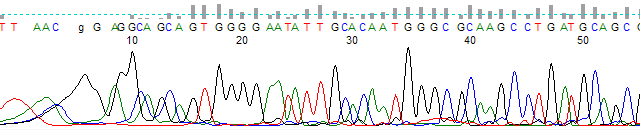
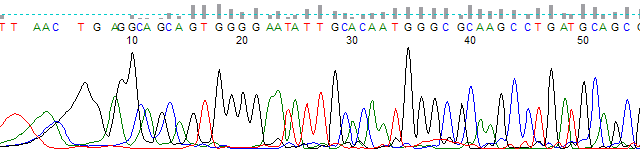
One of the new features introduced in PeakTrace 6.10 was the use edited basecalls setting. This option allows the retention of manual basecalling changes to the sequence when the fuse trace or fuse basecalls settings are used. This setting can be useful if you wish to correct KB Basecalling errors before PeakTrace Basecalling and the result is best illustrated by example.

Figure 1 shows a KB basecalled trace file. Note the basecalling error made by KB at base 6 where an obvious G peak was called as a low quality T.

Figure 1. KB basecalled trace before manual editing.

Figure 2 shows the same trace after manual editing using Chromas. Note the T at base 6 has been manually changed to a g.

Figure 2. KB basecalled trace after manual editing to correct basecalling errors.

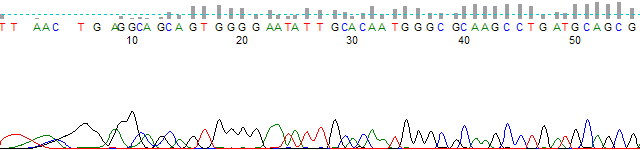
Figure 3 shows the manually edited trace after PeakTrace Basecalling using the default fuse trace setting of 1, but without the use edited basecalls setting. Note the edited G base at base 6 has reverted to the original KB basecalled T.

Figure 3. PeakTrace Basecalled trace using fuse trace of 1 without the use of use edited basecalls.
Figure 3. PeakTrace basecalled trace using fuse trace without use edited basecalls.

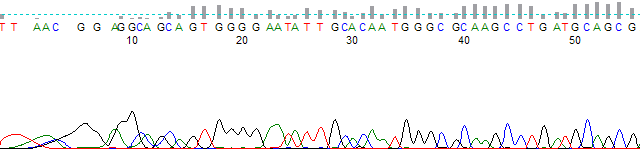
Figure 4 shows the manually edited trace after PeakTrace Basecalling using the default fuse trace setting of 1, but with the use edited basecalls setting. Note the edited G base at base 6 has been retained in the final call.

Figure 4. PeakTrace basecalled trace using fuse trace and use edited basecalls.

It is important to understand that the use edited basecalls only applies to the KB basecalled sequence retained by the fuse trace or fuse basecall options. Any manually edited basecalls that are subsequently replaced with PeakTrace basecalls are not kept.

Of course any PeakTrace basecalled trace can be manually edited after basecalling just like KB. If you wish to retain more of the manually edited basecalls then you can use a larger value for the fuse trace or fuse basecall setting (e.g. use 300 instead of 1).

Filed Under: In Depth, macosx, PeakTrace, PeakTrace RP, windows

Auto PeakTrace RP 6.43 released

August 4, 2016 By Daniel

Auto PeakTrace 6 RP
Auto PeakTrace 6 RP
Auto PeakTrace 6 RP

We have updated Auto PeakTrace RP to version 6.43. Most of the changes for this release are in the backend server so everyone using PeakTrace RP will get the improvements automatically, but there is a local client fix for a warning bug when auto start is used.

The full list of changes are

  • Bug fixes for the auto start and clean baseline modules.
  • Improvements to fuse basecall module.

Auto PeakTrace RP 6.43 for Windows and MacOS X can be downloaded from the PeakTrace RP downloads page and it will also shortly be available via the automatic update function. If you require the password to access the RP downloads page please contact us @ {This email is obscured. Your must have javascript enabled to see it} or get in contact with your local supplier for the update.

Filed Under: macosx, New Release, PeakTrace, PeakTrace RP, windows

Auto PeakTrace & PeakTrace 6.43 Released

August 2, 2016 By Daniel

Auto PeakTrace 6 main window listing 3730 traces, all reported as Success, with their high-quality base counts

Auto PeakTrace 6 main window listing 3730 traces, all reported as Success, with their high-quality base countsWe have released Auto PeakTrace 6.43 and PeakTrace Linux x86_64. This update is a bug fix/optimization release and is recommended for all users of the 6.40 or greater. The full list of changes and improvements are

  • Additional checks for PeakTrace USB Key issues.
  • Update of the CodeMeter runtime to 6.30.
  • Bug fixes for the auto start and clean baseline modules.
  • Improvements to fuse basecall module.

Auto PeakTrace 6.43 and PeakTrace 6.43 Linux x86_64 can be downloaded from the PeakTrace:Box Downloads page. If you do not have the password to access the PeakTrace:Box Downloads page please contact us @ {This email is obscured. Your must have javascript enabled to see it} or contact your local supplier for the update. This update will also be available via the automatic update system within 24 hours.

If you are currently running a version of PeakTrace from before 6.00 you may also need a license upgrade.

Filed Under: linux, New Release, news, PeakTrace, windows

PeakTrace 6.42 Linux x86_64 Released

July 22, 2016 By Daniel

PeakTrace chromatogram from bases 985 to 1035, with sharp, well-resolved peaks

We have released PeakTrace 6.42 for x86_64 Redhat/CentOS 6.8. This release is an optional release that improves the basecalling of traces with large peaks (spikes) as well as improving the use abi limit option. The full list of changes in this release are

  • Improved processing and basecalling of traces with large peaks.
  • Change to the use abi limits module to make the minimum base 1 rather than 0. This fixes a display bug for traces within the ABI Sequence Analysis™ software.
  • Updated list of supported sequencing run conditions.
  • CodeMeter™ runtime updated to 6.30.

PeakTrace 6.42 Linux x86_64 can be downloaded from the PeakTrace:Box Downloads page. If you do not have the password to access the PeakTrace:Box Downloads page please contact us @ {This email is obscured. Your must have javascript enabled to see it} or contact your local supplier directly. If you are currently running a version of PeakTrace from before 6.00 you may also need a license upgrade.

Filed Under: linux, New Release, news, PeakTrace

In Depth: Secondary Noise Peaks

July 15, 2016 By Daniel

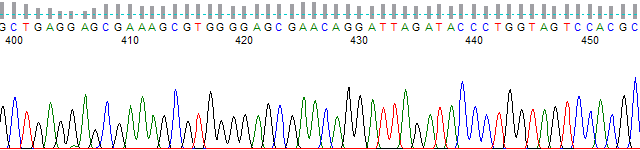
PeakTrace chromatogram from bases 400 to 452 with the secondary noise peaks setting at 5

One of the new features introduced in PeakTrace 6.40 was secondary noise peaks. The setting is unusual in that it actually makes the traces appear to be of lower quality than the result normally provided by PeakTrace. This setting introduces artificial secondary peaks under the primary peak proportional in height to the percentage value entered and the height of the primary peak. For example, using a secondary noise peaks value of 5 adds secondary peaks that are 5% of the primary peak heights under every primary peak in the trace.

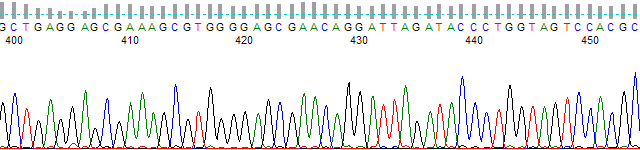
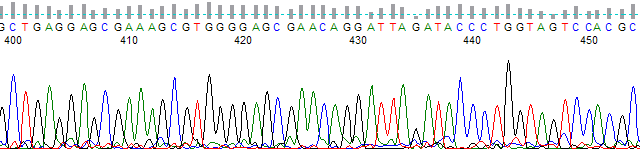
Adding secondary noise peaks can be useful if you wish to give your end users a trace file that looks much closer to that which would be output by the KB Basecaller. Figures 1 to 3 show examples of how the secondary noise peaks option works. Figure 1 shows an original KB Basecalled trace at ~base 400; Figure 2 shows the same trace after PeakTrace basecalling with a secondary noise peaks setting of 0 (i.e. off); Figure 3 shows the same trace, but using a secondary noise peaks setting of 5 (i.e. 5%).

KB-basecalled chromatogram from bases 400 to 452
Figure 1. KB basecalled trace.
PeakTrace chromatogram from bases 400 to 450 with the secondary noise peaks setting at 0
Figure 2. PeakTrace basecalled trace with default processing values.
PeakTrace chromatogram from bases 400 to 452 with the secondary noise peaks setting at 5
Figure 3. PeakTrace basecalled trace with a secondary noise peaks setting of 5.

While it is immediately obvious that the standard PeakTrace basecalling (Figure 2) is far superior to that provided by KB (Figure 1), some users are concerned that the default PeakTrace basecalled traces look “too good” to be real. While we think this is an unnecessary concern (after all nobody complains that their dinner tastes “too good” and they wished that it tasted worse), we do understand that some of our customers want to provide their end users with the superior basecalling of PeakTrace with a trace that looks very similar to what KB generates. The secondary noise peaks setting provides a simple way of degrading the trace output so that PeakTrace-basecalled traces look like KB-basecalled traces, while still providing the same base and quality score improvements that PeakTrace offers.

It is advisable to not use a secondary noise peaks value over 10. Using a large value will create a trace with a very poor appearance and end users may mistake the secondary peaks as true mixed peaks. This is one setting to use with caution.

See also: In Depth: Clean Baseline | In Depth: Extra Baseline | PeakTrace Online Pro Help | Open PeakTrace Online Pro.

Filed Under: In Depth, linux, macosx, PeakTrace, PeakTrace RP, windows

In Depth: Set ABI Limits

July 14, 2016 By Daniel

Sequencer Scanner with no ABI limits range set.

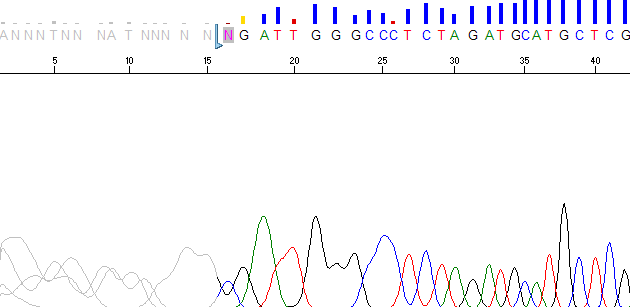
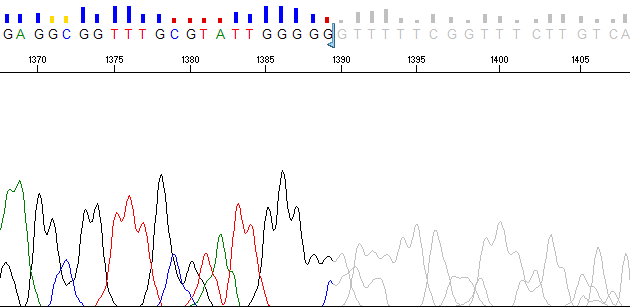
One of the new features introduced in PeakTrace 6.40 was Set ABI Limits. This option changes the PeakTrace trimming functions from hard trims (i.e. actual removal of the low quality regions) to the same soft (virtual) trimming that is performed by the KB Basecaller’s Post-Processor module. If trace trimming is selected within Sequencing Analysis, then KB will remove the low quality regions from the trace by setting the ABI Limits values in the trace file to indicate the high quality region. When the trace or basecall is viewed in Sequencing Analysis or Sequence Scanner, the trimmed basecalls are still present, but the peaks and bases are now gray (Figure 1).

Sequencer Scanner with no ABI limits range set.
Figure 1. Example trace viewed in Sequence Scanner with the ABI limits range set. The ABI limits region starts at base 15.

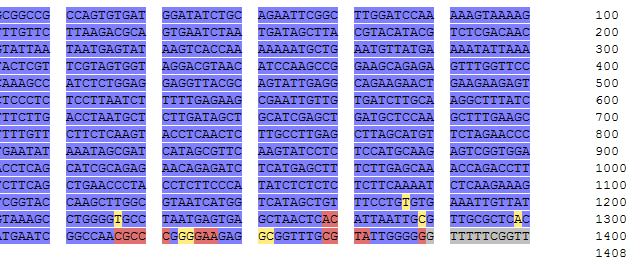
PeakTrace is now also able to set the ABI Limits values by using the Advanced Option Set ABI Limits with trace trimming. Instead of the hard removal of the low quality regions, these regions are “grayed out” when viewed in Sequence Scanner or Sequencing Analysis – just like KB (Figures 2 & 3).

PeakTrace trace end in Sequence Scanner using Set ABI Limits, with the low-quality region after base 1390 grayed out
Figure 2. PeakTrace basecalled trace using Set ABI Limits and Q Average Trim of 12 & 20. The last low quality region has been grayed out.
Sequence view of a PeakTrace basecall using Set ABI Limits, with high-quality bases in blue and the last low-quality bases in gray
Figure 3. PeakTrace basecall using Set ABI Limits and Q Average Trim of 12 & 20. The last low quality bases are shown in gray and the high quality regions in blue.

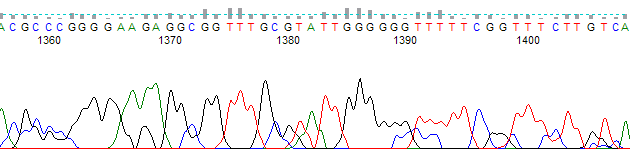
One of the limitations with using Set ABI Limits is that none of the non-ABI trace viewers are able to use the ABI limits region. For example, Figure 4 shows the same trace as shown in Figure 2, but in FinchTV. The low quality region after base 1390 is not shown grayed out or trimmed by FinchTV.

PeakTrace trace end from bases 1355 to 1405 in FinchTV, where the low-quality region is not grayed out

Set ABI Limits is a very useful addition for those users of PeakTrace who wish to replicate the results provided by the KB Basecaller as closely as possible. It provides the same “grayed out” trimming of the low quality regions that Sequencing Analysis Post-Processing provides.

Users of this setting are encouraged to upgrade to PeakTrace 6.42 or greater as this release has introduced a workaround for a bug in Sequencing Analysis that stops the display of the 3’ trimmed region when the 5’ end is untrimmed.

Filed Under: In Depth, macosx, news, PeakTrace, PeakTrace RP, windows

  • « Go to Previous Page
  • Page 1
  • Interim pages omitted …
  • Page 6
  • Page 7
  • Page 8
  • Page 9
  • Page 10
  • Interim pages omitted …
  • Page 22
  • Go to Next Page »

Primary Sidebar

DNA Sequencing Help

We have added a guide on troubleshooting automated DNA sequencing problems.

DNA Sequencing Service Facilities Reviews

Please see our review of 325 DNA sequencing core facilities and commercial services for more information on selecting the right sequencing service for your needs.

QualTrace III Online

Try the free online version of the QualTrace DNA sequencing QC software and see how real time quality control tracking can improve your read lengths and lower sequencing failure rates.

Contact Details

email. information@nucleics.com
phone. +61 489 152 658
  • home
  • peaktrace
  • software & reagents
  • forum
  • tools
  • services
  • support
  • about

Nucleics

Sanger Sequencing Software

Already have RP units? Run batches in your browser with PeakTrace Online Pro.

©Nucleics 1999 - 2026