• Skip to main content
  • Skip to primary sidebar

Nucleics

  • PeakTrace
    • About PeakTrace
    • PeakTrace Online
    • PeakTrace Online Pro
    • Online Pro for RP customers
    • PeakTrace 6
    • PeakTrace:Box
    • PeakTrace RP
    • PeakTrace for Chromas
    • Buy PeakTrace
    • Why use PeakTrace?
    • Validation of PeakTrace
    • PeakTrace FAQ
    • PeakTrace In Depth
  • DNA Sequencing Products
    • PeakTrace Basecaller
    • PeakTrace:Box
    • PeakTrace RP
    • PeakTrace for Chromas
    • QualTrace
    • LongTrace
    • CounterTrace
    • dLUTE SEQ
    • UniSeq
    • ASIN
  • Support & Services
    • PeakTrace Online Pro Registration
    • QualTrace III Online
    • DNA Sequencing Troubleshooting Guide
    • PeakTrace RP Downloads
    • PeakTrace:Box Downloads
    • Trace Viewers
    • User Manuals
    • Help Guides
      • How to Install Auto PeakTrace 6
      • How to Upgrade to Auto PeakTrace 6
      • How to Update the PeakTrace License on Linux
      • How to Generate a cmDust File
      • Online Activation of Auto PeakTrace 6
      • Auto PeakTrace 6 Online Activation Guide
      • DNA Sequencing Protocols
        • DNA Sequencing Protocol Tips
        • Exonuclease I – Shrimp Alkaline Phosphatase Clean Up of PCR Products
        • Tris EDTA DNA Sequencing Resuspension Buffer
        • DNA Sequencing Reaction Clean-up using Phenol & Butanol
    • DNA Sequencing Service Reviews
    • Software Downloads
    • MSDS
    • Services
      • Genomics Sequencing
      • Bioinformatics
  • Forum
    • Register
    • Login
    • PeakTrace Basecaller Forum
    • PeakTrace:Box Forum
    • Auto PeakTrace RP Forum
    • QualTrace Forum
    • DNA Sequencing Forum
    • DNA Sequencing Software
    • PCR Forum
    • DNA Isolation Forum
    • LongTrace Forum
    • dLUTE SEQ Forum
  • About
    • Contact
    • News
    • Jobs
    • Nucleics Privacy Policy
Buy PeakTrace

Daniel

Auto PeakTrace RP 6.42 Released

July 7, 2016 By Daniel

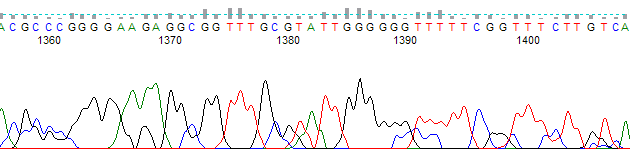
PeakTrace trace end from bases 1355 to 1405 in FinchTV, where the low-quality region is not grayed out

extra baseline processing

We have released Auto PeakTrace RP 6.42. This release is an optional minor release that improves the basecalling of traces with large spikes as well as the use abi limit option. The full list of changes in this release are

  • Improved processing of traces with large peaks.
  • Change to the abi limits module to make the minimum start base 1 rather than 0. This fixes a display bug for traces within ABI’s Sequence Analysis™ software.
  • Updated list of supported sequencing run conditions.

Auto PeakTrace RP 6.42 can be downloaded from our PeakTrace RP Downloads page for both Mac OS X (>10.8) and Windows (XP, Windows 7, Windows 8 and Windows 10). It will be available via the PeakTrace RP automatic application update function shortly. If you do not have the password to access the downloads page please contact us @ {This email is obscured. Your must have javascript enabled to see it} or contact your local supplier.

If you are not a current user of Auto PeakTrace RP 6 then please visit the Auto PeakTrace 6 RP registration page to create a PeakTrace account.

Filed Under: macosx, New Release, news, PeakTrace RP, windows

Chromas 2.60 with PeakTrace Released

July 6, 2016 By Daniel

Chromas with PeakTrace RP
Chromas 2.60 with PeakTrace

We are happy to announce the release, in collaboration with Technelysium, of PeakTrace for Chromas. Chromas 2.60 integrates the PeakTrace Basecaller into the Chromas trace viewer (enhance button). This release of Chromas comes with 20 free PeakTrace units allowing the power of PeakTrace to be explored during trace viewing on a trace by trace basis. Additional units can be purchased via our secure PeakTrace Online Store.

Chromas 2.60 with PeakTrace can be downloaded for free from the Technelysium website.

Filed Under: New Release, news, PeakTrace, PeakTrace RP, windows

Auto PeakTrace 6.41 Released

June 14, 2016 By Daniel

PeakTrace chromatogram from bases 985 to 1035, with sharp, well-resolved peaks
Example of PeakTrace Basecalling post base 1000.

We have released Auto PeakTrace 6.41. This release is an improvement/bug fix release and is a recommended update for all users of PeakTrace. The full list of changes include:

  • Improvements to the basecalling of traces containing mixed bases.
  • Improvements to clean baseline and extra baseline processing of traces.
  • Improved handling of traces that are basecalled with the kb or peaktrace/kb options.
  • Improvements to mixed basecalling module.
  • Reduced memory requirements and increased processing speed.
  • Fix to the automated update so it works with Windows 10.
  • Static build of the associated runtime libraries avoiding missing .dll issues.

Auto PeakTrace 6.41 can be downloaded from the PeakTrace:Box Downloads page. If you do not have the password to access the downloads page please contact us @ {This email is obscured. Your must have javascript enabled to see it}.

If you are upgrading from a release before 6.20 then please see the How to upgrade to Auto PeakTrace 6 page for the upgrade requirements.

If you are updating from a version after Auto PeakTrace 6.20 then you will need to online activate again using your PeakTrace Serial Number.

Filed Under: New Release, news, PeakTrace, windows

Update to the Free PeakTrace Online Settings

June 4, 2016 By Daniel

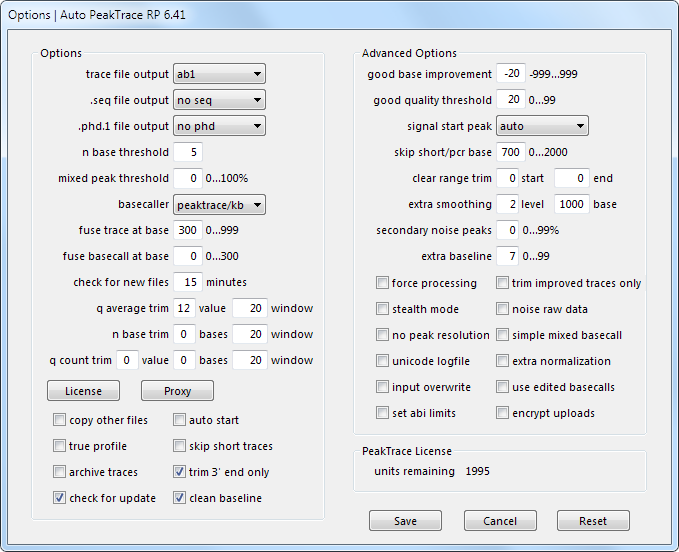
Options window of Auto PeakTrace RP 6.41 showing the PeakTrace Online settings, with good base improvement at −20

Options window of Auto PeakTrace RP 6.41 showing the PeakTrace Online settings, with good base improvement at −20

With the release of PeakTrace 6.40 we have updated the setting for the free version of PeakTrace (PeakTrace Online) to make optimal use of the improvements incorporated into this version. The new settings are now

-t abi -ft 300 -c -40 -wq 12 20 -xb 7 -cb yes -bc pk -ts no -xs 1000 2 -sm 700

These values correspond to the Auto PeakTrace and Auto PeakTrace RP Option settings:

  • fuse trace at base: 300
  • good base improvement: −40 bases
  • q average trim: 12 threshold; 20 base window
  • clean baseline: yes
  • extra baseline: 7
  • basecaller: peaktrace/kb (PeakTrace Basecalling with KB fallback)
  • trim 3’ end only: yes
  • extra smoothing: level 2; start base 1000
  • skip short/pcr base: 700

These settings are not suitable if you are trying to detect polymorphic sites (i.e. mixed peaks). For this you need to use a mixed peak threshold above the default 0.

The PeakTrace default values are usually the best place to start, but you should always trial the various options to find what works best for your needs.  If you would like further advice on the best settings to use with your sequencing data, please don’t hesitate to contact us  @ {This email is obscured. Your must have javascript enabled to see it}.

Filed Under: How-to, PeakTrace, PeakTrace RP

Auto PeakTrace RP 6.41 Released

June 3, 2016 By Daniel

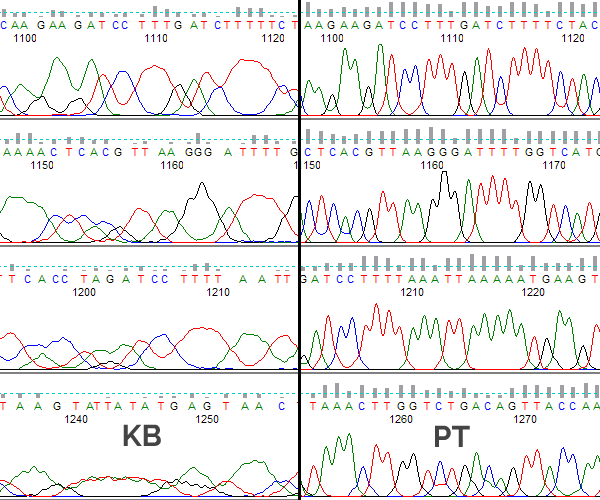
Comparison between PeakTrace and KB basecallersWe have released Auto PeakTrace RP 6.41. This is a minor update, but with a number of important changes to the internal modules that improve the performance and basecalling quality. The full list of changes include.
  • Improvements to the basecalling of traces containing mixed bases.
  • Improvements to clean baseline and extra baseline processing of traces.
  • Improved handling of traces that are basecalled with kb or peaktrace/kb options.
  • Improvements to mixed basecalling module.
  • Reduced memory requirements and increased processing speed.

Auto PeakTrace RP 6.41 can be downloaded from our PeakTrace RP Downloads page for both Windows (XP, Windows 7, Windows 8 and Windows 10) and MacOS X (10.6+). It is also available via the in-app update function. If you do not have the password to access the downloads page please contact us @ {This email is obscured. Your must have javascript enabled to see it} or contact your local supplier.

If you are not a current user of Auto PeakTrace RP 6 then please visit the Auto PeakTrace 6 RP registration page.

Filed Under: macosx, New Release, news, PeakTrace, PeakTrace RP, windows

Auto PeakTrace 6.40 Released

May 26, 2016 By Daniel

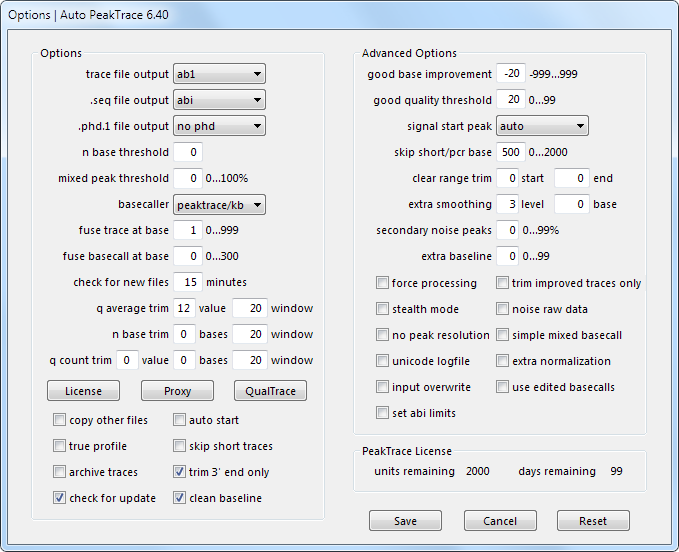
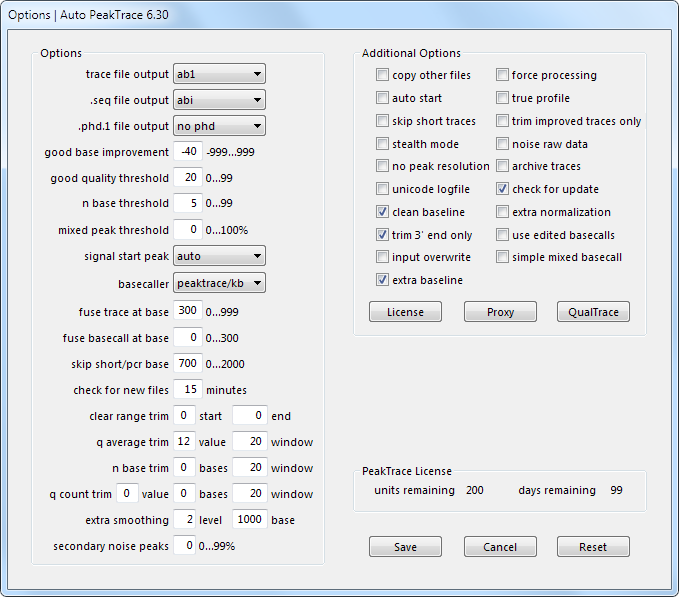
Auto PeakTrace 6.40 Options Window
Auto PeakTrace 6.40 Options Window.

We have released Auto PeakTrace 6.40 and PeakTrace 6.40 for Linux x86_64. This is a major release that improves the processing, basecalling, and appearance of traces. We have updated the Options menu of Auto PeakTrace 6 making it easier to use. We have also changed the default settings to make the best use of the new features incorporated into this release and the Users Manual has been updated and improved. Finally, PeakTrace 6.40 has a new feature which allows the ABI Limits values to be set by PeakTrace instead of performing hard trimming of the trace files. The full list of changes

  • New Feature. Set ABI Limits option.
  • New Feature. Improved Options layout and default settings.
  • Improvements to the extra baseline setting to allow user control of the threshold for secondary peak removal.
  • Improvements to the clean baseline setting to allow user control of the threshold for removing trace noise.
  • Improved processing of traces generated using BigDye™ 1.1 chemistry.
  • Updated Help/Users manual.
  • Initial support of the NimaGen BrilliantDye™ Terminator chemistry.
  • Bug fixes and improvements.

The update is highly recommended for all users of Auto PeakTrace 6 or PeakTrace 6.  Both the Linux and Windows version of PeakTrace 6.40 can be downloaded from the PeakTrace:Box Downloads page. It is also available via the in-app update function within Auto PeakTrace 6. If you do not have the password to access the downloads page please contact us @ {This email is obscured. Your must have javascript enabled to see it}.

Filed Under: New Release, news, PeakTrace, windows

Auto PeakTrace RP 6.40 Released

May 20, 2016 By Daniel

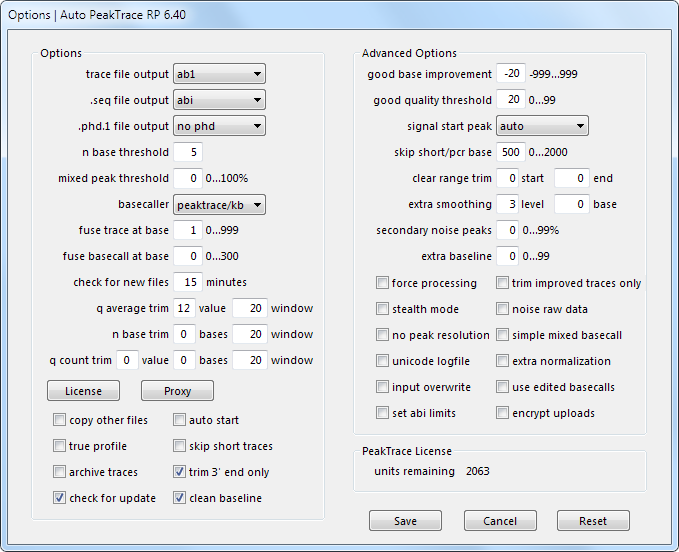
Auto PeakTrace RP 6.40 Options Menu

We have released Auto PeakTrace RP 6.40. This is a major update that significantly improves trace quality output and appearance. We have changed the Options menu to make Auto PeakTrace RP easier to use and updated the default settings to make best use of the new settings. In addition, we have improved the help manual and added a new feature which allows the ABI Limits values to be set by PeakTrace instead of hard trimming. The full list of changes include.
  • New Feature. Set ABI Limits.
  • New Feature. Improved Options layout and default settings.
  • Improvements to the extra baseline setting to allow user control of the threshold for secondary peak removal.
  • Improvements to the clean baseline setting.
  • Improved processing of traces generated using BigDye 1.1 chemistry.
  • Updated Help manual.
  • Initial support of the NimaGen BrilliantDye™ Terminator chemistry.
  • Bug fix for the abi+kb output option.

This update is highly recommended for all users of Auto PeakTrace RP 6.30 or earlier. If you had been using the extra baseline setting with Auto PeakTrace 6.30 then you must upgrade to this version as the 6.30 version of extra baseline will no longer work.

Auto PeakTrace 6.40 can be downloaded from the PeakTrace RP Downloads page for both Windows (XP, Windows 7, Windows 8 and Windows 10) and MacOS X (10.6+). It is available via the in-app update function. If you do not have the password to access the downloads page please contact us @ {This email is obscured. Your must have javascript enabled to see it}.

If you are not a current user of Auto PeakTrace RP 6 then please visit the Auto PeakTrace 6 RP registration page.

Filed Under: macosx, New Release, news, PeakTrace, PeakTrace RP, windows

In Depth: Extra Baseline

May 11, 2016 By Daniel

One of the new features of PeakTrace 6.30 is the extra baseline setting. This setting further improves the appearance of trace files by removing non-base peaks such as dye-blobs and baseline noise. It does not affect the base or quality call of the output file. This setting is best illustrated with an example trace.

Figure 1 shows an example trace that has been basecalled with the KB Basecaller™. The trace contains significant dye-blobs and noise peaks under the primary peaks. The appearance of the trace is not ideal.

Figure 1. No baseline cleaning.
Figure 1. KB basecalling.

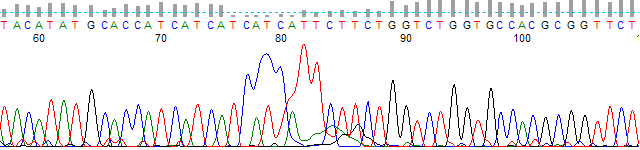
Figure 2 shows the same trace and region basecalled with PeakTrace 6.30 using the clean baseline setting. Much of the noise peaks have been removed, but the dye-blob region is still poor in appearance.

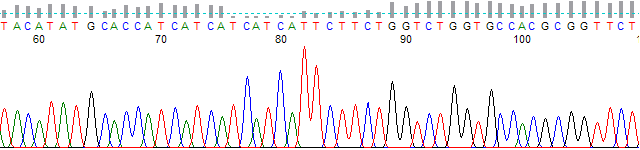
PeakTrace chromatogram from bases 58 to 105 using clean baseline, with a dye blob near base 80 and few noise peaks
Figure 2. PeakTrace basecalling using clean baseline.

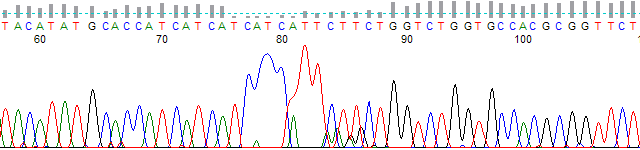
Figure 3 shows the same trace and regions as Figures 1 & 2, but using PeakTrace 6.30 and the extra baseline setting. The dyeblob region and noise peak signal has been removed from the trace. Note the DNA sequence and quality scores are identical in all three traces.

extra baseline processing
Figure 3. PeakTrace basecalling using extra baseline.

Pitfalls with using Extra Baseline

The extra baseline setting is a very powerful tool for improving the appearance of the trace files, but like all powerful tools it can prove problematic if abused. The three major issues to watch out for are:

  1. Applying extra baseline to traces with polymorphic bases (double peaks) and not using mixed basecalling. If you are going to use extra baseline on traces with mixed bases then it is imperative that you use the mixed basecall setting (i.e. setting the mixed peak threshold to greater than 0) in both KB and PeakTrace. Note: Failure to do this will result in the removal of the mixed peaks.
  2. Large dye blobs can cause problems of assigning the wrong peaks in the dyeblob region. The quality scores of these peaks will be low, but to an end user it will appear that the peaks are excellent and they may choose to ignore that the region is poor quality. The best solution is to use a large fuse trace or fuse basecall value (e.g. 250 to 300). This will minimize the chance that dyeblobs are turned into incorrect peaks.
  3. Using a large (> 1000) skip short/pcr base value can result in unnatural looking traces. The extra baseline setting is applied to the trace up to the skip short/pcr base. If it is required that a large skip short/pcr base value be used, then it is recommended that extra smoothing is also used. This will ensure the trace looks far more like a normal KB basecalled trace.

Update

The extra baseline setting has been changed in PeakTrace 6.40 to allow more user control over the threshold at which it is applied. Users now can control the quality score threshold below which extra baselining is not applied. For example, if the extra baseline setting is set to 15 only bases 15 or greater will have the additional baseline cleaning applied. This can avoid turning poor quality traces into traces that appear to be good, as well as avoiding the removal of mixed peak locations.

See also: In Depth: Clean Baseline | In Depth: Fuse Trace and Fuse Basecall | PeakTrace Online Pro Help | Open PeakTrace Online Pro.

Filed Under: In Depth, PeakTrace, PeakTrace RP

Auto PeakTrace 6.30 Released

May 10, 2016 By Daniel

Auto PeakTrace 6.30 Options Window

We have released Auto PeakTrace 6.30. This is a major release incorporating two new features for improving trace appearance – extra baseline and secondary noise peak. In addition, a number of the underlying algorithms used in the PeakTrace basecalling process have been improved further enhancing trace processing quality and read length.

The full list of changes in Auto PeakTrace 6.30

  • New Feature. Extra baseline option for improved appearance of trace files.
  • New Feature. Secondary noise peak option to add peak noise to the traces.
  • Auto PeakTrace 6.30 requires CodeMeter runtime 6.20 or higher.
  • Improved trace processing quality and speed.
  • Unsupported run types now output .seq and .phd.1 files based on the KB basecall if these file types are requested.
  • Trace types which do not contain quality scores can now be output in ab1 format without quality scores if either clean baseline, extra baseline, or extra normalization is selected.
  • Additional check that the archive folder can be created when using the archive traces option.
  • Improved handling of traces processing when manually starting and stopping processing.
  • If the N base threshold is set to 1 or 0 and the fuse basecall value is greater than 0, then any N bases from the original KB basecall will be set to a quality score of 2.
  • Bug fixes and enhancements.

The release is recommended for all users of Auto PeakTrace earlier than 6.12 and is an optional update if you are running Auto PeakTrace 6.20. If you are using a release before 6.20 please contact us @ {This email is obscured. Your must have javascript enabled to see it} (or your local supplier) before installing as we will need to be provided with the PeakTrace Serial Number before you can use this update.

This update is available from the PeakTrace:Box Downloads page or if you are running Auto PeakTrace 6.20 it will be available from the built in update function of Auto PeakTrace.

Filed Under: New Release, PeakTrace, windows

PeakTrace 6.30 Linux x86_64 Released

May 6, 2016 By Daniel

extra baseline processing

extra baseline processingWe have released PeakTrace 6.30 for x86_64 Redhat/CentOS 6.7. This update incorporates a number of major changes that improve trace processing and output quality. The full list of changes

  • New Feature. Extra baseline option (-xb) for improved appearance of trace files.
  • New Feature. Secondary noise peak option (-nsp) to add peak noise to the traces.
  • Improved trace processing quality and speed.
  • Unsupported run types now output .seq and .phd.1 files based on the KB basecall if these file types are requested.
  • Trace types which do not contain quality scores can now be output in ab1 format (without quality scores) if either clean baseline, extra baseline, or extra normalization is selected.
  • If the N base threshold is set to 1 or 0 and the fuse basecall value is greater than 0, then any N bases from the original KB basecall will be set to a quality score of 2.
  • Requires CodeMeter runtime 6.20 or higher (provided).
  • Bug fixes and enhancements.

PeakTrace 6.30 can be downloaded from the PeakTrace:Box Downloads page. If you do not have the password to access the PeakTrace:Box Downloads page please contact us @ {This email is obscured. Your must have javascript enabled to see it} or contact your local supplier directly. If you are currently running a version of PeakTrace from before 6.00 you may need a license upgrade.

We will be releasing Auto PeakTrace 6.30 early next week as soon as the final testing is complete.

Filed Under: linux, New Release, PeakTrace

  • « Go to Previous Page
  • Page 1
  • Interim pages omitted …
  • Page 7
  • Page 8
  • Page 9
  • Page 10
  • Page 11
  • Interim pages omitted …
  • Page 22
  • Go to Next Page »

Primary Sidebar

DNA Sequencing Help

We have added a guide on troubleshooting automated DNA sequencing problems.

DNA Sequencing Service Facilities Reviews

Please see our review of 325 DNA sequencing core facilities and commercial services for more information on selecting the right sequencing service for your needs.

QualTrace III Online

Try the free online version of the QualTrace DNA sequencing QC software and see how real time quality control tracking can improve your read lengths and lower sequencing failure rates.

Contact Details

email. information@nucleics.com
phone. +61 489 152 658
  • home
  • peaktrace
  • software & reagents
  • forum
  • tools
  • services
  • support
  • about

Nucleics

Sanger Sequencing Software

Already have RP units? Run batches in your browser with PeakTrace Online Pro.

©Nucleics 1999 - 2026