• Skip to main content
  • Skip to primary sidebar

Nucleics

  • PeakTrace
    • About PeakTrace
    • PeakTrace Online
    • PeakTrace Online Pro
    • Online Pro for RP customers
    • PeakTrace 6
    • PeakTrace:Box
    • PeakTrace RP
    • PeakTrace for Chromas
    • Buy PeakTrace
    • Why use PeakTrace?
    • Validation of PeakTrace
    • PeakTrace FAQ
    • PeakTrace In Depth
  • DNA Sequencing Products
    • PeakTrace Basecaller
    • PeakTrace:Box
    • PeakTrace RP
    • PeakTrace for Chromas
    • QualTrace
    • LongTrace
    • CounterTrace
    • dLUTE SEQ
    • UniSeq
    • ASIN
  • Support & Services
    • PeakTrace Online Pro Registration
    • QualTrace III Online
    • DNA Sequencing Troubleshooting Guide
    • PeakTrace RP Downloads
    • PeakTrace:Box Downloads
    • Trace Viewers
    • User Manuals
    • Help Guides
      • How to Install Auto PeakTrace 6
      • How to Upgrade to Auto PeakTrace 6
      • How to Update the PeakTrace License on Linux
      • How to Generate a cmDust File
      • Online Activation of Auto PeakTrace 6
      • Auto PeakTrace 6 Online Activation Guide
      • DNA Sequencing Protocols
        • DNA Sequencing Protocol Tips
        • Exonuclease I – Shrimp Alkaline Phosphatase Clean Up of PCR Products
        • Tris EDTA DNA Sequencing Resuspension Buffer
        • DNA Sequencing Reaction Clean-up using Phenol & Butanol
    • DNA Sequencing Service Reviews
    • Software Downloads
    • MSDS
    • Services
      • Genomics Sequencing
      • Bioinformatics
  • Forum
    • Register
    • Login
    • PeakTrace Basecaller Forum
    • PeakTrace:Box Forum
    • Auto PeakTrace RP Forum
    • QualTrace Forum
    • DNA Sequencing Forum
    • DNA Sequencing Software
    • PCR Forum
    • DNA Isolation Forum
    • LongTrace Forum
    • dLUTE SEQ Forum
  • About
    • Contact
    • News
    • Jobs
    • Nucleics Privacy Policy
Buy PeakTrace

Daniel

Auto PeakTrace 6.20 Released

March 17, 2016 By Daniel

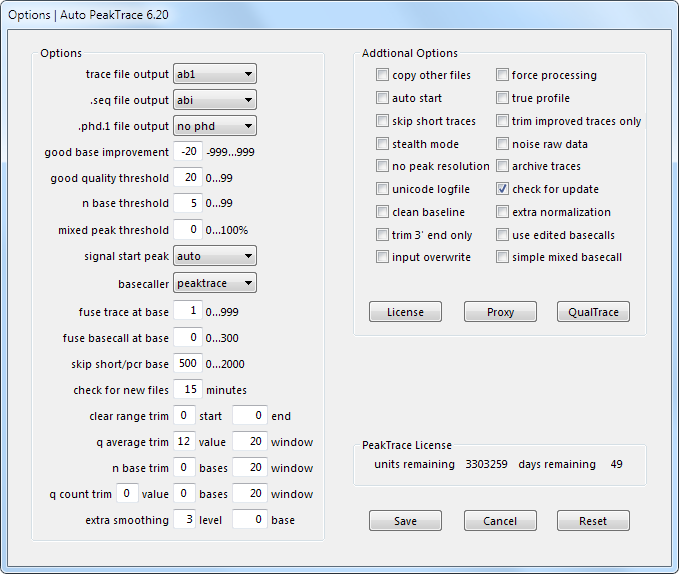
Auto PeakTrace Options Menu

We have released Auto PeakTrace 6.20. This is a major update that introduces a new licensing process – online activation. This update allows the PCR trim base to be manually set improving the sequencing of large PCR fragments (more than 500 bases). In addition, a large number of improvements have been made fixing bugs and enhancing the error messages. The full list of changes are:

  • New Feature. Online activation of Auto PeakTrace 6.
  • New Feature. User settable PCR trim base.
  • All N bases now have a quality score of 2 rather than 0.
  • Sporadic traces with all N bases should now not be generated.
  • Improved error messages with licenses that have not been upgraded to PeakTrace 6.00 or higher.
  • Other bug fixes and internal enhancements.

The release is recommended for all users of Auto PeakTrace earlier than 6.11 and is an optional update if you are running Auto PeakTrace 6.11 or 6.12. Please contact us @ {This email is obscured. Your must have javascript enabled to see it} (or your local supplier) before installing as we will need to be provided with the PeakTrace Serial Number before you can run this update.

Filed Under: New Release, news, PeakTrace, windows

PeakTrace 6.20 Linux x86_64 Released

March 15, 2016 By Daniel

We have released PeakTrace 6.20 for x86_64 Redhat/CentOS 6.7. This update incorporates a number of new switches that make it easier to upgrade from earlier PeakTrace 5. The major new feature is the PCR trim setting can be adjusted beyond base 500. This can aid in processing sequencing traces from larger PCR fragments. The full list of changes include:

  • New Feature. User settable PCR trim base.
  • New Feature. Command line option -qr to report the QualTrace III license information.
  • New Feature. Command line option -lc to report the PeakTrace license code.
  • New Feature. Command line option -bd to report the PeakTrace build date.
  • Upgrade of Codemeter Runtime minimum requirement to 6.10.
  • All N bases now have a quality score of 2 rather than 0.
  • Sporadic traces with all N bases should no longer be generated (bug fix).
  • Other bug fixes and internal enhancements.

PeakTrace 6.20 can be downloaded from the PeakTrace:Box Downloads page. If you do not have the password to access the PeakTrace:Box Downloads page please contact us @ {This email is obscured. Your must have javascript enabled to see it} or contact your local supplier directly. If you are currently running a version of PeakTrace from before 6.00 you will most likely need a license upgrade as well.

Filed Under: linux, New Release, news, PeakTrace

Auto PeakTrace RP 6.22 Released

March 14, 2016 By Daniel

Auto PeakTrace RP 6.22 Options Window

Auto PeakTrace RP 6.22 Options Window

Auto PeakTrace RP 6.22 has been released. The major change in this release is the ability to set the PCR base beyond 500. This allows better trimming of the end of PCR fragment traces larger than 500 bases. The full list of changes includes

  • New Feature. User settable PCR trim base.
  • All N bases now have a quality score of 2 rather than 0.
  • Improved handling of licensing issues.
  • Bug fixes and enhancements.

It is recommended that all users of Auto PeakTrace RP 6.20 or higher upgrade to this version. It can be downloaded from the PeakTrace RP Downloads page for both Windows (XP, Win7, Win8 and Win 10) and MacOS X (10.6+). If you do not have the password to access this page please contact@ {This email is obscured. Your must have javascript enabled to see it}. If you are a new user of Auto PeakTrace RP 6 then please register at our Auto PeakTrace 6 RP registration page.

Filed Under: macosx, New Release, news, PeakTrace RP, windows

How to Generate a cmDust File

March 12, 2016 By Daniel

cMDust file

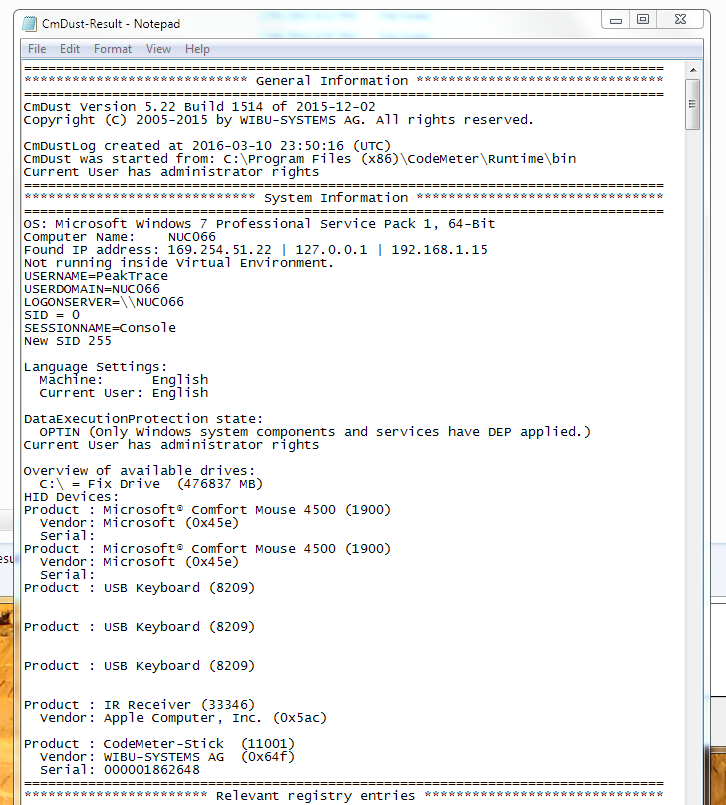
If you are having problems getting the Auto PeakTrace or the Linux PeakTrace software working, you may be requested to generate a cmDust file. This file is created by the cmDust utility, which is installed as part of the CodeMeter Runtime. The cmDust file provides us with a diagnostic of your system and can help us identify the cause of the problem(s) you are experiencing.

If requested by Nucleics (or your local supplier) to generate and send a cmDust file, these are the steps for both Windows and Linux.

Windows

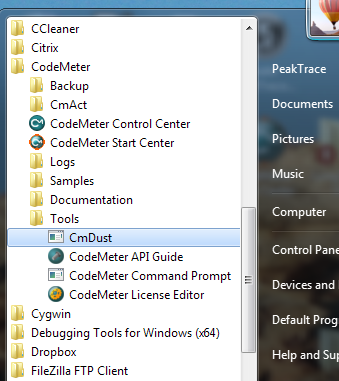
  1. Open the cmDust utility. Open the Windows Start Menu and search for cmDust (or look under CodeMeter → Tools).Windows Start menu with CmDust highlighted in the CodeMeter Tools folder
  2. Once selected, cmDust will generate a text file called cmDust-Result in your current User folder.CmDust-Result file open in Notepad, showing system diagnostic information
  3. Email this file to Nucleics (or your local supplier).

Linux

  1. Open a shell on the Linux machine which has the USB key.
  2. Type:
    cmu --cmdust --file <file_name>
  3. Email the output file to Nucleics (or your local supplier)

Filed Under: How-to, linux, PeakTrace, windows

Nucleics has Moved

February 16, 2016 By Daniel

Black-and-white photo of a street lined with large trees and parked cars

Nucleics has moved to 29 John St, Woollahra. There is not much more to add other than we may take a little longer than normal to get back to you while we set up the new office.

Edit. We are back to normal.

Filed Under: news

Auto PeakTrace RP 6.21 Released

January 21, 2016 By Daniel

Auto PeakTrace RP 6.21 has been released. This update improves the reliability and speed of PeakTrace RP processing.

  • New Feature. Additional Australian and Chinese based RP server.
  • More accurate estimated time to completion function.
  • Improved handling of proxy server issues.
  • Bug fixes.

It is highly recommended that all current users of Auto PeakTrace RP upgrade to this version. It can be downloaded from the PeakTrace RP Downloads page for both Windows (XP, Win7, Win8 and Win 10) and MacOS X (10.6+). If you do not have the password to access this page please contact@ {This email is obscured. Your must have javascript enabled to see it}. If you are a new user then please register to use Auto PeakTrace 6 RP.

Filed Under: macosx, New Release, news, PeakTrace RP, windows

Auto PeakTrace RP 6.20 Released

December 22, 2015 By Daniel

Options window of Auto PeakTrace RP 6.20

Options window of Auto PeakTrace RP 6.20

Auto PeakTrace RP 6.20 has been released. This is a major upgrade designed to improve processing speed. The file uploading and server backend has been completely redesigned to be able to dynamically adapt to your network speed. In addition we have added new servers on the USA West Coast (Los Angeles), USA East Coast (Atlanta) and Europe (Netherlands). We will be adding new servers in the coming months in both China and Singapore. The full list of changes are:

  • New Feature. Regional based servers to improve processing speed. Use of the new servers may require a new license code.
  • New Feature. User control over file upload encryption. Turning off encryption can speed the upload speed.
  • Dynamic speed adjustment to match upload speed with network speed. This should result in much faster trace processing on fast networks.
  • Bug fixes and internal improvements to improve robustness.

It is highly recommended that all current users of Auto PeakTrace RP upgrade to this version. It can be downloaded from the PeakTrace RP Downloads page for both Windows (XP, Win7, Win8 and Win 10) and MacOS X (10.6+). If you do not have the password to access this page please contact@ {This email is obscured. Your must have javascript enabled to see it}. If you are a new user then please register to use Auto PeakTrace 6 RP.

Filed Under: macosx, New Release, news, PeakTrace RP, windows

In Depth: Trim 3-Prime End Only

December 21, 2015 By Daniel

First 60 base KB basecalled trace.

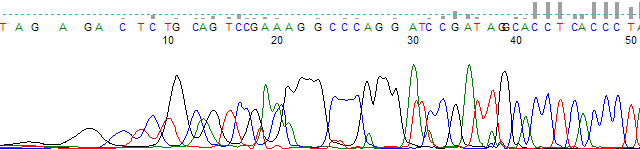
One of the most simple of the new features within PeakTrace 6 is the trim 3’ end only setting. This option allows you to use trace trimming to remove the low quality bases from the 3’-end of the trace while keeping the low quality bases at the 5’-start. Figure 1 shows an example KB™ basecalled trace file. The first 40 bases have a very low average quality score.

First 60 base KB basecalled trace.
Figure 1. First 60 bases of a KB basecalled trace.

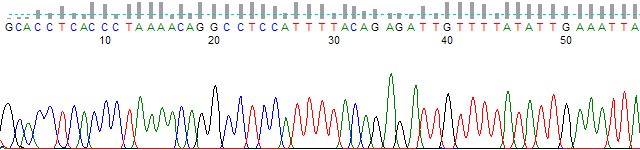
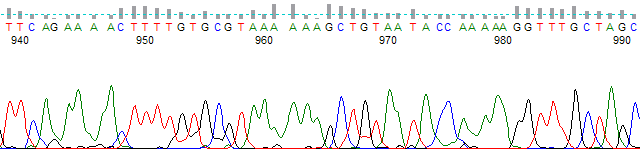
 Figures 2 & 3 show the same trace basecalled with the PeakTrace Basecaller™ using a Q average trim of 15 with a window of 20 bases. The trimming has removed the low quality regions from both the 5’- and 3’-ends of the trace. This results in the basecall starting from approximately base 40 of the original KB file and ending at base 991.

First 60 bases PeakTrace basecalled trace with trimming.
Figure 2. First 60 bases of a PeakTrace basecalled trace with q average trimming.
Last 60 bases of a PeakTrace-basecalled trace with q average trimming, from about base 940 to 990
Figure 3. Last 60 bases of a PeakTrace basecalled trace with q average trimming. 

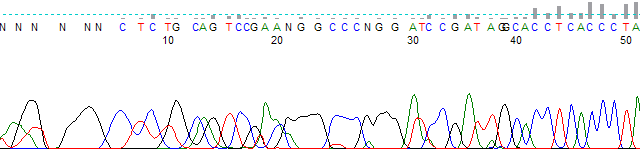
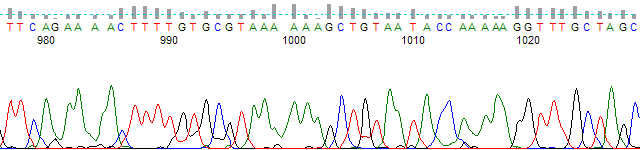
Figures 4 & 5 show the same PeakTrace basecalled trace but with the trimming limited to the 3’-end of the trace. The traces are trimmed to the same base at the 3’-end, but the 5’-end has retained the original low quality region as found in the KB basecalled trace.

First 50 bases of a PeakTrace-basecalled trace trimmed at the 3′ end only, keeping the low-quality N basecalls at the start
Figure 4. First 60 bases of a PeakTrace basecalled trace with trimming limited to the 3’ end only.
Last bases of a PeakTrace-basecalled trace trimmed at the 3′ end only, from about base 978 to 1025
Figure 5. Last 60 bases of a PeakTrace basecalled trace with trimming limited to the 3’ end only.

Conclusion

Using PeakTrace 6 it is now possible to limit trace trimming to the far end of the trace (3’-end) and leave the original low quality initial region intact. This setting can be useful when the initial low quality basecall can be aligned to known vector and aid in the accurate downstream clipping of vector sequence. This feature is available in versions 6.10 and higher for Auto PeakTrace, Auto PeakTrace RP and the command line PeakTrace.


Filed Under: In Depth, PeakTrace, PeakTrace RP

Update: PeakTrace Software Download Page

December 15, 2015 By Daniel

PeakTrace chromatogram from bases 790 to 840 using extra smoothing level 3 starting at base 800, with peaks still well resolved

We have updated the layout of our software downloads page. Previously all software updates were on the same page for the different versions of PeakTrace, but we found that many customers were confused as to which version they should download. To try and make this process less confusing we have split the downloads pages into a PeakTrace RP Downloads page and a PeakTrace:Box Downloads page.

These pages are also directly accessible from the Support menu.

The passwords to access these pages have changed so if you wish to download an update just email us at  {This email is obscured. Your must have javascript enabled to see it}.

Filed Under: linux, macosx, PeakTrace, PeakTrace RP, QualTrace, windows

In Depth: Extra Smoothing Part II

December 9, 2015 By Daniel

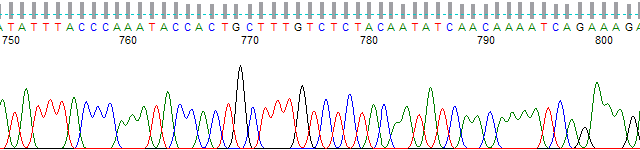
PeakTrace chromatogram from bases 750 to 800 using extra smoothing level 2 starting at base 400

In Part I of this series we looked at how to limit the sharpness of the trace peaks from PeakTrace by using the no peak resolution setting. While this is the simple way to make a PeakTrace basecalled trace look like a KB basecalled trace, the no peak resolution setting does not allow any fine control over the peak sharpness – the final peaks will be as sharp or as broad as they are in the raw data channel.

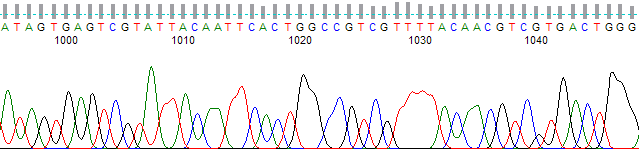
A new optional setting introduced with PeakTrace 6 (extra smoothing) allows the peak sharpness to be user controlled. This option applies an additional smoothing factor (ranging from 1 to 9) starting from the base position selected. While it can be applied to the whole trace, more typically extra smoothing is used to reduce the resolution of peaks in the later regions of the trace (i.e post base 1000).

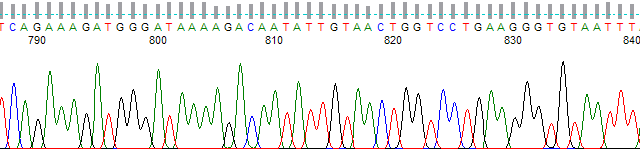
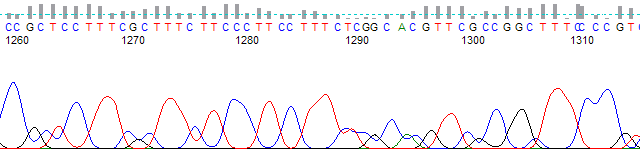
Figures 1 to 3 show an example PeakTrace .ab1 file that has had extra smoothing applied starting at base 800 at smoothing level 3. The peaks are still well resolved at base 840, but at base 1000 and beyond they are far less sharp than is typical for PeakTrace and the trace more closely resembles a KB trace.

PeakTrace chromatogram from bases 790 to 840 using extra smoothing level 3 starting at base 800, with peaks still well resolved
Figure 1. PeakTrace trace from bases 790 − 840 using extra smoothing.
PeakTrace chromatogram from bases 1000 to 1045 using extra smoothing level 3 starting at base 800, with broad peaks
Figure 2. PeakTrace trace from bases 1000 − 1050 using extra smoothing.
PeakTrace chromatogram from bases 1260 to 1315 using extra smoothing level 3 starting at base 800, with broad, KB-like peaks
Figure 3. PeakTrace trace from bases 1260 − 1315 using extra smoothing.

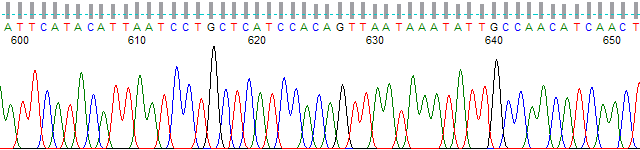
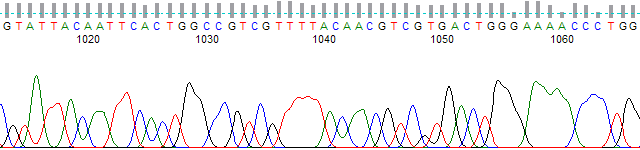
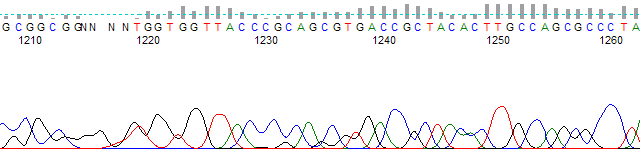
Extra smoothing can also be started earlier in the trace with a lower smoothing level to achieve a similar appearance to using the no peak resolution setting. Figures 4 to 7 show PeakTrace basecalling using extra smoothing starting at base 400 at a smoothing level 2. The trace peaks are quite similar in appearance to that obtained using the KB Basecaller.

PeakTrace chromatogram from bases 600 to 650 using extra smoothing level 2 starting at base 400
Figure 4. PeakTrace trace from bases 600 to 650 using extra smoothing level 2 starting at base 400.
PeakTrace trace from bases 750 to 800 using extra smoothing level 2 starting at base 400.
Figure 5. PeakTrace trace from bases 750 to 800 using extra smoothing level 2 starting at base 400.
PeakTrace trace from bases 1010 to 1070 using extra smoothing level 2 starting at base 400.
Figure 6. PeakTrace trace from bases 1010 to 1070 using extra smoothing level 2 starting at base 400.
PeakTrace trace from bases 1210 to 1265 using extra smoothing level 2 starting at base 400.
Figure 7. PeakTrace trace from bases 1210 to 1265 using extra smoothing level 2 starting at base 400.

Pitfalls with using Extra Smoothing

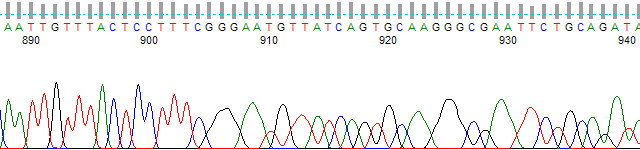
While extra smoothing is a powerful tool to control the resolution of peaks in a trace, it can be misused resulting in obvious artifacts. The most critical we have seen is the use of an excessively high smoothing value. Figure 8 shows an example of this effect where the extra smoothing was started at base 900 using smoothing level 7. The trace displays a very rapid change from sharp to broad peaks that is not typical of any basecaller.

PeakTrace chromatogram from bases 888 to 940 using extra smoothing level 7 starting at base 900, with the peaks changing abruptly from sharp to broad
Figure 8. PeakTrace trace from base 885 to 940 using extra smoothing level 7 starting at base 900.

Conclusion

The extra smoothing option offered by PeakTrace 6 provides fine user control over the sharpness of peaks in the output .ab1 file. The use of high levels of smoothing (over 3) is not recommended as these can result in rapid changes in peak resolution. If this setting is required, we recommend using a low smoothing value (e.g. 2 or 3) starting as late in the trace as possible.

Filed Under: In Depth, PeakTrace, PeakTrace RP

  • « Go to Previous Page
  • Page 1
  • Interim pages omitted …
  • Page 9
  • Page 10
  • Page 11
  • Page 12
  • Page 13
  • Interim pages omitted …
  • Page 22
  • Go to Next Page »

Primary Sidebar

DNA Sequencing Help

We have added a guide on troubleshooting automated DNA sequencing problems.

DNA Sequencing Service Facilities Reviews

Please see our review of 325 DNA sequencing core facilities and commercial services for more information on selecting the right sequencing service for your needs.

QualTrace III Online

Try the free online version of the QualTrace DNA sequencing QC software and see how real time quality control tracking can improve your read lengths and lower sequencing failure rates.

Contact Details

email. information@nucleics.com
phone. +61 489 152 658
  • home
  • peaktrace
  • software & reagents
  • forum
  • tools
  • services
  • support
  • about

Nucleics

Sanger Sequencing Software

Already have RP units? Run batches in your browser with PeakTrace Online Pro.

©Nucleics 1999 - 2026