A common problem with Sanger DNA sequencing is a rapid falloff in peak signal strength – what is known colloquially as a “ski-slope” trace. This problem can often be difficult to see in the processed data channels because of basecaller normalization, but is very easy to see in the raw channels. Figure 1 shows a typical example of this effect in the raw channels.
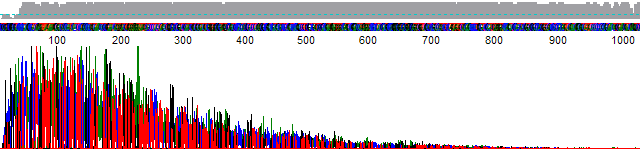
While there are many causes for rapid falloff in peak signal, the end result is the peaks at the end of the trace are very weak and can be close, or at, the detector noise level. This not only makes it hard to determine the basecall, it also makes it difficult to accurately normalize the peak heights in the raw channel.
The PeakTrace Basecaller™ and the KB Basecaller™ have historically had a very different philosophy to normalization of the rapid falloff traces. The KB Basecaller will normalize all the peaks to the same height no matter how extreme the signal declines, while PeakTrace limited the normalization to a factor of 40. On extreme signal decline traces (e.g. where the average peak heights fall from 25,000 to 25) PeakTrace would not “pull up” the weak peaks to the same extent as KB. The reason for this difference is we believe that the user should be aware that the trace had serious issues, and not just have the basecaller “sweep the dirt under the rug” and make the bad trace look good. We see many facilities unknowingly produce very poor traces because KB has hidden this problem from them.
Using Extra Normalization with PeakTrace Basecalling
With the introduction of QualTrace III into PeakTrace 6 it is possible to both fully correct the peak heights while also reporting on production issues like the rapid falloff of trace signal. Figure 2 shows how PeakTrace 5 would normalize and Figure 3 shows the same trace normalized using the PeakTrace 6 Extra Normalization setting.


The extra normalization setting also improves inter-channel and inter-peak normalization. Figure 4 shows a section of an imbalanced trace normalization by PeakTrace 5. Figure 5 shows the same trace normalized using the PeakTrace 6 extra normalization option. The C and G channels are better normalized using the extra normalization option.


Using Extra Normalization with KB Basecalling
The extra normalization setting can also be used with KB basecalled traces to improve their appearance by selecting the ABI/KB basecaller option within PeakTrace 6. Like the clean baseline setting this will not change the base or quality scores, but it will improve the appearance of the trace file. Figure 6 shows a typical KB trace file using standard KB normalization. Figure 7 shows the same trace, but with the extra normalization option used. While not dramatically different, the inter-channel and inter-peak heights are more consistent when using extra normalization.


Pitfalls with using Extra Normalization
There are two potential pitfalls with using extra normalization:
- You might miss production issues that are causing your signal intensity to drop off rapidly. This is one of the most common problems we see with traces that prevent PeakTrace from being able to improve the read length. If you don’t know there is a problem then it is very hard to fix.
- You may turn detector noise into something that looks like real peaks. This is a problem with KB and a potential problem with PeakTrace if the poor quality regions are not trimmed.
Conclusion
Extra normalization is an improved normalization added to PeakTrace 6 that improves the appearance of the PeakTrace basecalled trace file. It is recommended that it is used for all traces unless there is a particular need to use the previous normalization setting.