• Skip to main content
  • Skip to primary sidebar

Nucleics

  • PeakTrace
    • About PeakTrace
    • PeakTrace Online
    • PeakTrace Online Pro
    • PeakTrace 6
    • PeakTrace:Box
    • PeakTrace RP
    • PeakTrace for Chromas
    • Buy PeakTrace
    • Why use PeakTrace?
    • Validation of PeakTrace
    • PeakTrace FAQ
    • PeakTrace In Depth
  • DNA Sequencing Products
    • PeakTrace Basecaller
    • PeakTrace:Box
    • PeakTrace RP
    • PeakTrace for Chromas
    • QualTrace
    • LongTrace
    • CounterTrace
    • dLUTE SEQ
    • UniSeq
    • ASIN
  • Support & Services
    • PeakTrace Online Pro Registration
    • QualTrace III Online
    • DNA Sequencing Troubleshooting Guide
    • PeakTrace RP Downloads
    • PeakTrace:Box Downloads
    • Trace Viewers
    • User Manuals
    • Help Guides
      • How to Install Auto PeakTrace 6
      • How to Upgrade to Auto PeakTrace 6
      • How to Update the PeakTrace License on Linux
      • How to Generate a cmDust File
      • Online Activation of Auto PeakTrace 6
      • Auto PeakTrace 6 Online Activation Guide
      • DNA Sequencing Protocols
        • DNA Sequencing Protocol Tips
        • Exonuclease I – Shrimp Alkaline Phosphatase Clean Up of PCR Products
        • Tris EDTA DNA Sequencing Resuspension Buffer
        • DNA Sequencing Reaction Clean-up using Phenol & Butanol
    • DNA Sequencing Service Reviews
    • Software Downloads
    • MSDS
    • Services
      • Genomics Sequencing
      • Bioinformatics
  • Forum
    • Register
    • Login
    • PeakTrace Basecaller Forum
    • PeakTrace:Box Forum
    • Auto PeakTrace RP Forum
    • QualTrace Forum
    • DNA Sequencing Forum
    • DNA Sequencing Software
    • PCR Forum
    • DNA Isolation Forum
    • LongTrace Forum
    • dLUTE SEQ Forum
  • About
    • Contact
    • News
    • Jobs
    • Nucleics Privacy Policy
Buy PeakTrace

In Depth: Secondary Noise Peaks

July 15, 2016 By Daniel

One of the new features introduced in PeakTrace 6.40 was secondary noise peaks. The setting is unusual in that it actually makes the traces appear to be of lower quality than the result normally provided by PeakTrace. This setting introduces artificial secondary peaks under the primary peak proportional in height to the percentage value entered and the height of the primary peak. For example, using a secondary noise peaks value of 5 adds secondary peaks that are 5% of the primary peak heights under every primary peak in the trace.

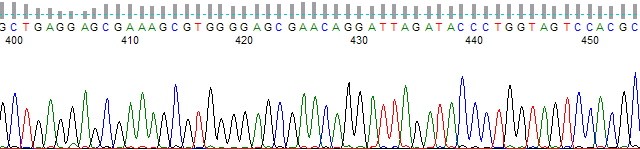
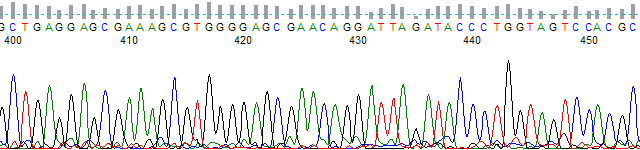
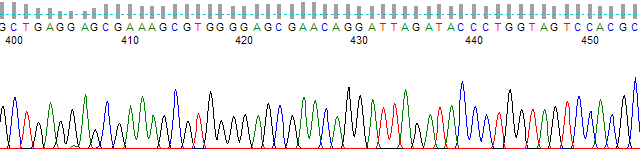
Adding secondary noise peaks can be useful if you wish to give your end users a trace file that looks much closer to that which would be output by the KB Basecaller. Figures 1 to 3 show examples of how the secondary noise peaks option works. Figure 1 shows an original KB Basecalled trace at ~base 400; Figure 2 shows the same trace after PeakTrace basecalling with a secondary noise peaks setting of 0 (i.e. off); Figure 3 shows the same trace, but using a secondary noise peaks setting of 5 (i.e. 5%).
KB-basecalled chromatogram from bases 400 to 452
Figure 1. KB basecalled trace.
PeakTrace chromatogram from bases 400 to 450 with the secondary noise peaks setting at 0
Figure 2. PeakTrace basecalled trace with default processing values.
PeakTrace chromatogram from bases 400 to 452 with the secondary noise peaks setting at 5
Figure 3. PeakTrace basecalled trace with a secondary noise peaks setting of 5.


While it is immediately obvious that the standard PeakTrace basecalling (Figure 2) is far superior to that provided by KB (Figure 1), some users are concerned that the default PeakTrace basecalled traces look “too good” to be real. While we think this is an unnecessary concern (after all nobody complains that their dinner tastes “too good” and they wished that it tasted worse), we do understand that some of our customers want to provide their end users with the superior basecalling of PeakTrace with a trace that looks very similar to what KB generates. The secondary noise peaks setting provides a simple way of degrading the trace output so that PeakTrace basecalled traces look like KB basecalled traces, while still providing the same base and quality score improvements that PeakTrace offers.

It is advisable to not use a secondary noise peaks value over 10. Using a large value will create a trace with a very poor appearance and end users may mistake the secondary peaks as true mixed peaks. This is one setting to use with caution.


Filed Under: In Depth, linux, macosx, PeakTrace, PeakTrace RP, windows

Primary Sidebar

DNA Sequencing Help

We have added a guide on troubleshooting automated DNA sequencing problems.

DNA Sequencing Service Facilities Reviews

Please see our review of 325 DNA sequencing core facilities and commercial services for more information on selecting the right sequencing service for your needs.

QualTrace III Online

Try the free online version of the QualTrace DNA sequencing QC software and see how real time quality control tracking can improve your read lengths and lower sequencing failure rates.

Contact Details

email. information@nucleics.com
phone. +61 3 9016 9373
  • home
  • peaktrace
  • software & reagents
  • forum
  • tools
  • services
  • support
  • about

Nucleics

Sanger Seqencing Software

©Nucleics 1999 - 2026