• Skip to main content
  • Skip to primary sidebar

Nucleics

  • PeakTrace
    • About PeakTrace
    • PeakTrace Online
    • PeakTrace Online Pro
    • PeakTrace 6
    • PeakTrace:Box
    • PeakTrace RP
    • PeakTrace for Chromas
    • Buy PeakTrace
    • Why use PeakTrace?
    • Validation of PeakTrace
    • PeakTrace FAQ
    • PeakTrace In Depth
  • DNA Sequencing Products
    • PeakTrace Basecaller
    • PeakTrace:Box
    • PeakTrace RP
    • PeakTrace for Chromas
    • QualTrace
    • LongTrace
    • CounterTrace
    • dLUTE SEQ
    • UniSeq
    • ASIN
  • Support & Services
    • PeakTrace Online Pro Registration
    • QualTrace III Online
    • DNA Sequencing Troubleshooting Guide
    • PeakTrace RP Downloads
    • PeakTrace:Box Downloads
    • Trace Viewers
    • User Manuals
    • Help Guides
      • How to Install Auto PeakTrace 6
      • How to Upgrade to Auto PeakTrace 6
      • How to Update the PeakTrace License on Linux
      • How to Generate a cmDust File
      • Online Activation of Auto PeakTrace 6
      • Auto PeakTrace 6 Online Activation Guide
      • DNA Sequencing Protocols
        • DNA Sequencing Protocol Tips
        • Exonuclease I – Shrimp Alkaline Phosphatase Clean Up of PCR Products
        • Tris EDTA DNA Sequencing Resuspension Buffer
        • DNA Sequencing Reaction Clean-up using Phenol & Butanol
    • DNA Sequencing Service Reviews
    • Software Downloads
    • MSDS
    • Services
      • Genomics Sequencing
      • Bioinformatics
  • Forum
    • Register
    • Login
    • PeakTrace Basecaller Forum
    • PeakTrace:Box Forum
    • Auto PeakTrace RP Forum
    • QualTrace Forum
    • DNA Sequencing Forum
    • DNA Sequencing Software
    • PCR Forum
    • DNA Isolation Forum
    • LongTrace Forum
    • dLUTE SEQ Forum
  • About
    • Contact
    • News
    • Jobs
    • Nucleics Privacy Policy
Buy PeakTrace

Auto PeakTrace RP 6.30 Released

April 29, 2016 By Daniel

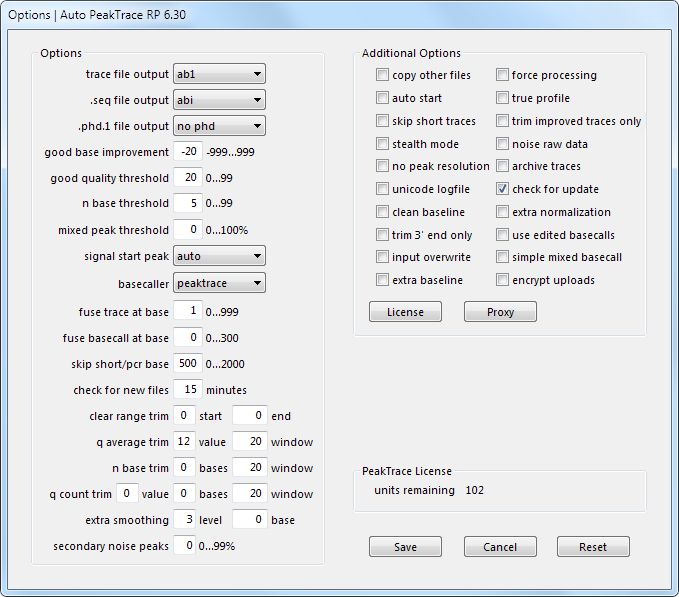
Options window of Auto PeakTrace RP 6.30, including the new extra baseline and secondary noise peaks settings

We have released Auto PeakTrace RP 6.30. This is a major update with two new features – extra baseline and secondary noise peaks. These two settings can improve the appearance of the traces and help to better match the appearance of PeakTrace basecalled traces to that obtained from the KB Basecaller. These new features are explained in the user help manual, but we will also be writing in depth articles on each of these new features. The full list of changes include.

  • New Feature. Extra baseline option for improved appearance of trace files.
  • New Feature. Secondary noise peak option to add peak noise to the traces.
  • Unsupported run types now output .seq and .phd.1 files based on the KB sequence if these file types are requested.
  • The logfile now records the local time rather than the server time of processing.
  • Further improvements to increase the robustness of the software on very fast networks.
  • Additional check that the archive folder can be created when using the archive traces option.
  • Improved handling of traces processing when manually starting and stopping processing.
  • If the n base threshold is set to 1 or 0 and the fuse basecall value is greater than 0, then any N bases from the original KB sequence will be basecalled.
  • Upgrade of 7za to 15.14.
  • Bug fixes and other enhancements.

This PeakTrace RP release can be downloaded as per usual from the PeakTrace RP Downloads page for both MacOS X (10.6+) and Windows (XP, Windows 7, Windows 8 and Windows 10). It will also be available via the in-app update function in a few days. If you do not have the password to access the downloads page please contact us @ {This email is obscured. Your must have javascript enabled to see it}.

If you are not a user of Auto PeakTrace RP 6 then please visit the Auto PeakTrace 6 RP registration page.

Filed Under: macosx, New Release, news, PeakTrace RP, windows

Primary Sidebar

DNA Sequencing Help

We have added a guide on troubleshooting automated DNA sequencing problems.

DNA Sequencing Service Facilities Reviews

Please see our review of 325 DNA sequencing core facilities and commercial services for more information on selecting the right sequencing service for your needs.

QualTrace III Online

Try the free online version of the QualTrace DNA sequencing QC software and see how real time quality control tracking can improve your read lengths and lower sequencing failure rates.

Contact Details

email. information@nucleics.com
phone. +61 3 9016 9373
  • home
  • peaktrace
  • software & reagents
  • forum
  • tools
  • services
  • support
  • about

Nucleics

Sanger Seqencing Software

©Nucleics 1999 - 2026