• Skip to main content
  • Skip to primary sidebar

Nucleics

  • PeakTrace
    • About PeakTrace
    • PeakTrace Online
    • PeakTrace Online Pro
    • PeakTrace 6
    • PeakTrace:Box
    • PeakTrace RP
    • PeakTrace for Chromas
    • Buy PeakTrace
    • Why use PeakTrace?
    • Validation of PeakTrace
    • PeakTrace FAQ
    • PeakTrace In Depth
  • DNA Sequencing Products
    • PeakTrace Basecaller
    • PeakTrace:Box
    • PeakTrace RP
    • PeakTrace for Chromas
    • QualTrace
    • LongTrace
    • CounterTrace
    • dLUTE SEQ
    • UniSeq
    • ASIN
  • Support & Services
    • PeakTrace Online Pro Registration
    • QualTrace III Online
    • DNA Sequencing Troubleshooting Guide
    • PeakTrace RP Downloads
    • PeakTrace:Box Downloads
    • Trace Viewers
    • User Manuals
    • Help Guides
      • How to Install Auto PeakTrace 6
      • How to Upgrade to Auto PeakTrace 6
      • How to Update the PeakTrace License on Linux
      • How to Generate a cmDust File
      • Online Activation of Auto PeakTrace 6
      • Auto PeakTrace 6 Online Activation Guide
      • DNA Sequencing Protocols
        • DNA Sequencing Protocol Tips
        • Exonuclease I – Shrimp Alkaline Phosphatase Clean Up of PCR Products
        • Tris EDTA DNA Sequencing Resuspension Buffer
        • DNA Sequencing Reaction Clean-up using Phenol & Butanol
    • DNA Sequencing Service Reviews
    • Software Downloads
    • MSDS
    • Services
      • Genomics Sequencing
      • Bioinformatics
  • Forum
    • Register
    • Login
    • PeakTrace Basecaller Forum
    • PeakTrace:Box Forum
    • Auto PeakTrace RP Forum
    • QualTrace Forum
    • DNA Sequencing Forum
    • DNA Sequencing Software
    • PCR Forum
    • DNA Isolation Forum
    • LongTrace Forum
    • dLUTE SEQ Forum
  • About
    • Contact
    • News
    • Jobs
    • Nucleics Privacy Policy
Buy PeakTrace

In Depth: Automatic Bubble Spike Removal

November 30, 2015 By Daniel

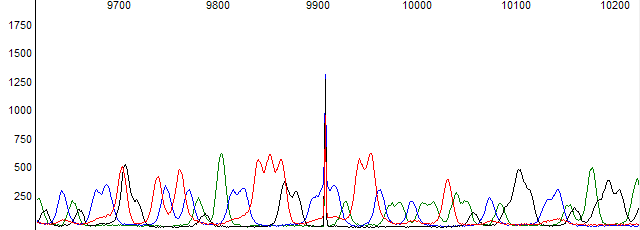
One production problem that can occur with Sanger DNA sequencing is sharp spikes in the raw data channel. These spikes can appear anywhere in the raw channel, are very intense and narrow (2 to 5 scans), with signal in all four channels of approximately equal intensity (Figure 1). These spikes are caused by a small gas bubble in the polymer moving past the sequencer’s CCD detector, causing the laser light to be refracted onto the CCD, leading to a sharp spike in raw signal.
Sharp spike caused by a gas bubble.
Figure 1. Example of a sharp spike caused by a gas bubble.

These spikes are often greater than the real peak signal and their presence can lead to problems basecalling the data. Figure 2 shows an example of what one of these sharp spikes can do to the true peak data. The base at the location of the spike can not be determined and the base ends up being called as an N or mixed base (H in this case).
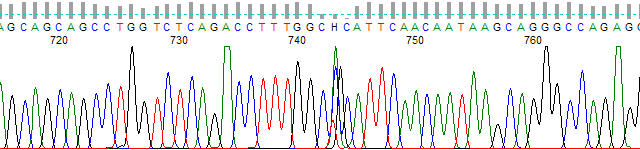
Figure 2. Result of sharp bubble spike on the processed trace and basecall.
Figure 2. Result of a sharp bubble spike on the processed trace and basecall.

While these bubble spikes are a production problem that should be solved in the lab, they can be corrected in software using the PeakTrace Basecaller™ (6.12 and higher). Figure 3 shows the same trace file as shown in Figures 1 & 2, but basecalled using PeakTrace 6.12. The spike has been removed with the correct C base peak now clearly visible.
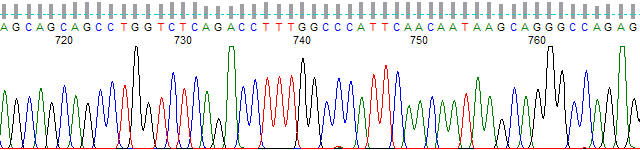
Figure 3. Removal of spike peak by PeakTrace 6.12.
Figure 3. Removal of the bubble spike peak by PeakTrace 6.12.

Pitfalls with using software correction of bubble spikes

While the sharp spikes caused by bubbles can in most cases be corrected in software, it is always best to fix the cause rather than using software to undo the damage. Relying on the basecaller to correct the spikes can result in you missing that you have a production problem. The best way to know if you have a bubble spike problem is to monitor the BUBBLE field of the QualTrace III log file. This field reports the number of strong sharp spikes found in the raw data channel. Significant rates of bubble spikes in production indicate a degassing problem of the polymer and/or buffer and should be corrected.

Conclusion

Sharp spikes are caused by production problems, but they can be corrected using the latest version of the PeakTrace Basecaller. It is important to monitor for the presence of “bubble” spikes by using QualTrace III so that production protocols can be corrected if an issue arises.

Filed Under: In Depth, PeakTrace, PeakTrace RP

Primary Sidebar

DNA Sequencing Help

We have added a guide on troubleshooting automated DNA sequencing problems.

DNA Sequencing Service Facilities Reviews

Please see our review of 325 DNA sequencing core facilities and commercial services for more information on selecting the right sequencing service for your needs.

QualTrace III Online

Try the free online version of the QualTrace DNA sequencing QC software and see how real time quality control tracking can improve your read lengths and lower sequencing failure rates.

Contact Details

email. information@nucleics.com
phone. +61 489 152 658
  • home
  • peaktrace
  • software & reagents
  • forum
  • tools
  • services
  • support
  • about

Nucleics

Sanger Seqencing Software

©Nucleics 1999 - 2026