• Skip to main content
  • Skip to primary sidebar

Nucleics

  • PeakTrace
    • About PeakTrace
    • PeakTrace Online
    • PeakTrace Online Pro
    • PeakTrace 6
    • PeakTrace:Box
    • PeakTrace RP
    • PeakTrace for Chromas
    • Buy PeakTrace
    • Why use PeakTrace?
    • Validation of PeakTrace
    • PeakTrace FAQ
    • PeakTrace In Depth
  • DNA Sequencing Products
    • PeakTrace Basecaller
    • PeakTrace:Box
    • PeakTrace RP
    • PeakTrace for Chromas
    • QualTrace
    • LongTrace
    • CounterTrace
    • dLUTE SEQ
    • UniSeq
    • ASIN
  • Support & Services
    • PeakTrace Online Pro Registration
    • QualTrace III Online
    • DNA Sequencing Troubleshooting Guide
    • PeakTrace RP Downloads
    • PeakTrace:Box Downloads
    • Trace Viewers
    • User Manuals
    • Help Guides
      • How to Install Auto PeakTrace 6
      • How to Upgrade to Auto PeakTrace 6
      • How to Update the PeakTrace License on Linux
      • How to Generate a cmDust File
      • Online Activation of Auto PeakTrace 6
      • Auto PeakTrace 6 Online Activation Guide
      • DNA Sequencing Protocols
        • DNA Sequencing Protocol Tips
        • Exonuclease I – Shrimp Alkaline Phosphatase Clean Up of PCR Products
        • Tris EDTA DNA Sequencing Resuspension Buffer
        • DNA Sequencing Reaction Clean-up using Phenol & Butanol
    • DNA Sequencing Service Reviews
    • Software Downloads
    • MSDS
    • Services
      • Genomics Sequencing
      • Bioinformatics
  • Forum
    • Register
    • Login
    • PeakTrace Basecaller Forum
    • PeakTrace:Box Forum
    • Auto PeakTrace RP Forum
    • QualTrace Forum
    • DNA Sequencing Forum
    • DNA Sequencing Software
    • PCR Forum
    • DNA Isolation Forum
    • LongTrace Forum
    • dLUTE SEQ Forum
  • About
    • Contact
    • News
    • Jobs
    • Nucleics Privacy Policy
Buy PeakTrace

In Depth: Skip Short Traces

December 5, 2016 By Grace

The skip short traces option allows PeakTrace 6™ to skip over traces that have less than a certain number of bases and which may not be improved by PeakTrace. This setting is useful because the KB Basecaller typically basecalls short read  DNA sequence well and hence the improvement from using PeakTrace can be minimal. By using this setting users can avoid having to manually preselect the traces for PeakTrace basecalling, a time consuming and often inaccurate step.

This function is aimed at users who are only interested in improving longer runs, or would like to avoid having to manually preselect the traces that will see the most improvement from PeakTrace. The reads below the set read length are skipped over and the cost of using PeakTrace avoided on these traces.

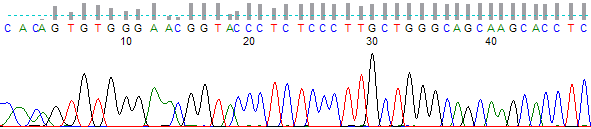
When using this function, trim settings, noise raw data and stealth mode will all still be applied to the short trace at no charge (Figures 1 & 2). If it is desired that trimming is not performed on the short traces then the trim improved traces only function should be selected. Trim improved traces only will apply the trimming to the PeakTrace processed traces only and not to the short traces skipped over.
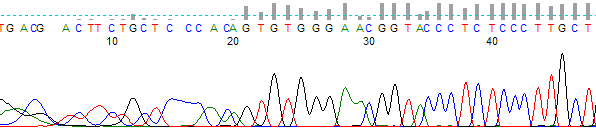
Figure 1. KB basecalled short trace before processing
Figure 2. Trace skipped by Auto PeakTrace 6. Note that this trace has had trimming applied, however the rest of the trace is identical to the original file

Potential Pitfalls with using Skip Short Traces

If the skip short/pcr base option is set above 500 bases then traces that could have been improved will be charged. A setting lower than 500 will allow more traces to be processed and the functionality of the skip short traces option will remain on, however a setting of 0 in the skip short/pcr base option will effectively turn skip short traces off, as processing will be attempted for all traces with more than 0 bases.

If this setting is used with those settings that improve the KB traces (i.e.  clean baseline, extra normalization, and extra baseline) then PeakTrace will improve the KB trace and this will become a charged trace. To avoid this, set the basecaller to peaktrace and/or unselect any of KB improving settings.

Filed Under: In Depth, PeakTrace, PeakTrace RP

Primary Sidebar

DNA Sequencing Help

We have added a guide on troubleshooting automated DNA sequencing problems.

DNA Sequencing Service Facilities Reviews

Please see our review of 325 DNA sequencing core facilities and commercial services for more information on selecting the right sequencing service for your needs.

QualTrace III Online

Try the free online version of the QualTrace DNA sequencing QC software and see how real time quality control tracking can improve your read lengths and lower sequencing failure rates.

Contact Details

email. information@nucleics.com
phone. +61 3 9016 9373
  • home
  • peaktrace
  • software & reagents
  • forum
  • tools
  • services
  • support
  • about

Nucleics

Sanger Seqencing Software

©Nucleics 1999 - 2026